
What is getdesign.md
getdesign.md is VoltAgent an AI-native design system library and tool platform launched by the team, whose core offering is the DESIGN.md design specification files of 60+ top brands. Based on the DESIGN.md concept proposed by Google Stitch, it is a design system document written in pure Markdown, essentially a "visual specification manual" for AI. Developers only need to place the DESIGN.md file in the project root directory, and AI coding tools (such as Cursor、Claude Code、GitHub Copilot , etc.) can generate brand-style UI with pixel-perfect fidelity in one click.
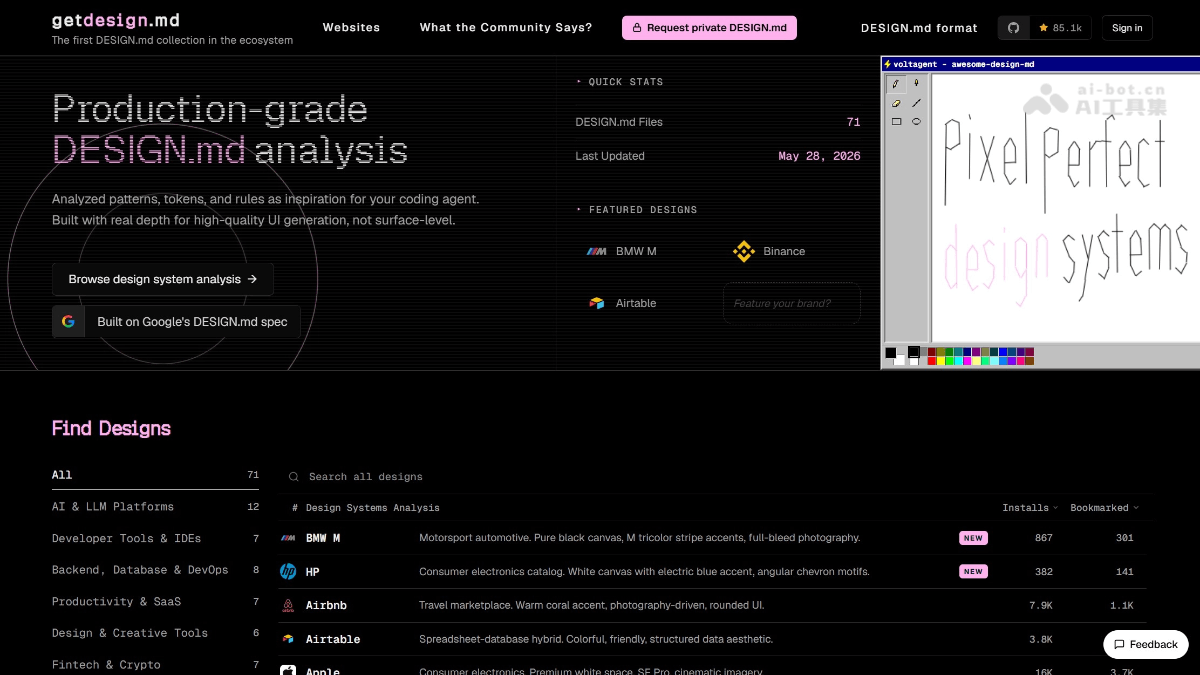
Main features of getdesign.md
-
60+ major-brand design systems, ready to use out of the box: Includes complete design specifications for top brands such as Stripe, Apple, Notion, Linear, Airbnb, Figma, Tesla, Vercel, Claude, and Spotify, covering precise color values, typography hierarchy, component styles, layout, and responsive rules.
-
AI-native compatibility, works with zero configuration: Pure Markdown format, directly readable by LLMs, with no parsing library or additional configuration required, and support for mainstream AI coding tools such as Claude Code, Cursor, GitHub Copilot, and Windsurf.
-
Visual preview + version control: Each design specification comes with
preview.htmlandpreview-dark.htmlpreview pages, allowing you to view colors, fonts, and component effects online; plain text files support Git tracking and PR review. -
Quick installation via CLI tool: Install DESIGN.md into a local project with one command via
npx getdesign@latest add [品牌名]. -
MCP protocol integration: Through the Model Context Protocol server, search for and download design systems directly in AI coding tools.
-
Style mixing support: Multiple brands' DESIGN.md files can be installed at the same time, letting AI blend different design languages (such as Notion's warm tones + Linear's minimalist typography).
-
Paid customization service: Supports submitting any website URL to generate a private DESIGN.md for a fee (not publicly listed in the directory), as well as the Vibecoder kit website starter kit.
How to use getdesign.md
-
Choose a brand: Visit the getdesign.md official website https://getdesign.md/,浏览目录,选择想要的设计风格(如 Stripe, Notion, Linear, etc.).
-
Install the file: Run a CLI command in the project terminal, for example:
-
npx getdesign@latest add stripe(Stripe style) -
npx getdesign@latest add notion(Notion style) -
npx getdesign@latest add apple(Apple style)
-
-
Place it in the project root directory: After installation is complete, the project root directory will generate the
DESIGN.mdfile. -
Instruct the AI to use it: Add an instruction to the prompt in your AI coding tool, for example: "Refer to the DESIGN.md in the project root directory and generate the UI for this page according to the design specifications inside."
-
(Optional) Style mixing: Install multiple DESIGN.md files at the same time, then tell the AI to blend elements from specific brands.
Core advantages of getdesign.md
-
Rapid prototyping: When you need to quickly produce high-quality UI prototypes, directly apply brand styles such as Apple and Linear.
-
Brand style migration: Refactor an existing project into a specific brand's visual language (such as changing from a Bootstrap style to a Stripe style).
-
AI website-building assistance: Works with AI site-building tools like Lovable, v0, and Bolt, providing precise design references.
-
Design asset production: Generates brand-consistent banners, social posts, marketing pages, etc. based on DESIGN.md.
-
Design system learning: Learn design patterns across different domains (SaaS, e-commerce, fintech, media) by reading the DESIGN.md files of 60+ major companies.
Competitor comparison for getdesign.md
| Comparison dimension | getdesign.md | designmd.app | Vibe Design |
|---|---|---|---|
| Product positioning | A community-driven inspiration library for brand design systems | Google's official DESIGN.md specification and reference library | AI automatically extracts the design system of any website |
| Core approach | Manually curate publicly available CSS design tokens from major companies | Standardized design system documentation following the official spec | Playwright crawling + Gemini AI automated analysis and extraction |
| Number of files | 60+ brands (Stripe, Notion, Linear, etc.) | 454+ design systems (including brands, styles, and vertical scenarios) | No preset library; generated in real time on demand (1,200+ systems generated) |
| Data source | Manually extracted and curated from public website CSS | Official spec examples + community-contributed standardized files | Real-time crawling of any public website submitted by users |
| File format | Pure Markdown (expanded to 9 major modules) | YAML front matter + Markdown body (official 8-section format) | Structured HTML document (with live preview) |
| Official CLI | npx getdesign@latest add [品牌] |
npx @google/design.md lint/diff/export |
No CLI; operates on the web |
| Generation method | Browse → download a ready-made DESIGN.md | Browse → download a ready-made DESIGN.md | Paste URL → AI automatically extracts and generates |
Application scenarios for getdesign.md
-
Rapid prototyping: When you need to quickly produce high-quality UI prototypes, directly apply brand styles such as Apple, Linear, etc.
-
Brand style migration: Refactor an existing project into a specific brand's visual language (e.g., from Bootstrap style to Stripe style).
-
AI site-building assistance: Works with AI site-building tools like Lovable, v0, and Bolt, providing precise design references.
-
Design asset production: Generates brand-consistent banners, social posts, marketing pages, etc. based on DESIGN.md.
-
Design system learning: Learn design patterns across different domains (SaaS, e-commerce, fintech, media) by reading the DESIGN.md files of 60+ major companies.