
What is Dongtu
Dongtu is a multifunctional AI image processing tool. It has a variety of special features, including creating illusion images with hidden text and generating realisticAI portraits. Users can easily integrate text into images to create mysterious visual effects, and can generate images in various styles and ID photos. With its simple operation interface and powerful image processing capabilities, Dongtu allows users to quickly create personalized graphic and text materials, suitable for social media sharing and personal use.
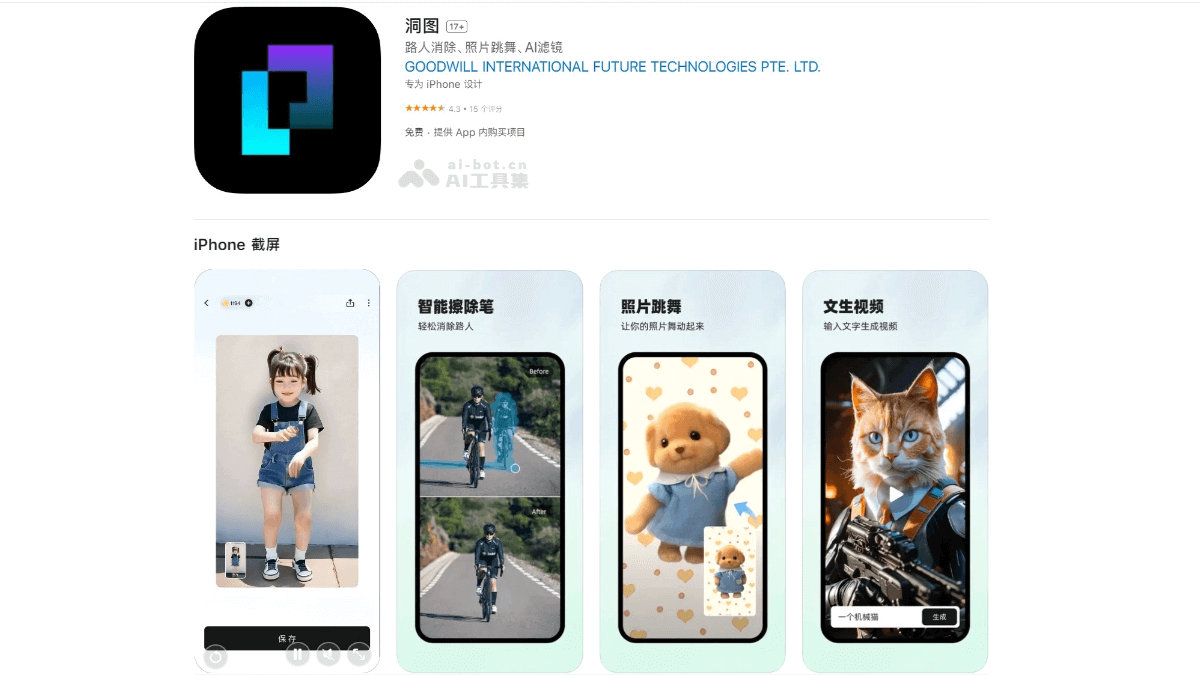
Main features of Dongtu
- Passerby removal: If there are too many passersby in photos taken while traveling, you can use Dongtu's intelligent erasure feature. AI can remove passersby with one tap, making the photo background cleaner.
- Photo dance: Upload a photo, and Dongtu can make the person in the photo dance. You can try it with photos of friends or celebrities.
- AI video: Easily generate a variety of stunning videos with text or photos.
- AI face swap: Put your face on any photo and easily play your favorite character.
- AI skin beautification: Beautify your face instantly, no manual retouching needed. With just one tap, your face can look super beautiful.
- AI filters: With just one photo, various AI stylized filters can be generated, including 1930s and OuterBanks filters, etc.
- Make photos clearer: When photos are not clear, you can use Dongtu's enhancement feature to improve photo quality and restore old photos of elders.
- AI image expansion: AI can help you expand images and discover some fun and interesting new photo effects.
How to use Dongtu
- Download and install: Visitthe Apple App Storeor search for "Dongtu" in your phone's app store, then download and install it on your device.
- Choose a feature: After opening the Dongtu app, you will see different feature sections, such as passerby removal, photo dance, AI video, AI face swap, AI skin beautification, AI filters, and make photos clearer, etc. Choose the feature you want to use.
- Upload images or enter text: Depending on your choice, upload the image you want to process or enter the relevant text description. For example, if you want to remove passersby from a photo, choose the "Passerby removal" feature and upload the photo; if you want to generate AI portraits, choose the "Illusion image" or "AI portraits" feature to upload an image or enter text.
- Wait for generation: After uploading an image or entering text, Dongtu will process it based on AI technology.
- Save and share: If you are satisfied with the generated result, you can save it to your phone or share it directly to social media.
Application scenarios of Dongtu
- Social media sharing: Dongtu allows users to create illusion images with hidden text and realistic AI portraits, increasing the mystery and fun of images. It is suitable for sharing on social media to attract attention and discussion.
- Personal privacy protection: Users can use Dongtu to cleverly integrate the text they want to hide into an image, creating a mysterious illusion effect for privacy protection.
- Create illustrations and portrait photos: Dongtu provides a variety of portrait photo options, allowing users to easily create personalized portrait photos, suitable for professional portraits or social media avatars.
- Photo enhancement and restoration: Dongtu features a smart eraser that can remove unwanted parts and blemishes from photos with one tap, improving image quality; it also has a photo enhancement feature that can improve photo quality and even restore old photos.
- Animated image and video creation: Dongtu can turn static photos into dancing videos, or make the people in photos speak or sing, adding fun and interactivity to images and videos.