
What is Deep-Live-Cam
Deep-Live-Cam is an open sourceAI real-time face swapping tool, users only need one image to achieve real-time face swapping in videos. It supports multiple hardware platforms such as CPU, NVIDIA CUDA, Apple Silicon, Core ML, etc., ensuring smooth video processing. Deep-Live-Cam software has built-in anti-abuse mechanisms, complies with legal and ethical norms, and reminds users to obtain consent from the person whose face is being swapped when using it.
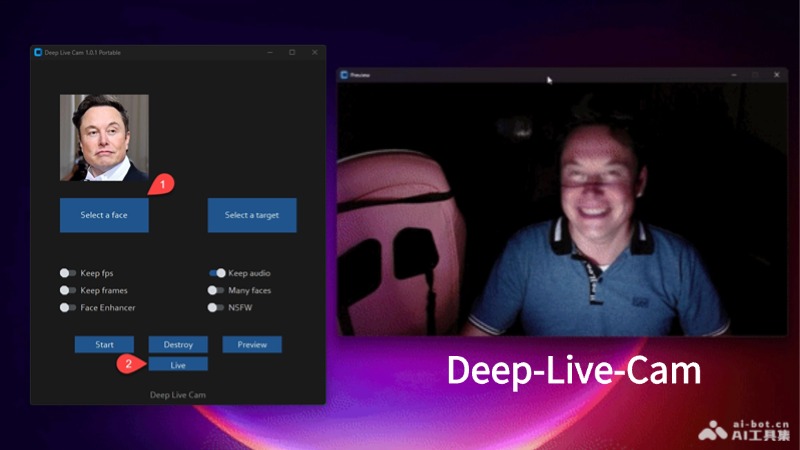
Main Features of Deep-Live-Cam
- Real-time face swapping: Users can replace faces in real-time during live video with a single image.
- One-click operation: Simple and easy-to-use interface, one-click start of the face swapping process.
- Deepfake video generation: Can generate realistic face-swapped videos that are difficult to distinguish from real ones.
- Multi-platform support: Compatible with multiple hardware such as CPU, NVIDIA CUDA, Apple Silicon, DirectML, etc., adapting to different user needs.
- Built-in anti-abuse mechanism: Prevents processing of inappropriate content such as nudity or violence.
How to Use Deep-Live-Cam
- Install environment:Install Python (version 3.10 recommended), pip, git, ffmpeg, and the Visual Studio 2022 runtime for Windows.
- Clone repository:Use git to clone the Deep-Live-Cam repository locally.
- Download models:Download the required model files, such as GFPGANv1.4 and inswapper_128_fp16.onnx, and place them in the project's "models" folder.
- Install dependencies:Create and activate a virtual environment (recommended), then use pip to install the required dependency packages.
- Run program:If there is no GPU, you can run the program using CPU. On the first run, the program will download some models, which takes some time.
- Use GPU acceleration:Depending on the hardware configuration, install the corresponding CUDA Toolkit or other execution provider dependencies, and run the program with the corresponding command-line arguments.
- Select input:After running the program, select an image containing the desired face and the target image or video.
- Start face swapping:Click the "Start" button to begin the face swapping process. During processing, you can view the face swapping effect in real-time in the specified output directory.
- Webcam mode:If you want to use a webcam for real-time face swapping, follow the instructions on the program interface.
- Command-line arguments:You can adjust the program's behavior through command-line arguments, such as selecting source files, target files, output paths, frame processors, etc.
Deep-Live-Cam Project Address
-
GitHubRepository:https://github.com/hacksider/Deep-Live-Cam
Application Scenarios of Deep-Live-Cam
- Entertainment production: Used to produce entertainment videos, such as performances imitating celebrities or fictional characters.
- Artistic creation: Artists can use Deep-Live-Cam to create unique artworks or animations.
- Education and training: Replace the instructor's face in teaching videos to adapt to different teaching environments or languages.
- Advertising and marketing: Use face swapping technology in advertisements to attract viewers' attention or showcase different usage scenarios of products.