
What is Coze Desktop
Coze Desktop is the computer client of "Coze", the AI Agent platform under ByteDance, enabling AI to truly have the ability to operate a local computer. After authorization, the Agent can directly read and write local files, process data in batches, and execute commands such as Python/Git; paired with cloud drive, it achieves real-time synchronization between local and cloud, and supports multiple Agents sharing directories for relay collaboration; it also supports deep screenshots and remote control via mobile phone.
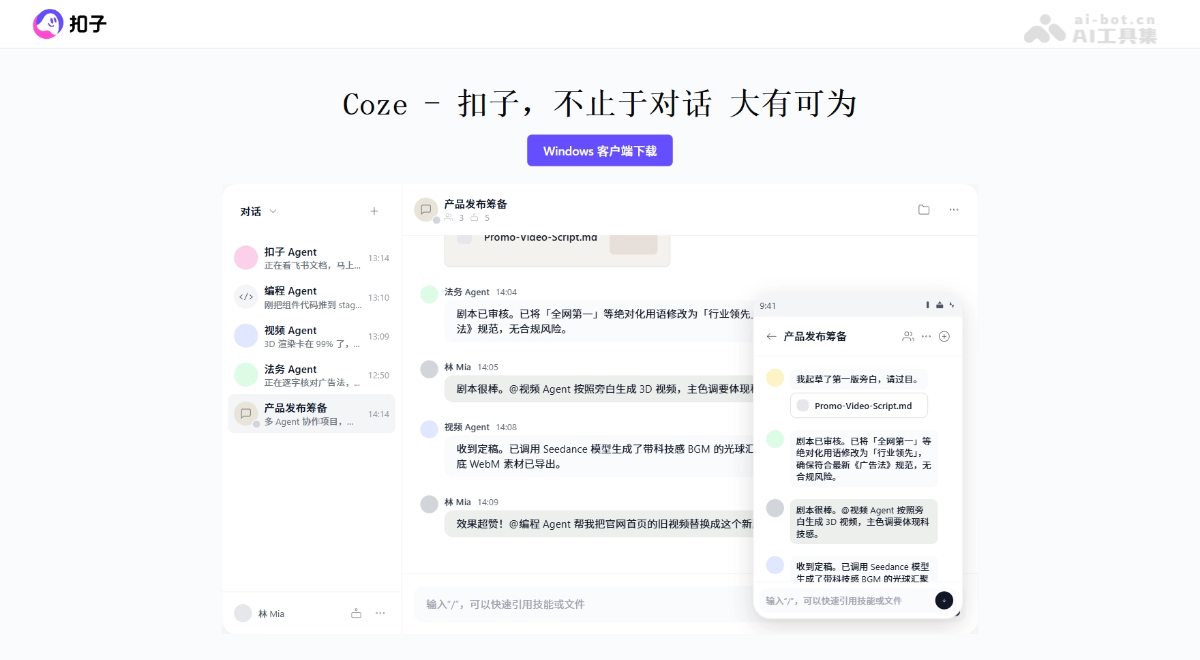
Main features of Coze Desktop
-
Local file processing: After authorization, the Agent can directly read and write local files on the computer, completing operations such as batch organization, format conversion, and report generation, with results saved directly back to the specified folder.
-
Command execution and development: Supports running scripts and commands such as Python, Node.js, and Git locally, assisting with environment installation, project management, or deployment.
-
Coze Cloud Drive: Provides a unified file space with real-time synchronization between local and cloud, allowing multiple Agents to share the same directory to complete tasks in relay, with seamless connection across devices.
-
Deep screenshots: Screenshots are automatically sent to the Agent, which recognizes the text and interaction relationships in the image, quickly synchronizing context information.
-
Mobile remote control: Send instructions remotely to the desktop Agent through the mobile App, processing local computer files anytime and anywhere.
-
Multi-Agent collaboration: Multiple Agents can divide work and collaborate within the same project cloud drive space, such as one gathering data and one making a PPT, with files shared in real time.
How to use Coze Desktop
- Install and log in: Visit theCozeofficial website to download and install Coze Desktop and complete account login.
- Authorize folders: Enable local computer capabilities in settings and authorize the folders to be processed to the Agent.
- Issue instructions: Enter natural language instructions through dialogue, letting the Agent directly read, process, or generate local files.
- Use the cloud drive: Use Coze Cloud Drive as a unified file space to achieve automatic synchronization between local and cloud and cross-device access.
- Deep screenshots: Use the deep screenshot tool to capture screen content; screenshots are automatically sent to the Agent and parsed for information in the image.
- Mobile remote control: Send instructions to the Agent in the Coze mobile App to remotely control the desktop to process local files.
- Multi-Agent collaboration: When creating a project, bind the cloud drive working directory and invite multiple Agents to join the same space for division of work and collaboration.
Core advantages of Coze Desktop
-
Direct local file operations: After authorization, the Agent can directly read and write local files, with batch processing, format conversion, and report generation all requiring no repeated uploads and downloads.
-
Command execution and development: Supports running scripts such as Python, Node.js, and Git locally, helping you install environments and manage projects like an "on-site programmer".
-
Real-time cloud drive synchronization: Local and cloud files are automatically synchronized, with seamless relay across devices, and logging into the same account on multiple computers is unlimited.
-
Multi-Agent collaboration: Multiple Agents can share the same cloud drive directory, dividing tasks such as scraping data and creating PPTs, with files shared in real time.
-
In-depth screenshot analysis: Screenshots are automatically passed to the Agent, which not only recognizes images but also parses the text and page interaction relationships in the image.
-
Mobile remote control: Issue commands to the desktop Agent via the mobile app to handle local computer files anytime, anywhere.
-
Autonomous and controllable permissions: Folders are authorized by user selection, and the Agent requires user confirmation before executing sensitive commands, ensuring safety and control.
Comparison with similar competitors of the Coze desktop client
| Comparison dimension | Coze desktop client (ByteDance) | Tencent QClaw |
|---|---|---|
| Core positioning | A desktop productivity environment for local file processing + cloud drive collaboration + multi-Agent integration | A minimalist wrapper based on OpenClaw, focused on remotely controlling computers via WeChat |
| Local file operations | After authorization, can directly read and write local folders, batch processing, format conversion, and report generation | Supports file transfer and local file viewing, with relatively basic control capabilities |
| Command execution | Supports running commands such as Python, Node.js, and Git, and can install environments and deploy projects | Mainly aimed at non-technical users, does not provide native command-line development capabilities |
| Collaboration mode | Multiple Agents share a cloud drive directory to relay tasks, with support for team and enterprise editions | Mainly single-person tasks, with commands issued via WeChat Mini Program |
| Cloud synchronization | Built-in Coze cloud drive, local ~/Coze/Drive real-time two-way synchronization with the cloud |
Relies on WeChat file transfer, with no unified cloud drive workspace |
| Multi-device interaction | Full-device collaboration across desktop + mobile App + web, with mobile able to remotely control the computer | The WeChat Mini Program "QClaw Manager" serves as the core entry point, enabling remote computer operation |
| Ecosystem compatibility | Natively compatible with third-party Agent tools such as Claude Code and Codex | Based on the OpenClaw ecosystem, with built-in preset skills in the "Inspiration Square" |
| Suitable audience | Operations, development, project managers, and team collaboration users | Ordinary individual users seeking zero configuration and quick onboarding |
Application scenarios of the Coze desktop client
-
Local file batch processing: Authorize a folder to the Agent and complete repetitive file operations such as HEIC to JPG conversion, video compression to GIF, and invoice organization in one sentence.
-
Data analysis and report generation: The Agent automatically reads local Excel/CSV data and, after analysis with Python, generates an HTML operations review report or visualization charts.
-
Programming assistance and project management: Checks the local Python environment, installs dependencies, executes Git operations, and deploys projects, assisting development like an "on-site programmer."
-
Cross-device remote work: When out, issue commands to the desktop Agent via the mobile App to remotely organize sales reports or confirm project materials on the computer.
-
Multi-Agent collaboration projects: Within a project cloud drive space, Claude Code is responsible for scraping data, Codex is responsible for creating PPTs, and multiple Agents relay to produce a complete solution.