
What is Composer 2
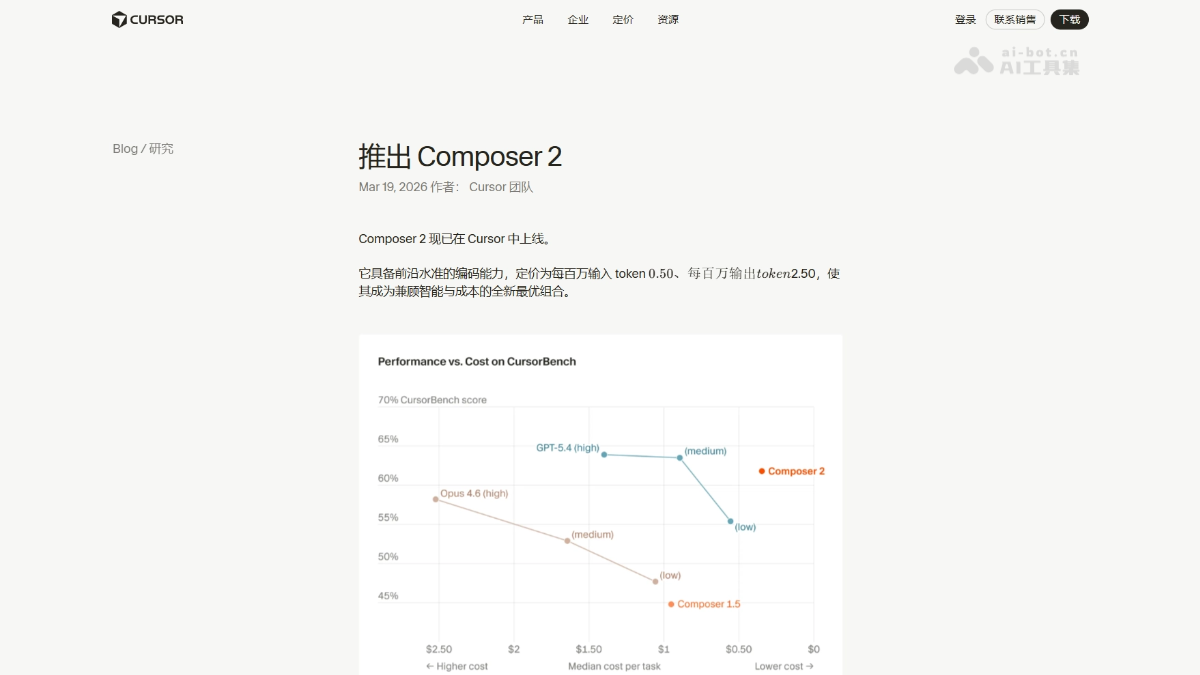
Composer 2 is Cursor the new generation AI programming model launched by, positioned as "the optimal balance of intelligence and cost." Priced at only $2.50/million tokens, it achieves a score of about 61% on the CursorBench test, with performance close to GPT-5.4 (medium) at a significantly lower cost. It scored 61.7% on Terminal-Bench 2.0 (the previous generation version 1.5 scored only 47.9%), surpassing Opus 4.6. The model is the first to adopt continued pretraining and scaled reinforcement learning techniques, and has officially launched on the Cursor platform.
Composer 2's Main Features
-
Intelligent Code Generation: Automatically generates complete code based on natural language descriptions, supporting end-to-end implementation of complex programming tasks.
-
Code Editing and Refactoring: Understands existing codebases and performs intelligent modifications, automatically refactoring and optimizing code structure.
-
Conversational Programming: Collaborates on coding with AI through context-aware continuous conversation, supporting follow-up questions and iterative development.
-
Multi-language Support: Supports mainstream programming languages such as Python, JavaScript, TypeScript, Go, and more.
-
Tool Integration: Deeply integrated with the Cursor editor, supporting terminal command execution and external tool invocation.
-
Autonomous Task Execution: As an Agent model, autonomously plans and executes multi-step programming tasks, greatly improving development efficiency.
Composer 2's Technical Principles
- Continued Pretraining: Cursor conducts continued pretraining on the base model for the first time, further learning on general programming data to enhance code understanding and generation capabilities.
- Scaled Reinforcement Learning: Optimizes model behavior through large-scale reinforcement learning, enabling it to make better decisions in complex programming tasks and improving end-to-end task completion quality.
- Agent Architecture Design: Composer 2 adopts an Agent architecture, capable of autonomously planning multi-step tasks, invoking tools (such as terminal and file operations), and interacting with the environment to automate delivery from requirements to code.
- Specialized Optimization: Deep optimization for programming scenarios, including specialized training for tasks such as code completion, refactoring, and debugging, enabling excellent performance on programming benchmarks such as CursorBench and Terminal-Bench.
Composer 2's Key Information and Usage Requirements
- Positioning: A programming model with the optimal balance of intelligence and cost
- Pricing: $2.50 / million input tokens
- Performance: CursorBench about 61%, Terminal-Bench 2.0 reaches 61.7%
- Technology: First continued pretraining + scaled reinforcement learning
- Comparison: Performance close to GPT-5.4 (medium), with significantly lower cost
- Platform: Requires installation of the Cursor editor
- Version: Already officially launched in Cursor, no additional configuration required
- Access: Use directly through the Composer feature entry
Composer 2's Core Advantages
- Ultimate Cost-Effectiveness: At a low cost of $2.50/million tokens, it achieves intelligence close to GPT-5.4 (medium), redefining the cost-efficiency boundary of programming models.
- Performance Leap: Terminal-Bench 2.0 score jumped significantly from 47.9% in version 1.5 to 61.7%, surpassing Opus 4.6, with markedly enhanced code understanding and execution capabilities.
- Technical Breakthrough: For the first time, continual pre-training and scaled reinforcement learning are introduced, bringing the model's reasoning and planning capabilities in complex programming tasks to a new height.
- Ready to Use: Now officially launched on the Cursor platform, no additional configuration required, experience cutting-edge programming intelligence directly through the Composer entry point.
- Agent Capabilities: Supports autonomous planning and execution of multi-step programming tasks, enabling end-to-end automated development from requirement description to code delivery.
How to Use Composer 2
- Install Cursor: Download and install the latest version of the Cursor editor.
- Log In: Open Cursor and log in to your account to get started.
- Enter Composer: Click the Composer icon in the left sidebar, or use a keyboard shortcut to open the Composer panel.
- Start a Conversation: Describe your programming needs in natural language in the input box, and Composer 2 will automatically understand and generate code.
- Iterative Development: Continue the conversation based on the generated results, ask follow-up questions to modify, optimize, or extend functionality, with support for multiple rounds of iteration.
- Execute Operations: Composer 2 can autonomously execute terminal commands, create and modify files, and invoke tools to complete complex tasks.
- Notes: Ensure a stable network connection and use the latest version of Cursor for the best experience.
Comparison of Composer 2 with Similar Competitors
| Product | Positioning | Advantages | Disadvantages | Terminal-Bench 2.0 |
|---|---|---|---|---|
| Composer 2 | A programming Agent with the optimal balance of intelligence and cost | Extremely high cost-effectiveness, strong Agent capabilities, end-to-end automation | Relatively closed ecosystem, limited to the Cursor platform | 61.7% |
| GitHub Copilot | Code completion and suggestion tool | Deep GitHub ecosystem integration, large user base | Weak Agent capabilities, insufficient automation for multi-step tasks | – |
| Claude Code (Opus 4.6) | Programming Agent model | Strong code understanding, good versatility | Higher cost, less cost-effective than Composer 2 | 58.0% |
| GPT-5.4 | General large model programming capability | Top-tier performance, strongest overall capabilities | High cost, Composer 2 is more economical at equivalent intelligence | 75.1% |
Application Scenarios of Composer 2
-
Building a Project from Scratch: Automatically generate a complete project structure and code files based on natural language requirement descriptions, enabling rapid launch and prototype development of new applications.
-
Feature Module Development: End-to-end implementation of specific business features, such as user authentication systems, payment interface integration, data visualization charts, and other complex modules.
-
Code Refactoring and Optimization: Intelligently analyze existing codebases, automatically identify outdated code patterns and refactor them, improving system performance and long-term maintainability.
-
Bug Fixing and Debugging: Precisely locate the root cause of code errors, generate targeted fix solutions and automatically execute modifications, greatly shortening the debugging cycle.