
What is Comfy Agent
Comfy Agent is the first embedded AI Agent officially launched by ComfyUI, and it is now fully available on Comfy Cloud. Users describe their needs in natural language, and Comfy Agent can build, iterate, and directly run workflows, helping creators get rid of the tedious operations of finding nodes, building pipelines, and checking errors. Comfy Agent supports real-time collaborative canvas editing, visual understanding of assets, creating and calling Skills, and can open up to 5 conversation groups simultaneously.
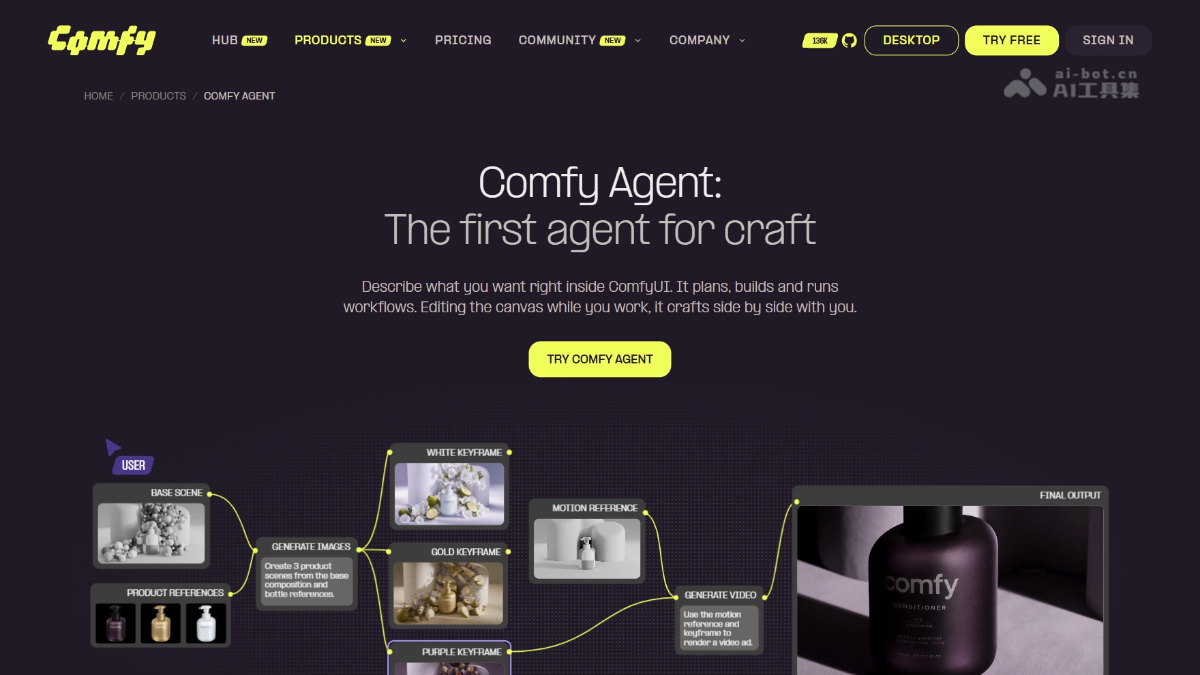
Main features of Comfy Agent
-
Build workflows with natural language: Just describe your needs, and Comfy Agent can automatically plan and build a complete workflow.
-
End-to-end task execution: It can build, edit, interpret, run, and debug workflows, completing tasks in one conversation.
-
Real-time collaborative editing: It operates directly alongside you on the canvas, detects your changes in real time, and neither blocks the other.
-
Visual understanding of assets: It can "see" the nodes and assets on the canvas and supports direct referencing from the asset library or node graph.
-
Skill system: You can create and save custom Skills, and also call public Skills to extend capabilities.
-
Multi-task parallelism: Open up to 5 Agent conversations at the same time, with all records fully retained.
-
Built-in knowledge base: Provides curated knowledge such as model recommendations, node selection, and parameter tuning to assist technical decisions.
-
Batch generation and execution: The same workflow can be used to process assets in batches, such as running 20 product images with one click.
How to use Comfy Agent
-
Register/Log in: Visit the Comfy Agent official website https://cloud.comfy.org/,注册或登录 Comfy Cloud account.
-
Open the Agent panel: After entering the application, click the "Agent" panel.
-
Describe your needs: Tell it what to do in natural language, for example, "Use this product photo to make 20 ad versions."
-
Confirm execution: The AI will plan and build the workflow, and run the generation after obtaining consent.
-
Collaborative adjustment: You can edit nodes on the canvas in real time, and the AI will detect this synchronously and make modifications accordingly.
-
Parallel tasks: When needed, you can open up to 5 conversations at the same time to handle different creative tasks separately.
-
Reuse and retention: Save commonly used processes as Skills and call them directly next time for batch reuse.
Core advantages of Comfy Agent
-
Native embedded: As an officially built-in Agent of ComfyUI, no environment configuration is required, and it is ready to use upon login, making it beginner-friendly.
-
Full-process automation: From planning and building to running and debugging workflows, it is completed in one stop, eliminating the tedium of manually finding nodes and checking errors.
-
Real-time human-AI collaboration: The Agent edits in parallel with you on the same canvas without blocking each other, so you can enjoy AI efficiency while retaining full control.
-
Visual-level understanding: It can directly "understand" the assets and nodes on the canvas, referencing them accurately rather than guessing from text alone.
-
Reusable workflows: What is delivered is a complete pipeline that can be modified and reused in batches at any time.
-
Open Skill Ecosystem: Supports creating custom Skills and calling public Skills, enabling continuous capability expansion.
-
Multi-task Parallelism: Up to 5 conversations can run simultaneously, ideal for comparing multiple solutions or batch processing tasks.
Comparison of Comfy Agent with Similar Competitors
| Dimension | Comfy Agent | Runway Agent |
|---|---|---|
| Platform | ComfyUI / Comfy Cloud | Runway Creative Workspace |
| Core Positioning | Build, iterate, and run node-based workflows to deliver complete, reusable pipelines | Plan and generate end-to-end media outputs through conversation |
| Collaboration Mode | Edit node graphs side by side in real time on a canvas, with humans able to make synchronized modifications | Conversational planning and creation, with users responsible for reviewing their choices and results |
| Outputs | The workflow itself (nodes, seed, sampler, model) + generated results | Final media assets (video, image, audio) |
| Model Ecosystem | Well-versed in the latest open-source models and ComfyUI custom nodes, freely combinable | Mainly Runway's own models (Gen-4.5, Aleph 2.0, Act-Two), with some third-party models as well |
| Visual Control | Full node-level control, with parameters at every step visible and adjustable | Mainly natural language instructions; node pipelines can be customized but are not the core interaction |
| Parallel Capability | Up to 5 groups of Agent conversations in parallel | Does not emphasize multi-session parallelism |
| Scalability | Can create/call Skills, and will soon support local GPU and custom nodes | Supports custom workflows and MCP connections to external Agents |
Comfy Agent Application Scenarios
-
Animation Creation: Assists independent animators throughout the entire process, from character design refinement and scene exploration to comparing generated results, completing everything from story to final film.
-
Film and TV VFX Post-production: Completes subject isolation, mask generation, depth/normal processing, and compositing channel output within the same workflow.
-
Product Advertising and Marketing: Generates brand advertising assets in multiple formats and styles in batches based on product reference images, from brief directly to campaign-level final films.
-
Workflow Teaching and Debugging: Interprets the logic of existing workflows, troubleshoots errors, and recommends better models and parameters, helping beginners quickly get started with ComfyUI.