
What is cmux
cmux is an open-source terminal tool designed specifically for AI Coding Agents. It aggregates and displays Git branches, PR statuses, ports, and Agent notifications through vertical tabs, and works with an intelligent notification ring to precisely locate tasks awaiting confirmation. The tool includes a programmable browser that lets Agents directly operate local services, supports split screens and the Claude Code Teams multi-Agent parallel mode, and provides a CLI and Socket API for automated orchestration.
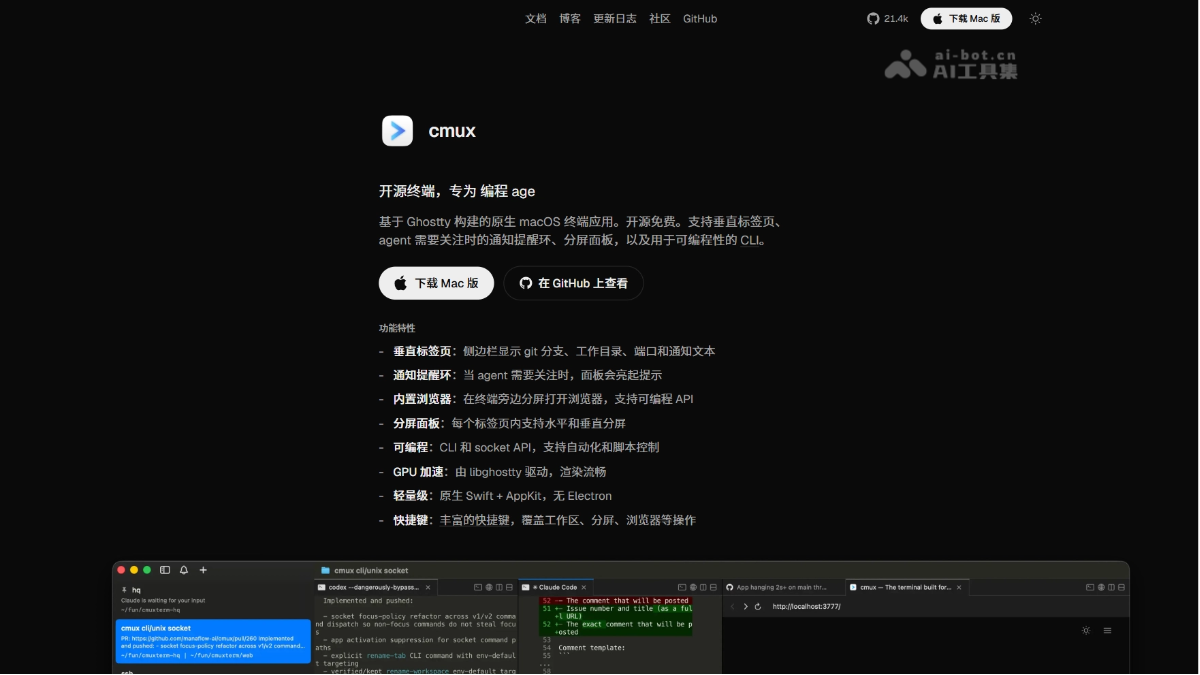
cmux's main features
- Vertical tabs and high-density information bar: The sidebar displays all terminal sessions as vertical tabs, and each tab directly shows the Git branch, associated PR status and number, working directory, listening ports, and the latest notification text.
- Intelligent notification ring system: When an Agent task gets stuck and waits for user confirmation, the corresponding panel automatically lights up with a blue halo, the sidebar tab highlights in sync, and a macOS desktop notification is pushed; keyboard shortcuts are supported for quickly jumping to the latest unread notification.
- Native split screens and Claude Code Teams: Supports horizontal and vertical split screens, and can launch Claude Code Teams mode with one click, running multiple Agents side by side in native split panes, with each Agent's metadata and notification status independently synced and displayed in the sidebar.
- Built-in programmable browser: A browser pane can be opened directly next to the terminal, supporting capturing page accessibility tree snapshots, obtaining element references, and performing clicks/form filling/running JS, enabling Agents to directly operate local development servers without switching windows.
- CLI and Socket API: Provides a command-line interface and Unix Socket API, supporting scripted creation of workspaces, split screens, tabs, sending input, and controlling the browser, enabling complete automated workflow orchestration.
- SSH remote workspaces: Creates independent workspaces for remote machines, and the browser pane routes through the remote network so that localhost is directly available; images dragged into a remote session are automatically uploaded via scp without manually typing commands.
cmux's technical principles
- Architecture and rendering layer: cmux embeds libghostty as the underlying terminal rendering library, inheriting its GPU-accelerated rendering capabilities; the upper-layer GUI is natively developed with Swift + AppKit, avoiding the performance and memory overhead of Electron/Tauri, and terminal keybindings directly reuse the local Ghostty configuration file.
- Agent notification capture mechanism: The notification system automatically monitors Agent process status through standard terminal escape sequences, and can be manually triggered through the cmux CLI and Claude Code hooks; when an Agent needs user intervention, the framework draws a blue notification ring on the target panel, synchronously updates the sidebar unread marker, pops up the notification panel, and pushes a native macOS desktop notification.
- Programmable control interface: All workspace, split screen, tab, browser, and input operations are exposed through the Unix Socket API, and external processes or scripts can directly connect to the socket to control terminal layout and content flow; a CLI wrapper is also provided, enabling Agents themselves or CI pipelines to automate the orchestration of multi-session tasks.
How to use cmux
- Install the application: Only macOS is supported. Run in the terminal
brew install --cask cmux, or download the.dmginstaller from GitHub Release. - Launch and configuration: On first launch, it automatically reads the local Ghostty configuration file (
~/.config/ghostty/config) to apply the theme, font, and keybindings; cmux-specific shortcuts can be customized in the settings. - Create an Agent session: Click the sidebar
+to create a new tab, and directly runclaudeorcodexand other Agent commands; runcmux teamsto launch multi-Agent side-by-side mode with one click. - Monitor and respond to notifications: When an Agent needs confirmation, watch for the blue highlighted tab in the sidebar and click it to jump there; press the shortcut key to cycle through all unread notifications.
- Browser and automation: Select a browser pane from the split-screen menu and enter the local development address; use the
cmuxCLI command or Socket script to control tab creation, input sending, and layout switching.
Core advantages of cmux
-
Native performance: Built with Swift/AppKit, with no Electron memory overhead, fast startup, and smooth rendering.
-
Agent-native design: From notifications to split screen, every feature is designed around "multi-Agent parallelism" scenarios, rather than passive adaptation of a traditional terminal.
-
Extremely high information density: Vertical tabs simultaneously display branches, PRs, ports, and notifications, so you can locate the desired session at a glance.
-
Programmable automation: CLI + Socket API frees workflow orchestration from GUI limitations and can integrate with scripts, CI, or Agents themselves.
-
Zero-configuration onboarding: No tmux prefix key or complex configuration files required; ready to use out of the box.
cmux project address
- Official website:https://cmux.com/zh-CN
- GitHub repository:https://github.com/manaflow-ai/cmux
Comparison of cmux with similar competitors
| Dimension | cmux | Warp | Microsoft Intelligent Terminal |
|---|---|---|---|
| Product positioning | AI Agent multi-task native terminal | Agentic Development Environment | Windows AI Agent native terminal |
| Architecture | Swift/AppKit native application | Rust/Electron | Windows Terminal fork (C++) |
| Supported platforms | macOS only | macOS/Linux/Windows | Windows only |
| Agent integration | Passive hosting (Claude Code/Codex, etc.) | Active Agent Mode + Oz orchestration layer | Active ACP protocol + 25+ Agent CLI |
| Vertical tabs | ✅ With Git/PR/port/notification metadata | ❌ Bottom block-style tabs | ❌ Traditional top tabs |
| Agent notifications | ✅ Halo + highlight + desktop notifications | ✅ Block-style AI output + Agent panel | ✅ Integrated Windows notification center |
| Built-in browser | ✅ Programmable API | ❌ | ❌ |
| MCP support | ❌ (supported by the Agent itself) | ✅ Native MCP | ✅ Via Agent CLI |
| Multi-Agent parallelism | ✅ Claude Code Teams split screen | ✅ Multi-Agent sessions + cloud orchestration | ⚠️ Single-Agent switching |
Application scenarios of cmux
-
Multi-Agent parallel development: Run 4-6 Claude Code/Codex sessions simultaneously to handle different modules, and track the progress of each task in real time through vertical tabs.
-
Full-stack local debugging: Run the backend service in the terminal, access localhost in a split-screen browser in the same window, and the Agent directly captures the page DOM to execute frontend tests.
-
Remote server operations: Connect to a remote workspace via SSH, access remote intranet services directly through the browser, and drag and drop to upload screenshots or log files.
-
Automated workflow orchestration: Use Socket API scripts to create standard split-screen layouts on a schedule and automatically distribute tasks to each Agent panel.