
Recently Claude Opus 5.5 has gone completely viral.
What people didn't expect is that for a pure text large model, its viral representative works across the internet are all high-quality videos:
Someone used it to make a music MV of a song sung from an AI perspective to doomsayers, with a concept and lyrics more sophisticated than the vast majority of AI meme songs.
el.cine paired Claude Opus 5.5 with Seedance 2.5 to directly generate a cinematic-grade clip with explosive texture.
Kevin Ngo's approach was even more impressive: he had Opus 5.5 write piano music in Python, create 3D animation, and then hand it to Blender for rendering, generating a gentle and healing animated video.
Seeing this, you must be wondering: how does a text model without even a canvas make videos?
This article will share with friends how to make AI videos with Claude Opus 5.5.
01. How does Opus 5.5 generate videos?
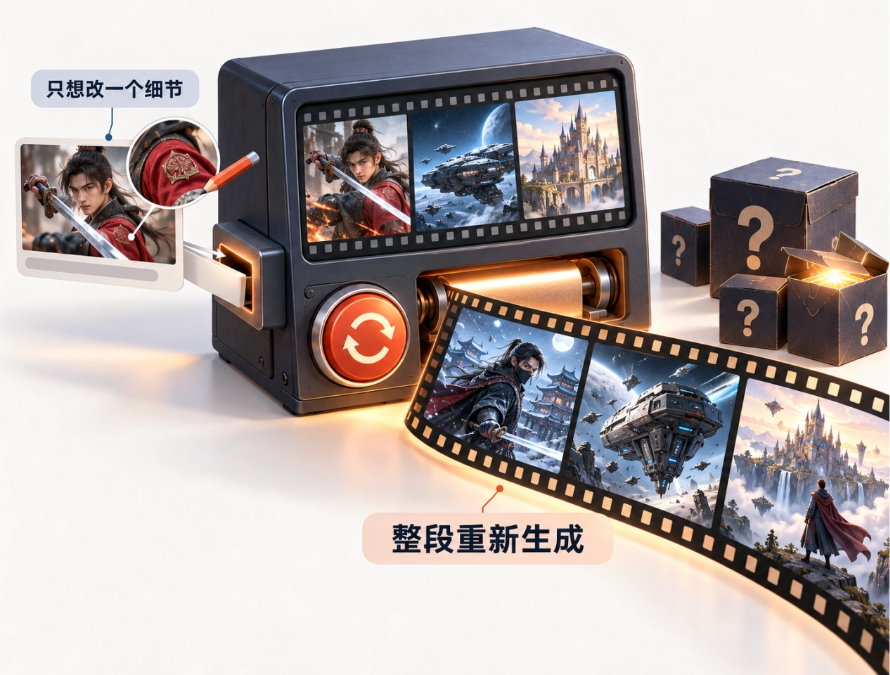
The video models we commonly see, such as Seedance and Sora models, are essentially based on diffusion probabilistic algorithms to guess what the pixels of the next frame look like.
They are indeed very strong for generating martial arts, sci-fi, and fictional blockbusters, but it is difficult to achieve precise control over the visuals.
The most torturous part is that what these video models generate is like opening a blind box; even if you change a very small detail, you have to regenerate the entire thing with a prompt.
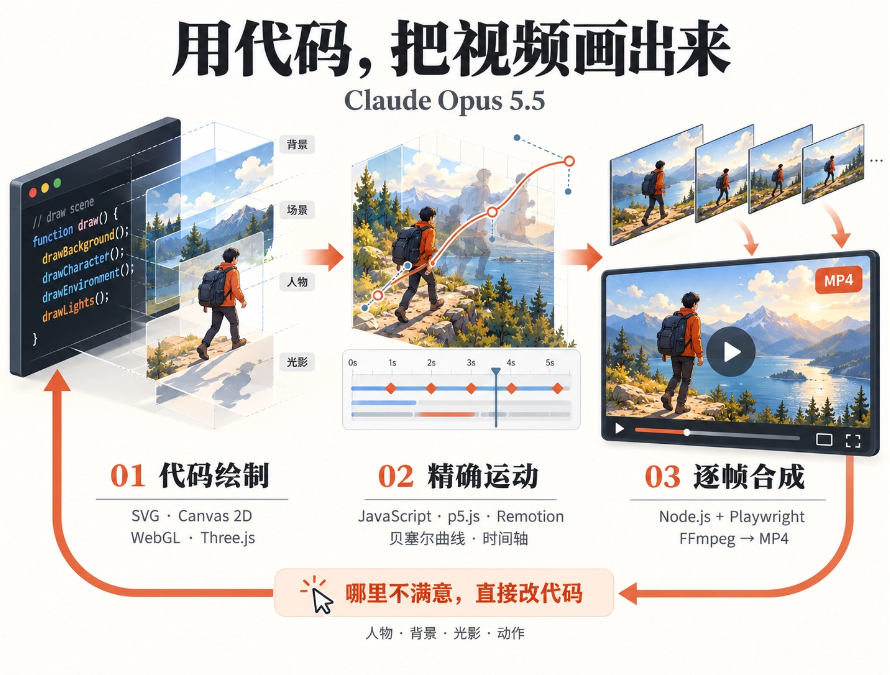
Claude Opus 5.5 uses code-driven rendering. It uses SVG, Canvas 2D, WebGL, or Three.js to draw characters, backgrounds, and lighting stroke by stroke, then uses timelines and easing curves to control how each layer moves.
Music, sound effects, and narration are also generated by code and precisely timed to the visuals.
Finally, it uses a headless browser to capture frames one by one and calls FFmpeg to composite an MP4 video.
Most importantly, Opus 5.5 uses code to draw videos, so wherever you are unsatisfied, you can directly modify it.
At this point, someone will definitely ask: writing code to make animations is nothing new, so why did Opus 5.5 suddenly blow up?
The core lies in the qualitative leap Opus 5.5 has made in aesthetic intuition and engineering error correction.
Opus 5.5's extreme long context and aesthetic understanding, and its terrifying end-to-end error correction ability, allow it to ensure that in animation timeline code thousands of lines long, layer hierarchy is not messed up, physical collisions do not clip through models, and audio-visual sync is accurate to the smallest detail.
02. How to Make Videos with Claude Opus 5.5
In Claude, switch the model to Opus 5.5 and switch the reasoning intensity to UltraCode mode. The model will automatically invoke multiple sub-agents to collaborate in parallel, greatly increasing code orchestration speed. Next, let's experience it together through 7 application scenarios.
Product Promo Video
prompt: Research [iphone Duo]. Make a 30-second dynamic video with original background music, sound effects, and Chinese narration, with audio-visual sync.
Opus 5.5 will research the product itself, distill the selling points, and organize the storyboard. Music and sound effects are directly synthesized with code, and narration is generated using Microsoft's free TTS. Sound effects and narration are aligned one by one according to the timing of the visuals, with very accurate beat matching.
Children's Picture Book
prompt: Generate a children's picture book-style video, 30s long, with a story about a little rabbit's National Day holiday.
Many people think that writing code can only produce blocky web pages. Opus 5.5 used a Canvas noise algorithm to simulate watercolor paper texture and added a hand-drawn jittery line effect, expanding a single sentence from a nurse into a complete 7-page story picture book. Even the "shushing" white noise of page turns and the arpeggios of the music box were calculated by algorithms, warm and healing.
Project Introduction
prompt: Create a promotional video based on the project code.
Give Opus 5.5 a GitHub repository, and Opus 5.5 can directly extract the selling points from the source code and documentation, organize the storyboard itself, produce the BGM, and even do its own beat sync. The efficiency of technical promotion is directly increased by 10 times.
15-second high-density motion graphics blockbuster
prompt: A 15-second long motion graphics demo video, used to showcase the skills and abilities of a motion designer.
Opus 5.5 made extensive use of nonlinear elastic curves and staggered delay techniques that only advanced animators understand. Every transformation follows conservation of momentum, and the easing curves, transitions, and rhythm are all at the level of a professional motion designer.
UI one-shot transformation animation
If the previous case was just a small test of skill, this case shows what terrifying dominance in long-context engineering really means.
prompt:
<inputs>
Please first ask me for the following information: which 8 to 12 UI states I want this shape to become (for example, button, loader, player, slider, switch, tabs, chart, command palette, toast); whether the visuals use pure black and white, or add one accent color; and a royalty-free track at about 120 BPM (for example, commercially usable music on Mixkit).
</inputs>
<direction>
Create Dribbble-quality UI motion. It is the same shape throughout, with no cuts: every state transforms from the same element, with size, corner radius, and color changing accordingly, and content switches with a brief blur effect. Use the cursor to drive every change, showing real clicks and drags. Use a light warm gray canvas, black-and-white UI elements, and a clean UI font (Geist). Use spring motion throughout, with at most very slight bounce. The camera gradually zooms in so that each state fills the frame. The last frame must be exactly the same as the first frame, so the video can loop.
Do not use: bouncy easing, particle bursts, glow, gradients on UI elements, inconsistent icon stroke widths, rhythm gaps, or anything that looks like a template.
</direction>
<structure>
120 BPM, 7 bars total, with action on every beat.
Button → loader → checkmark complete → Dynamic Island → music player (play/pause icon morphing) → drag the progress bar → the progress bar becomes a volume slider, and stretches when dragged past the maximum → switch toggles on the beat → slider knob becomes a liquid tab indicator → tab expands into an auto-drawn chart, with a tooltip appearing on hover → chart collapses into a ⌘K command palette → type text to filter → press Enter → toast appears → back to button.
</structure>
<build>
- Create a standalone HTML file, with a 1440×1440 square canvas. All styles are calculated from time in seek(t): no CSS transitions, no timers, and no state retained between frames.
- Use the closed-form step response formula for spring animation. If a value changes its target multiple times, add together the spring response corresponding to each change so that it is always a pure function of time.
- The two side edges of the tab indicator are driven by different springs, so that the leading edge stretches forward before the trailing edge. The switch's slider knob uses the same treatment.
- Dragging uses direct manipulation: while the cursor is held down, the value is calculated based on the cursor position; after release, the element springs back starting from the position where it was let go.
- Use numpy to analyze the music and determine the beat grid, starting from the downbeat. Based on the measured sound effect peaks, schedule when each UI sound effect appears.
- Render with Playwright: capture 4 subframes per frame, then blend them with ffmpeg's tmix to create a 60fps motion blur effect.
- Before the full render, first render one frame per beat. Fix all parts that are rhythmically off, crowded in layout, or hard to read.
</build>
<gotchas>
Do not use will-change on camera-zoomed elements, otherwise the text will become blurry. When text switches inside a transformed container, entrance and exit need to be scheduled separately, otherwise the text will overlap. The last frame must be exactly identical to the first frame, including the cursor's position and velocity, otherwise there will be a stutter when looping.
</gotchas>
<start>
First ask me for the information I need, then before writing any code, show me the UI state list according to the beat grid.
Continuous morphing of complex states, where the interface keeps morphing within a single shot, and the hierarchy and transitions of elements must never fall into disorder—this best demonstrates its long-code engineering capability.
Popular science video
prompt: A video showing the course of human progress and looking ahead to the next 30 years.
In the end, Opus 5.5 delivered a 3-minute animated short film, complete with an original soundtrack.
Opus 5.5 delivered a 3-minute narrative animation, complete in structure, and also with original music.
Movie story
I think the most impressive use is still having Opus 5.5 act as the overall director, calling GPT Image 2.5 and Seedance 2.5 together to generate video.
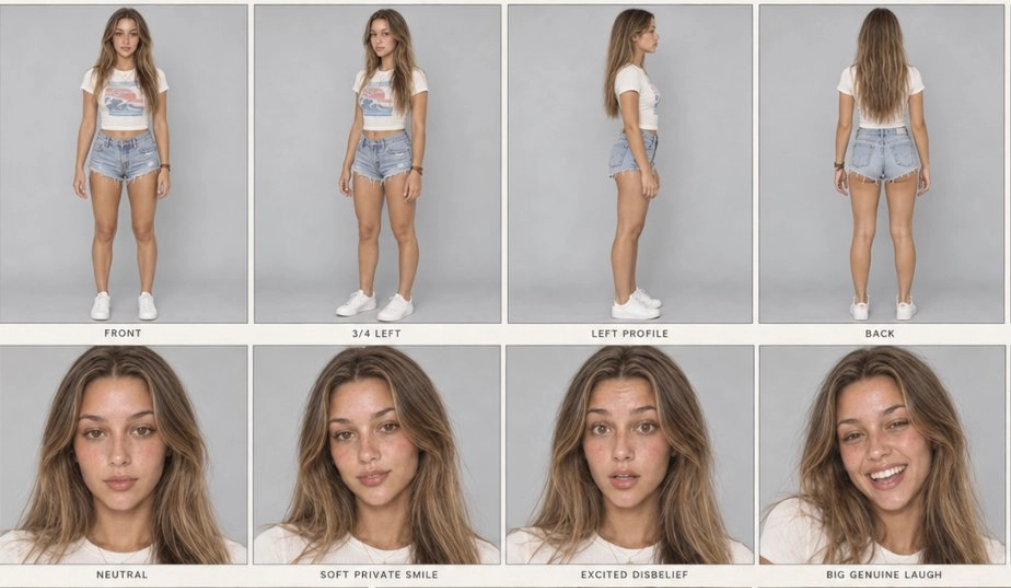
GPT Image 2.5 generates the character design sheet.
prompt: Create a main character and scene reference design sheet for the woman in <<<image_1>>>. Each panel must be the same person: consistent face and bone structure, brown eyes, freckles on the bridge of the nose and cheeks, naturally full lips; light brown long hair parted down the middle, with sun-lightened strands and caramel highlights, a few loose strands drifting naturally. She always wears the same thin gold necklace with a small cross pendant; a brown braided cord bracelet on her right wrist; a faded cropped white T-shirt printed with a light blue and coral red sun and wave pattern; light-wash denim shorts with frayed hems. The character's identity must be locked, and it must not change between any panels.
<<<image_2>>> and <<<image_3>>> are for style reference only: reference their early-2000s portable digital camera home-video color tone, do not copy the people in them, and do not copy the text overlay effects.
Layout: create a wide 16:9 design sheet, with a warm off-white paper background; divide panels with thin gray lines; below each panel, label small black text in a clean sans-serif font. Three rows in total.
First row—character turnaround views (neutral studio environment, soft even daylight, plain light gray background, full body in frame, natural standing A-pose, arms slightly away from the body, barefoot or wearing white sneakers):
Front / left front 3/4 angle / left side / back / right side / right front 3/4 angle
This row uses true natural colors, clearly showing the clothing and body proportions. The height and image proportions remain consistent across the six angles.
Second row — face and details (tight close-ups of head and shoulders, same soft daylight; realistic skin texture, visible pores, freckles and fine vellus hair, with a slight natural sheen, no retouching):
Natural neutral expression / reserved and intimate smile / excited and incredulous (raised eyebrows, wide eyes) / heartfelt laugh (teeth showing, cheeks raised) / playful "I told you so" (slight head tilt, closed-mouth smile) / four detail panels: eye macro, necklace and cross pendant, braided cord bracelet on wrist, T-shirt print and frayed jeans hem.
Full-image realism requirements: realistic skin texture, natural asymmetry, clearly distinguishable individual strands of hair and flyaways, realistic clothing wrinkles, accurate hand structure with five fingers on each hand; no beauty filters, plastic skin, or CGI feel.
In the upper-left corner of the character sheet, label the title in small uppercase letters: "Character and Scene Reference Sheet". Apart from the panel labels, no other text should appear. No watermarks, no logos, do not copy subtitles from the style reference images, and no other people should appear.
Continue having Opus 5.5 call GPT Image 2.5 to generate the initial frame:
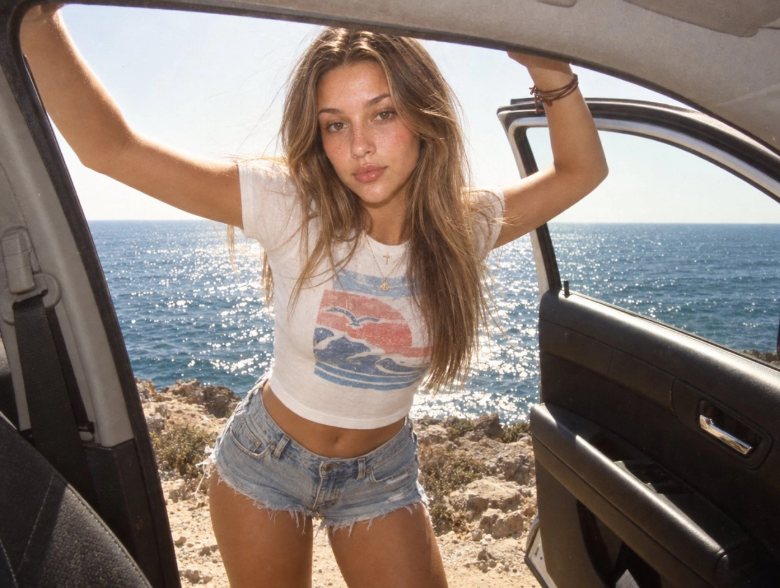
Prompt: Strictly use the uploaded character reference sheet as the identity reference for the person. Her face and bone structure, brown eyes, light freckles on the bridge of the nose and cheeks, naturally full lips, and long straight light brown hair parted down the middle with sunlit caramel highlights must match exactly. Keep her delicate gold necklace and small cross pendant.
Scene: A candid snapshot taken from inside a parked silver sedan, with the camera shooting outward through the open rear passenger door. The door frame, gray fabric headliner, black door interior panel with chrome handle, and part of the seatbelt frame the scene from both sides of the image. She stands at the edge of a rocky sea-cliff road above the ocean, both arms raised, one hand gripping the upper edge of the door frame and the other resting on the edge of the roof, her body leaning slightly toward the camera. Her pose is relaxed and natural, not deliberately posed, with a calm expression, looking straight at the camera.
Clothing: A fitted cropped white pure cotton T-shirt printed with a faded, sun-worn vintage graphic in light blue and coral red, slightly worn and soft in texture. Light-wash low-rise denim shorts with frayed hems. A slender brown leather cord bracelet on one wrist. Hair is slightly messy, blown by the wind, with a few strands brushing across her face.
Background: Behind her is a deep blue Mediterranean Sea filling the frame, with sunlight sparkling on the surface; the straight horizon line is at chest height; the sky is pale and hazy; dark rocks and gravel are visible below the cliff edge.
Lighting: Strong direct midsummer noon sunlight, bright image, slightly overexposed. Skin is warm from the sun with a natural sheen, the cheeks and bridge of the nose slightly gleaming; soft shadow under the chin; faint reflections on the white car interior.
Camera and image style: 35mm film photo texture shot with an early-2000s compact digital camera, 28mm wide-angle lens, slight barrel distortion at the edges; shot from chest height inside the car. Warm, faded, sun-baked color tones; lifted blacks, low contrast; soft highlights, slightly blown out in the sky; whites slightly yellow; slight soft glow on bright edges; visible fine film grain, the image slightly soft, focus not perfect. Overall like a real candid snapshot from a summer road trip, not a studio photo.
Realism: realistic skin texture, visible pores and freckles; no retouching, no plastic skin; retain natural flyaway hair, realistic wrinkles on the T-shirt, and dust and wear marks on the car interior.
Aspect ratio 4:3. No text, no watermarks, no logos.
Continue having Opus 5.5 call Seedance 2.5 to generate the video.
Opus 5.5 coordinates, GPT Image 2.5 produces the character design sheets, and Seedance 2.5 produces shots such as the in-car one, thereby ensuring the character stays consistent throughout and looks realistic.
03. Some Sharing
The Claude series models have strong visual capabilities, but they easily converge toward the same style; the most effective way to break through is to use the visual reference trick—upload an image for it to reference.
In terms of production approach, 2D animation, text effects, and flat graphics can be drawn directly with code, and then their changes can be controlled over time.
When you need characters, images, or live-action footage, you can have generation tools like Jimeng produce the assets, then use code for multi-layered arrangement and packaging;
If it's a more complex 3D character and scene, it can even use Python scripts to control Blender, running the entire pipeline from modeling and animation to rendering.
This millisecond-level precise control brought by code means you change whatever you want to change, and the sense of control is maxed out. It can be said that Opus 5.5, for the first time, seamlessly wove together underlying mathematics and physics, dynamic layout, and multimodal tools, truly granting independent creators industrial-grade delivery precision.
Original link:From writing code to making videos, Claude Opus 5.5 has been played with in new ways