

What is Clacky AI
Clacky AI is a cloud development environment (CDE) for developers, building an L3-level Agentic AI programming assistant. Clacky AI supports full-stack development (including Python, Node.js, Golang, Ruby, Java, and other languages), helping developers quickly build and iterate from ideas into practical, usable systems. Based on features such as structured task decomposition, multithreaded collaboration, and self-diagnosis and repair, Clacky AI improves development efficiency and lowers the development threshold, making it very suitable for team collaboration and rapid iteration projects. The "Time Machine" feature supports tracing every node in the development process, ensuring stable project progress.
Clacky AI's main features
- Engineering mindset: Emphasizes the complete process from project planning to iteration, in line with human intuition.
- Full-stack support: Supports frontend, backend, and common programming languages ((such as Golang, Python, Node.js, Ruby, Java, etc.)), allowing users to generate complex projects based on simple prompts.
- Cloud development environment: All development environments are preconfigured, so users do not need to install dependencies locally, lowering the usage threshold.
- Multithreaded workflow: A multithreaded workflow based on Git branches, supporting isolated and parallel task execution.
- Self-diagnosis and repair capabilities: Autonomously plans tasks and automatically repairs issues when they occur.
- Time Machine feature: Allows users to trace back to any node, preserving the complete context state of each task node.
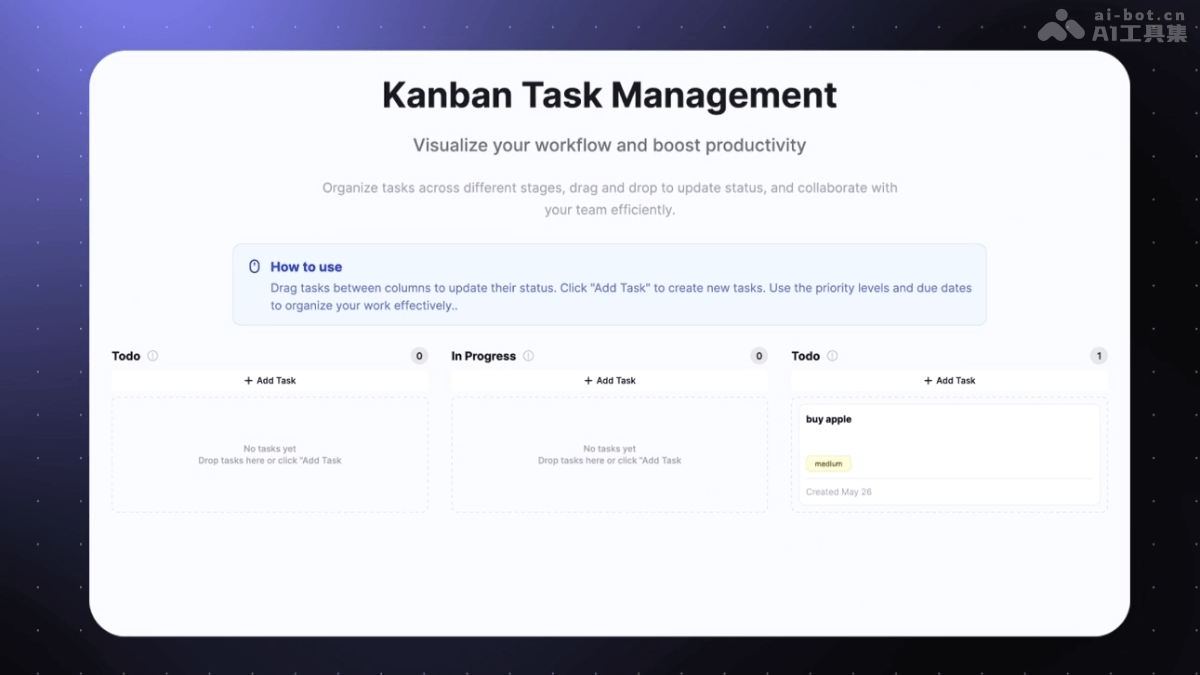
Clacky AI's official examples
Prompt: Develop a kanban-style task management system.
Clacky AI's official website address
- Official website address:clacky.ai
How to use Clacky AI
- Register and log in: Visit the Clacky AI official website, register an account, and log in.
- Apply for beta access: Clacky AI is currently still in beta, so you need to apply for beta access. Click the apply for beta button, fill in the relevant information, and wait for approval.
- Create a project: After logging in, enter the Clacky AI workspace. Click the "Create Project" button to start creating a new project. Enter the project name and description, and select the project type (such as a Web application, crawler tool, game, etc.).
- Enter requirements: After the project is created, enter the specific requirement description. Clacky AI provides a "prompt tuning" feature to help users describe requirements more clearly and structurally. After confirming the requirements, Clacky AI automatically generates a requirement list, allowing users to further refine or adjust it.
- Task planning and execution: Clacky AI automatically decomposes tasks according to the requirements and generates a task list. Users can choose to start task execution directly or manually adjust the task order and priority.
- Code generation and optimization: During task execution, Clacky AI generates code and displays it in real time in the code editor. Users can use the "Time Machine" feature to view the change records of each step and trace back to any node.
- Team collaboration: If it is a team project, create multiple threads (Thread) in the project and assign them to different team members. Each thread independently handles a subtask, and team members develop in their own threads.
- Code export and deployment: After the project is completed, export the generated code locally. Users can deploy the code to a server or cloud platform as needed.
Clacky AI's Core Advantages
- Full-Cycle Development: From zero-to-one prototyping (0→1) to large-scale iteration (1→N), all completed within a unified development environment.
- Designed for Important Projects: Designed for real projects from the start, no need to switch tools midway, supports continuous growth.
- Intelligent Partner: As a logically clear, goal-driven AI teammate, focused on delivering results and scaling projects.
How Clacky AI Supports Team Collaboration
- Enables parallel task execution based on isolated threads.
- Supports humans and AI collaborating on different parts of a project.
- Cloud-based real-time progress tracking and dynamic adjustments.
Clacky AI's Application Scenarios
- Full-Stack Project Development: Suitable for building complete full-stack applications from scratch, such as developing an e-commerce website, where frontend interface design, backend logic processing, and database integration can all be completed in one stop, quickly generating a runnable system.
- Team Collaborative Development: Supports team members creating multiple threads within the same project, asynchronously handling different tasks, sharing project context, suitable for multi-person collaborative development of complex projects, improving collaboration efficiency.
- Rapid Prototyping: Helps developers quickly turn ideas into runnable prototypes, generating an initial version based on simple prompts, suitable for individual developers or teams to quickly validate product direction in the early stages of a project.
- Teaching and Learning: As a programming teaching tool, it helps students quickly understand programming concepts, generate example code, lower the learning threshold, and is suitable for programming education scenarios.
- Enterprise-Level Application Development: Enterprises use its rapid development and iteration capabilities to shorten project cycles, improve market response speed, and reduce local resource configuration and maintenance costs based on the cloud development environment.

