
What is ChatGPT Projects
ChatGPT Projects is a newly launched feature by OpenAI that integrates multiple practical tools, improving users' work efficiency. Projects supports users in uploading various files, enhancing the depth and specificity of ChatGPT conversations. Projects can be created to organize different work content; for example, for preparing a family gathering, you can set up a project named "Family Gathering" and choose a color for it for easy distinction. The Projects feature includes conversation management tools that help team members effectively organize and search communication records, ensuring information transparency. Overall, the Projects feature simplifies users' operation processes and improves the system's stability and reliability through three core functions: project management, data storage, and version control.
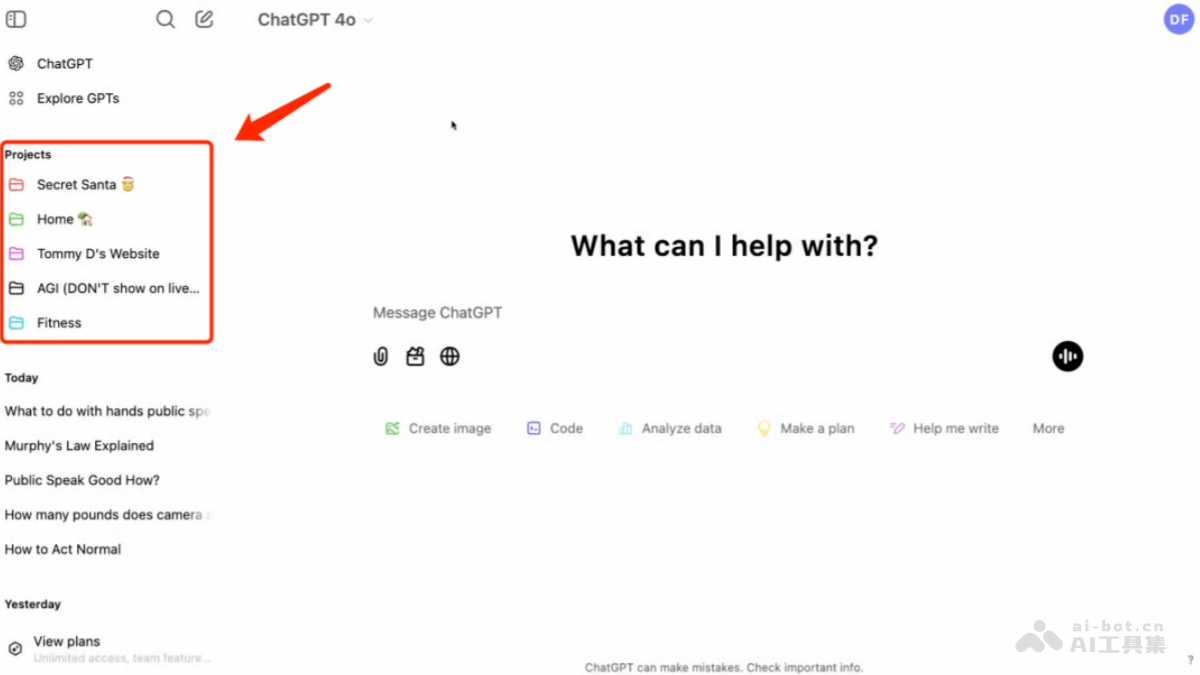
Main feature highlights of ChatGPT Projects
- File and instruction upload: Users can upload files and set custom instructions, and ChatGPT can provide deeper and more specific insights based on project needs.
- Conversation organization: Projects supports users in integrating related conversations, files, and instructions together, simplifying and improving organizational work.
- Personalized project space: Users can create dedicated project spaces, set a title and icon color for each project, add files and instructions, and customize how ChatGPT responds within that project.
- Search functionality: Users can quickly locate past conversations within a project, saving time and ensuring key details can be easily retrieved.
- Canvas tool: Users can use the Canvas tool within the project space for collaborative workflows.
- Real-time collaboration: The Projects feature supports real-time chat collaboration and tools such as multi-type code execution, suitable for developers and project managers.
- Gradual rollout: The Projects feature is currently available to ChatGPT Plus, Pro, and Teams users, and will gradually be made available to free users and enterprise and education users in the future.
- User experience improvements: The Projects feature focuses on improving user experience by integrating ChatGPT's various functions together, making it convenient for users to perform tasks such as writing, research, programming, and web search.
How to use ChatGPT Projects
- Visit the official website: VisitChatGPT's official website. Currently, the Projects feature can only be used on the ChatGPT web version and the Windows desktop client; the mobile app and macOS do not yet support it.
- Create a project: In the ChatGPT interface, click the "+" sign in the left navigation bar on the home page to start creating a new project and give it a name.
- Customize project color: To make it easier to distinguish different projects, you can set a color for each project.
- Upload files: Within a project, you can upload various types of files, including text, images, and videos, so that ChatGPT can obtain rich background information and generate deeper and more specific insights.
- Set personalized instructions: You can set personalized instructions for a project to achieve more efficient conversation management and project collaboration.
- Integrate conversations and files: The Projects feature supports integrating chat records, files, and custom instructions into a clear interface, providing users with a tidy working environment.
- Use ChatGPT features: In projects, you can use multiple features of ChatGPT, such as SearchGPT, Canvas, and programming.
- Organize and retrieve conversation history: Through the Projects feature, you can easily organize and retrieve conversation history and files related to a specific project, improving work efficiency.
- Team collaboration: In teamwork, ChatGPT Projects provides conversation management tools, and team members can easily organize and search past conversation records.
Application scenarios of ChatGPT Projects
- Project management and organization: The Projects feature supports users in creating and managing multiple projects, and each project can have its own specific files, instructions, and chat records.
- Content creation and research: For content creators and researchers, the Projects feature provides a platform for centrally storing and managing data, and users can save information such as conversation records, research materials, and creative drafts in the cloud.
- Programming and software development: Developers can use the Projects feature to manage code snippets, development documents, and test results in the software development process. The Projects feature supports the Canvas interface, which can help developers visually organize and modify code.
- Education and learning: In the field of education, the Projects feature can help teachers and students organize course materials, assignments, and research projects. Teachers can create projects to store course outlines, lecture notes, and student assignments, and students can use the Projects feature to manage their study notes and research materials.
- Personal financial management: Users can use the Projects feature to manage personal finances, such as budget planning, expense tracking, and investment analysis. By creating different projects, users can manage different types of financial information separately,
- Data analysis and reporting: The Projects feature can help users centrally manage and analyze data, and generate reports and visualization charts.