
What is Canvas
Canvas is released by OpenAIChatGPTnew feature, now fully open and integrated into ChatGPT, supporting users to collaborate with AI on writing and programming projects. Canvas supports running Python code directly, and can display the text or graphical output results of the code in real time, greatly improving programming efficiency. Canvas has excellent context awareness, can provide real-time writing suggestions, and help optimize article structure and content. It also supports custom GPT models, allowing users to customize AI assistants according to their needs. Canvas promotes the further development of the human-AI collaboration model and provides users with a powerful productivity tool.
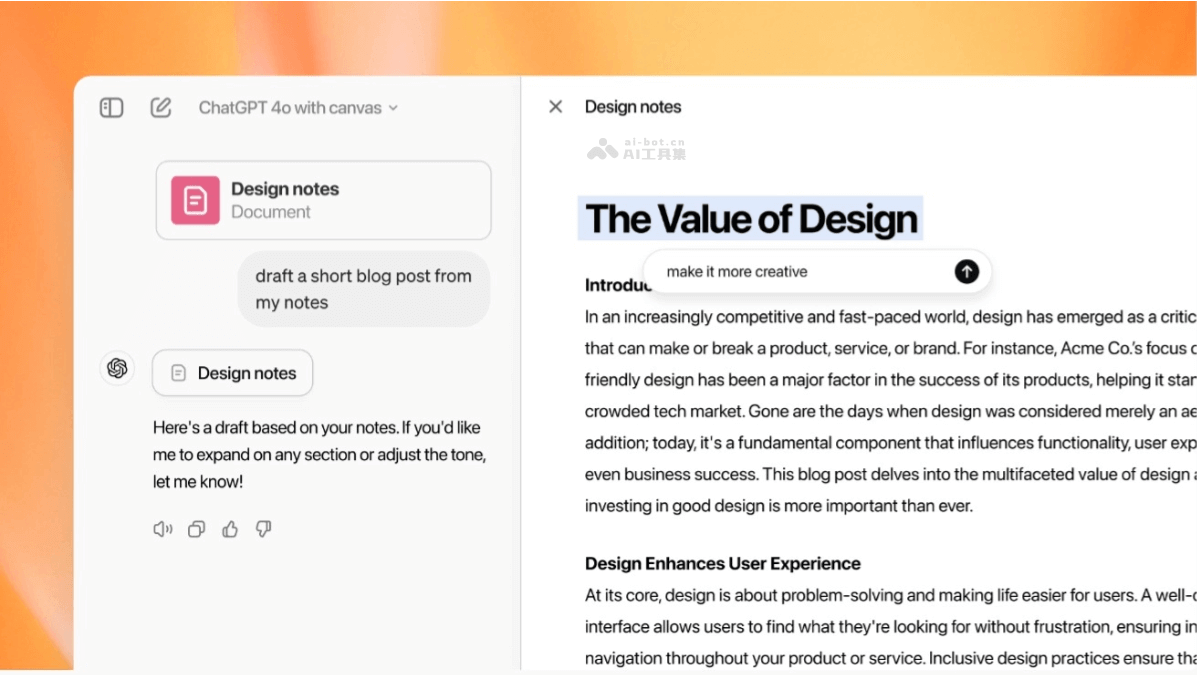
Canvas's main features
- Integrated writing and programming: As an AI assistant, Canvas supports users in interactively collaborating with ChatGPT on writing and programming projects.
- Real-time code execution: Users can run Python code directly on Canvas and view the text or graphical results generated by the code.
- Code assistance features: Provides code review, adding logs, comments, bug fixes, and multilingual code conversion, etc.
- Writing assistance features: Canvas can provide real-time writing suggestions, polish text, and help optimize article structure and content.
- Context awareness: Has excellent context awareness and can provide precise editing and writing suggestions based on specific parts of the document.
- Custom GPT integration: Supports deep integration with custom GPT models, allowing users to directly call custom AI models in Canvas to complete specific tasks.
- Team collaboration optimization: Updated collaboration features, introduced an intelligent collaboration system, and improved team work efficiency.
- Image recognition and content generation: Can generate corresponding text responses based on image content, such as writing a reply based on the user's wish information.
- Highlight and focus: Users can highlight specific parts of text or code, letting ChatGPT focus on specific parts.
- Direct editing: Users can directly edit text or code in Canvas, just like in a document editor or IDE.
- Shortcut action menu: Provides a series of shortcut actions, such as adjusting text length, changing reading level, adding polish and emojis, etc.
- Version control: Users can use the back button to restore to a previous version, making version comparison and rollback convenient.
Canvas's writing capabilities
- Suggest edits:Provides inline text modification suggestions to help users improve grammar, spelling, sentence structure, etc. Provides style and content improvement suggestions based on context, making the text clearer and more accurate.
- Adjust the length:Supports users in increasing or decreasing the length of the text as needed. For content that needs detailed elaboration, expand the text; for content that needs concise expression, shorten the text.
- Reading level:Adjusts the complexity of the text to suit readers of different reading levels. Adjusts from a simple children's book level to a complex academic article level.
- Add final polish:After completing the first draft of the text, perform final polishing, including grammar checking, style consistency, and fluency improvement, to ensure the text reaches publication quality before release.
- Add emojis:Add emojis to the text to enhance emotional expression and visual effect. Suitable for occasions that need to add fun or emphasize certain points.
Canvas's Programming Capabilities
- Code review: Provide inline suggestions to improve code quality, including improving algorithms, data structure selection, code style, etc.
- Add logs: Help developers insert print statements to better debug and understand the code's execution flow.
- Add comments: Add comments to code to improve code readability and maintainability.
- Fix errors: Detect issues in code and provide fix suggestions to help resolve compile errors or runtime errors.
- Code translation: Translate code from one programming language to another, supporting multiple popular programming languages, such as JavaScript, TypeScript, Python, Java, C++ or PHP.
Canvas's Technical Principles
- Natural Language Understanding (NLU): Canvas is based on advanced natural language understanding technology and can understand users' instructions and context, providing accurate writing and programming suggestions.
- Machine learning models: Canvas is based on large language models to generate text and understand code. It can predict and generate responses that match user input.
- Context awareness: Canvas can identify and understand specific parts of a document, analyzing the context of text and code based on algorithms, and providing relevant editing and modification suggestions.
- Code execution environment: For programming features, Canvas has a built-in code execution environment that supports users running Python code directly in the interface.
- WebAssembly and Python emulator: To support the running of Python code, Canvas uses WebAssembly technology to integrate a Python emulator.
- GPT-4o model: Canvas is built based on the GPT-4o model, which is trained for collaboration.
- Trigger Canvas: The model knows when to open Canvas, make targeted edits, or completely rewrite.
- Core behaviors: Including triggering Canvas, generating diverse content, making targeted edits, rewriting documents, and providing inline criticism.
- Automated evaluation: Using more than 20 internal automated evaluations to measure progress.
- Synthetic data generation: Using novel techniques, such as extracting outputs from OpenAI o1-preview, for post-training of the model.
Canvas's Project Address
- Project official website:openai.com/index/introducing-canvas
- ChatGPT product official website:https://ai-bot.cn/sites/30.html
Canvas's Application Scenarios
- Programming application scenarios:
- Software development: Assist developers in writing, reviewing, and optimizing source code.
- Education and learning: Help students learn programming concepts, providing code examples and exercises.
- Team collaboration: In team projects, promote code sharing and feedback, and improve code quality.
- Technical writing: Assist in writing technical documentation, API descriptions, and developer guides.
- Code maintenance: Provide suggestions for refactoring and cleanup during legacy code maintenance.
- Debugging and testing: Help developers debug code by adding logs and comments.
- Writing use cases:
- Content creation: Help writers, bloggers, and marketers create engaging articles and content.
- Academic writing: Assist scholars and researchers in writing papers, reports, and research proposals.
- Business communication: Provide writing support for business documents, emails, and proposals.
- Editing and proofreading: Assist editors and proofreaders in improving text quality.
- Social media: Help users write engaging posts and updates on social media.
- News reporting: Assist journalists in quickly writing press releases and reports.