
In today's digital age, competition in the e-commerce industry is becoming increasingly fierce. How to efficiently and cost-effectively create attractive clothing display content has become a key need for merchants. This article will explore in depth an innovative solution—usingVisual Factory AI tool, choose Banana AI to generate outfit models, and turn them into high-quality dynamic display videos through Veo AI. Combining AI technology can bring significant advantages of cost reduction and efficiency improvement to clothing e-commerce, and can create more visually impactful and attractive viral visual content. Let's learn how to achieve this magical creative process step by step.
01. Use Banana to create outfit models
Visit the Visual Factory official website https://d.aijuh.com/ , register an account and log in.
According to your needs, for example, choose the Banana image generation feature.
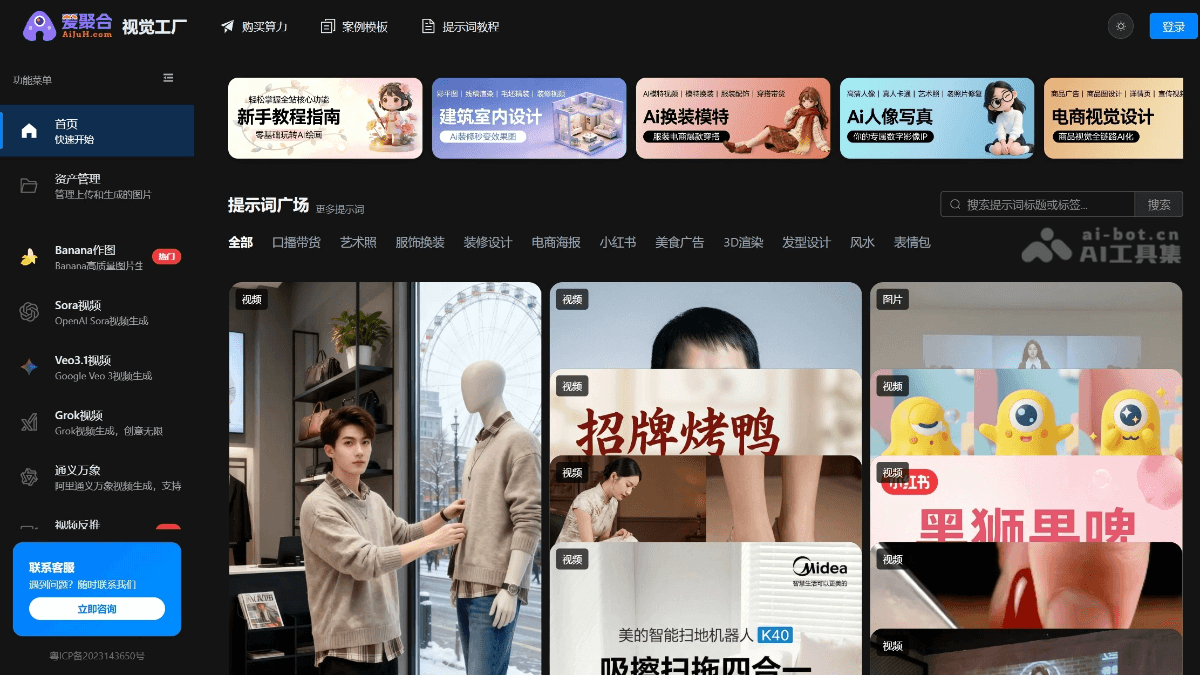
All prompts are used directly in Banana image generation. Upload the original clothing material (it can also be a fitting model photo), then copy the prompt below and paste it, choose 9:16 for continuous image generation.
Women's AI model outfit change
Prompt: E-commerce product display image, 8K ultra HD, commercial photography quality, soft high-end indoor lighting. Main elements: 1. Real model: young East Asian woman (long slightly curly hair, natural light makeup), wearing [uploaded image 1] (reference image weight 0.95, feature lock + detail threshold 98, artistic correction 0.1;), pose is side-facing gently touching hair, holding a phone for a selfie, relaxed and natural state. 2. Mannequin: 1:1 scale **complete white three-dimensional mannequin (with head + complete limbs + lower body)**, simultaneously wearing exactly the same outfit as the real model, standing on a **metal stand with a base** (the stand only shows the leg portion, the lower body is covered by the mannequin), located on the right side of the real model, pose is standard standing, completely consistent with the real model's clothing fit/details. Background scene: minimalist clothing studio background, the wall projects **"fashion show runway catwalk scene"**—the model walking in the image is **the same person as the main real model, and wearing exactly the same outfit** (the runway is light gray, the audience is blurred); on the left, a black clothing rack is partially visible (hanging clothes in the same color scheme), stone-textured countertop + Apple computer; on the right, a black beanbag sofa, the floor is light gray tile, the space is clean and transparent. Mandatory requirements: – The mannequin must be in "complete human form (including head, limbs, lower body)", and must not appear as "no head/only upper body/exposed metal rod"; – The runway model in the background projection = the main real model + the same outfit, with a completely consistent appearance and styling; – The real model faces the camera head-on throughout, with no side-facing/tilted angle, and the phone selfie naturally partially covers the front face; – Clothing details (texture, pattern, accessories) are 100% restored, and the clothing of the real model and the mannequin is completely identical; – The visual focus is concentrated on the clothing, the background is slightly blurred, conforming to the high-end aesthetic of e-commerce sales images.
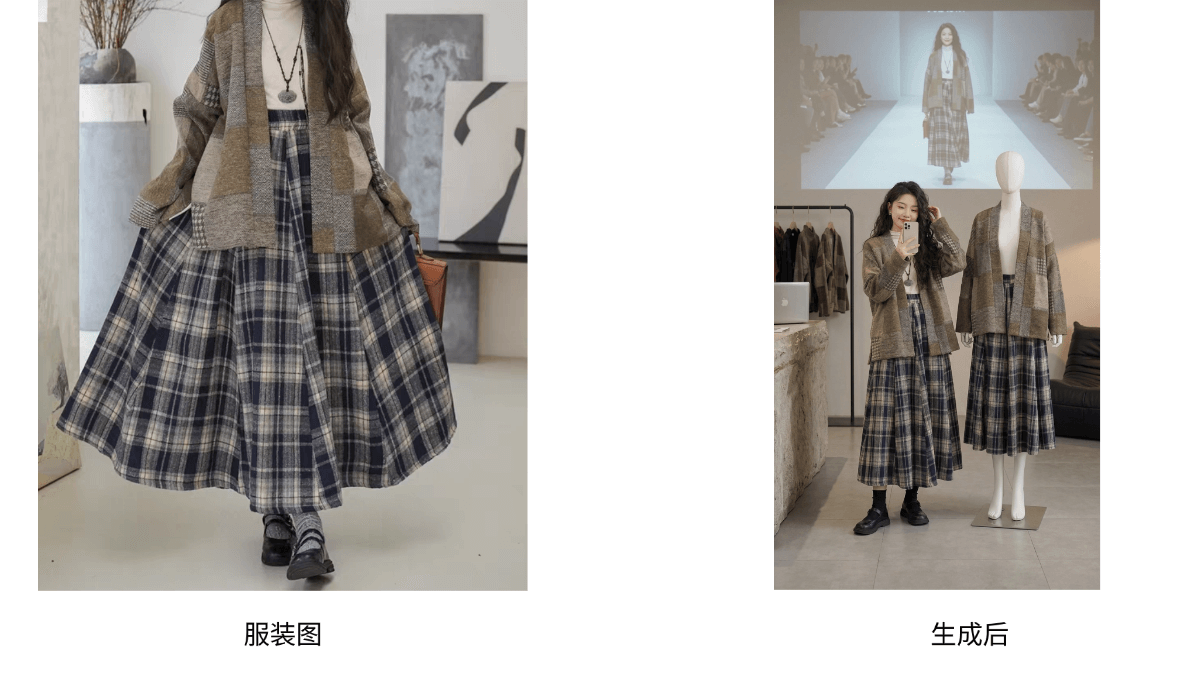
Prompt: E-commerce product display image, 8K ultra HD, commercial photography texture, soft high-end custom lighting (matching warm/cool tonality according to clothing style). Prioritize in-depth analysis of [Uploaded Image 1] core information: automatically identify clothing style (vintage/streetwear/commuter/sweet-cool/light luxury, etc.), silhouette design, color matching, material texture, and core elements, and use this as a basis to match a highly compatible scene and visual tonality; reference image weight 0.95, feature lock + detail threshold 98, artistic correction 0.1. Subject elements: Real model: young East Asian woman (long slightly wavy hair, natural light makeup), wearing the clothing from [Uploaded Image 1], infused with a slight pheromone feel — soft, expressive eyes, lips slightly pressed with a smile, pose facing the camera head-on while lightly touching her hair (hand movement relaxed and unforced), holding a phone to naturally cover her face, overall temperament balancing sweet and alluring, restrained yet attractive, state relaxed and natural. Mannequin: 1:1 scale complete white three-dimensional mannequin (including head + complete limbs + lower body), simultaneously wearing the exact same clothing as the real person, standing on a metal stand with a base (the stand only shows the leg portion, with the lower body covered by the mannequin), positioned to the right of the real person, in a standard standing pose, 100% consistent with the real person's clothing silhouette/details. Background scene: dynamically match the scene according to clothing style (replacing a single studio): If vintage style: pair with an old Shanghai alley/vintage cafe background, with the wall projecting a Republican-era style runway show image of the same model wearing the same clothing; If streetwear style: pair with an urban trendy brand street district/industrial-style warehouse background, with the wall projecting a street fashion show scene of the same model wearing the same clothing; If commuter style: pair with a light luxury office building workspace/high-end reception room background, with the wall projecting a business fashion week runway show image of the same model wearing the same clothing; If sweet-cool style: pair with a trendy toy concept store/neon street corner background, with the wall projecting a sweet-cool style show scene of the same model wearing the same clothing; General details: in the runway show image projected on the wall, the model is the main real model, the clothing is the same style (the runway color tone matches the scene style, the audience is blurred); on the left side place display props matching the clothing style (vintage style with wooden hangers + old-fashioned gramophone/streetwear style with metal hangers + trendy brand skateboard/commuter style with leather hangers + light luxury ornaments), stone-textured tabletop + Apple computer; on the right side place soft furnishings adapted to the scene (vintage style with velvet sofa/streetwear style with industrial-style iron chair/commuter style with leather single sofa); floor material matches the scene tonality (vintage style with solid wood flooring/streetwear style with concrete floor/commuter style with marble floor), the space is clean and transparent, and the background is slightly blurred to highlight the clothing. MandatoryRequirements: The mannequin must be a "complete human form (including head, limbs, lower body)", and must not appear as "headless/only upper body/metal rod exposed"; the runway model in the background projection = main real model + same clothing, with image and outfit completely consistent; the real model faces the camera head-on throughout, with no side angle/tilted angle, and the effect of holding a phone to cover the face is natural; clothing details (texture, pattern, accessories) are 100% restored, and the clothing of the real person and the mannequin are completely identical; the visual focus is concentrated on the clothing, the background is slightly blurred, conforming to the high-end aesthetic of e-commerce sales images; the overall visual style is highly unified with the clothing tonality of [Uploaded Image 1], the scene serves the clothing style, and does not depart from the clothing's own characteristics.
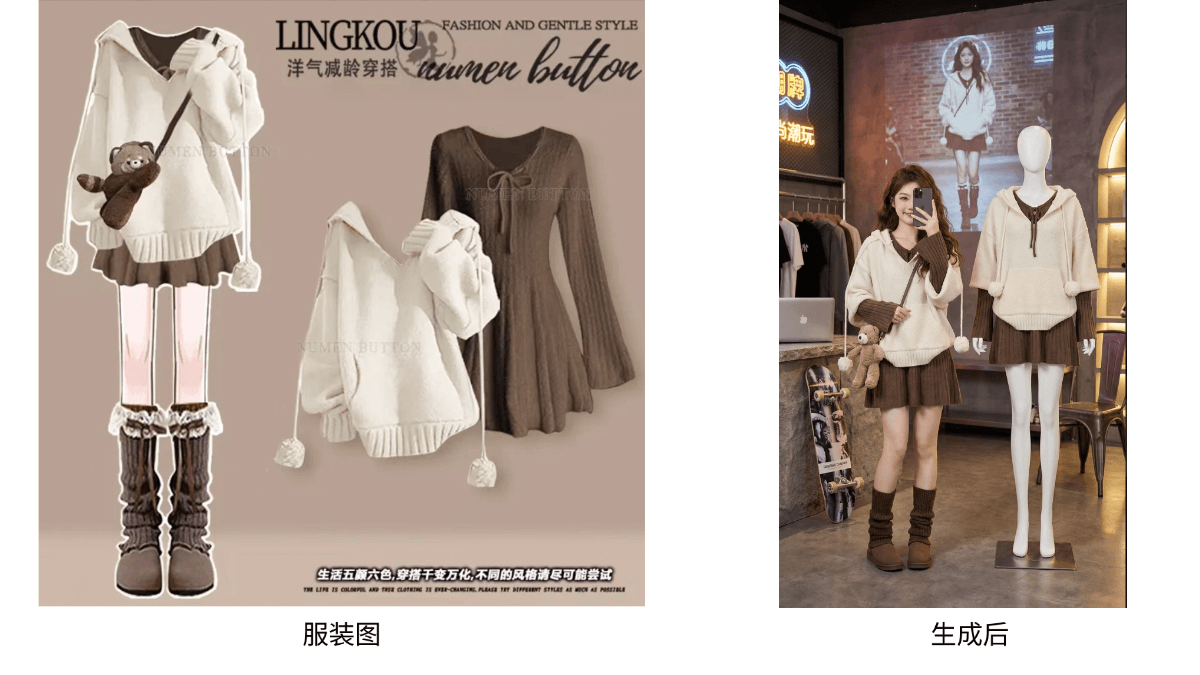
Male AI model outfit change
Banana-generated outfit-change AI models can use real-person portraits, such as your own employees or your own model image, divided into single finished images or multiple unfinished images, composited into a new AI real-person model.
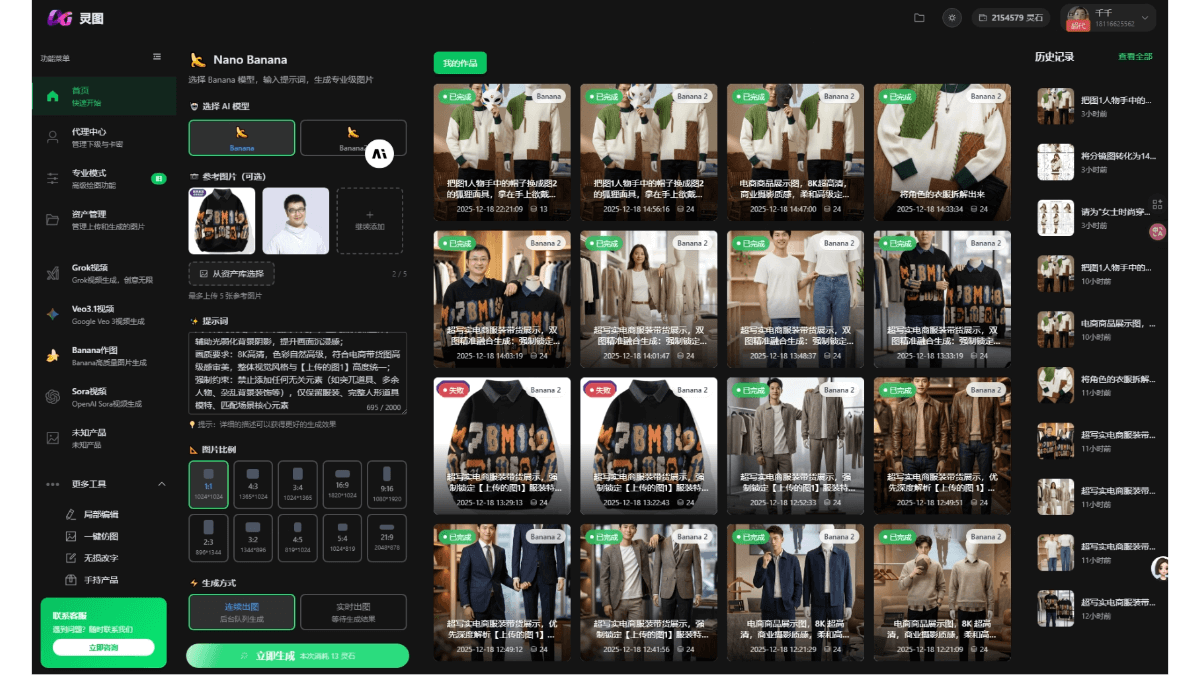
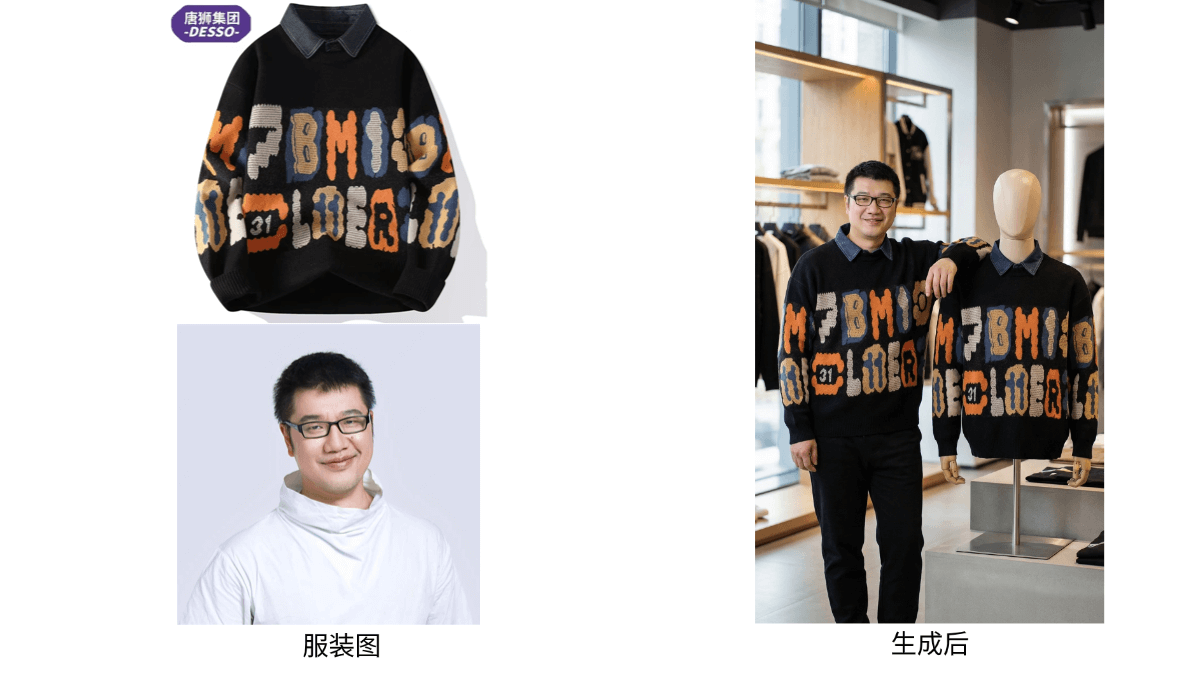
Ultra-realistic e-commerce clothing sales presentation, forcibly locking the clothing features of [Uploaded Image 1] (reference image weight 1.0, feature lock threshold 100%, artistic correction 0, AI autonomous clothing generation prohibited), the main character and the humanoid prop mannequin beside them **100% replicate the style, texture, pattern, and accessories of the clothing in the image**, with no deviation whatsoever; Main character settings: East Asian young male, **full body completely presented within a 9:16 frame**, facing the camera head-on throughout, no side angle/tilted angle, face clearly visible, natural and friendly expression (can be handsome/gentle, matching the clothing style), posture natural, relaxed, and not stiff (randomly generated: ① both hands lightly adjusting the collar/cuffs of the humanoid prop mannequin's matching clothing; ② standing naturally, elbows lightly resting on the humanoid prop mannequin's shoulders; ③ one hand supporting the humanoid prop mannequin's waistline, the other hand hanging naturally); Humanoid prop mannequin requirements: **complete and intact, with a head model, well-proportioned**, completely identical clothing to the main character, placed on the right side of the main character, **placed on a small display stand/staggered-height base, forming a natural height difference with the main character, with visual focus on the main character**; Scene and lighting: the scene strictly matches the clothing tone (daily casual style → minimalist streetwear store/commuter style → light luxury business store/winter style → retro warm-toned store/sports style → sports brand store/vacation style → island-style buyer's shop), **the scene construction has spatial depth (using staggered shelf heights, perspective relationships of doors and windows, and blurred foreground small props to enhance layering), the background uses progressive blur (foreground clear, midground soft, background hazy)**, highlighting the main character and clothing; commercial lighting adapted to clothing texture (casual style bright natural light/workplace style cool-toned premium light/winter style warm yellow soft light), the main light source focuses on the subject, auxiliary light weakens background shadows, enhancing the image's immersive feel; Image quality requirements: 8K high definition, natural and premium colors, conforming to the premium aesthetic of e-commerce sales images, the overall visual style highly unified with [Uploaded Image 1]; Mandatory constraints: prohibited from adding any irrelevant elements (such as abrupt props, extra people, cluttered background decorations, etc.), retaining only the clothing, the complete humanoid prop mannequin, and core elements of the matching scene
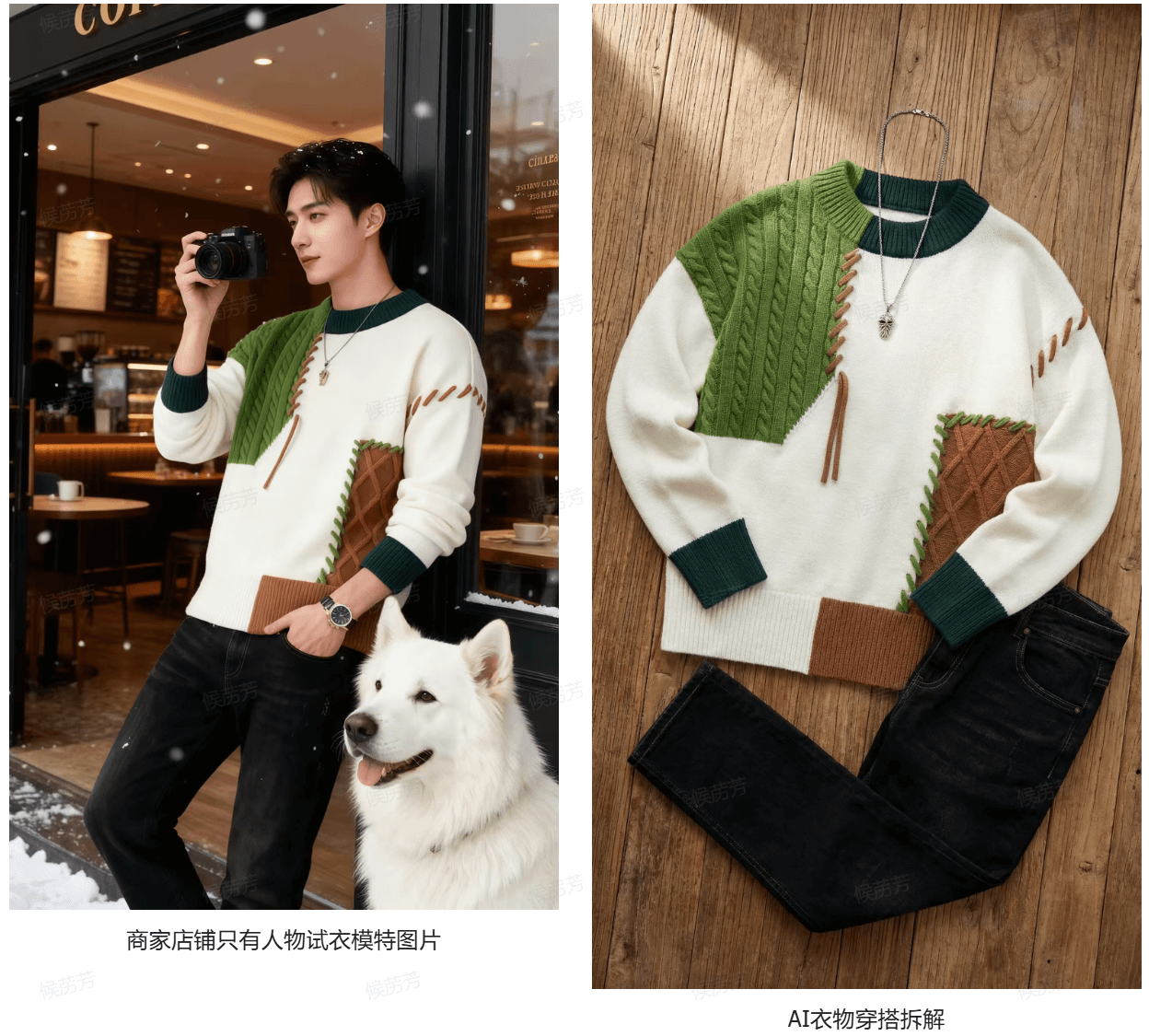
Break down the clothes
Prompt: Break down the character's clothes
02. VEO generates AI model videos
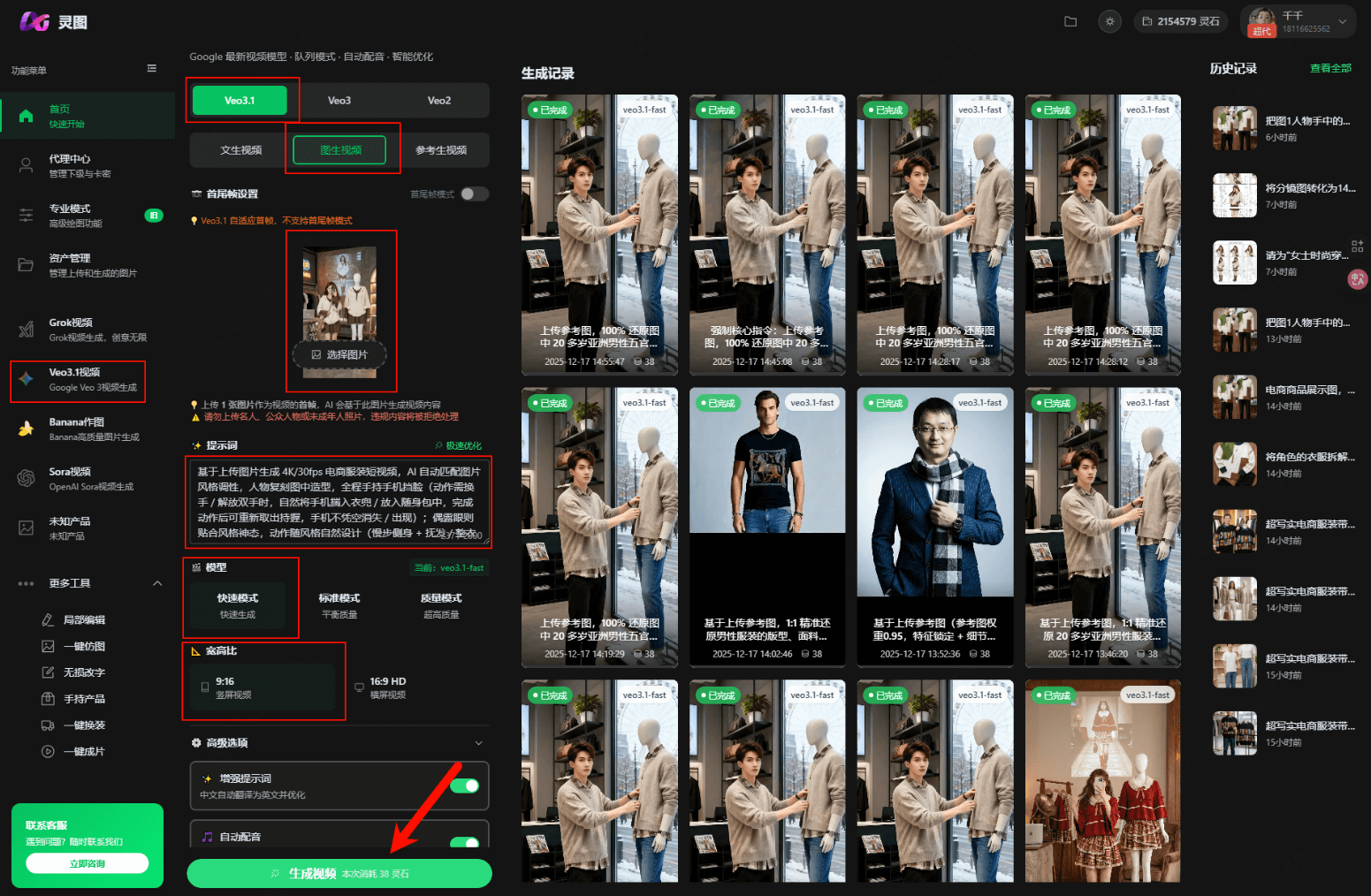
The core technique for realizing e-commerce AI marketing videos: the "core dynamic + static extension" material combination method, for example, how to plan and generate two sets of materials to achieve rapid finished videos with zero editing
-
Goal: Break through Veo's 8-second limit for a single video and efficiently generate a set of "semi-finished" video materials that can be directly spliced without frame-by-frame editing.
-
Core idea: We do not seek to generate a complex video with one long prompt; instead, like a director, we design the "shot breakdown" well, have AI generate them separately, and finally simply splice them in editing software.
-
Two sets of material design:
-
Core dynamic shot (0-8 seconds): used for the opening or transitions, attracting attention, and displaying the dynamic try-on effect.
-
Static extension shots (each 0-8 seconds): used for the main display, can generate multiple clips with different angles or shot sizes as the main content of the video
-
Planning key points: ensure that in all "static extension" shots, the model's pose, expression, and lighting environment are highly consistent, so that splicing does not appear abrupt.
Female AI model video
Plan A: Generate "core dynamic shot" + Plan B: Generate "static extension shots"
veo prompt - A: core dynamic shot (general version)
The woman holds a phone, completely covering her face; her eyes should not be too scary, and the eyes occasionally revealed should look attractive. She slowly steps forward and backward while turning left and right; her other hand naturally brushes her hair, makes a peace sign, and adjusts her clothes. Throughout, the details naturally showcase the entire outfit's fit and texture. The movements are unhurried and smooth, with a relaxed, generous, sweet, and cute posture. The shadow should track with the person, and the image should be realistic and high-definition.
veo prompt - B: Static extended shot (frozen photo)
Create an 8-second 8K ultra-HD fashion video, generated by Veo3, no audio, no watermark. –style "AI matches the style of the uploaded material, pure static candid photography texture" –character "Reference the image in the uploaded material, enhance sweetness and cuteness (round eyes / energetic smile / soft features)" –motion "0-8 seconds entirely pure static shutter freeze (no body / prop / scene micro-movements)" –detail "ultra-fine textures, full-frame clarity, freeze without hair strand / fabric dynamics, no outlines / effects" –color "AI matches the material color palette, soft facial lighting to enhance sweetness" –duration "8.0" –transitions "0-8 seconds, 8 groups of full-frame freezes (1 second each), 0.1-second random quick transitions (move left / squeeze left)" –shot-type "full-frame full-body throughout, close-ups prohibited" –shutter-effect "shutter candid static freeze" –static-poses-scene "8 groups of frozen poses + scene adaptations: Front natural standing pose (with a simple solid-color background wall, highlighting the overall silhouette of the clothing, suitable for minimalist / professional style, subject centered in a full-body display); 45° side standing pose (beside a stylized floor clothes rack, with accessories of the same style hanging on the rack, suitable for casual / retro style, highlighting the side tailoring of the clothing); 90° profile standing pose (beside a minimalist side table / decorative objects, with stylized small items on the side table: knitted pillows for a cozy style, brass candlesticks for a retro style, suitable for cozy / industrial style, showing the drape of the clothing); Front slight side pose (beside core props, such as a coffee cup / briefcase placed on the table, props echoing the style: coffee cup for casual style, briefcase for professional style, enhancing scene immersion); 45° front standing pose (with blank background in the corner of the scene, background left empty to highlight the person, suitable for street photography / casual style, creating a sense of space); Front standing pose (in front of a main visual background, such as a bay window / floor-to-ceiling window; bay window covered with a blanket in the same color scheme (cozy style), minimalist office chair beside the floor-to-ceiling window (professional style), suitable for cozy / professional style, natural light outlining the texture of the clothing); Half-side leaning pose (beside a retro sofa / iron shelving unit, body half-side leaning against static furniture, one hand lightly resting on the backrest / edge of the shelving unit, retro books beside the sofa / green plants on the iron rack, suitable for retro / industrial style); Front crossed-hands standing pose (with an industrial-style metal door frame / home entryway background, arms naturally crossed at the abdomen, suitable for professional / minimalist style, highlighting the clothing's crisp / gentle texture)" –props-scene "props / scene static throughout, placed according to the stylingbut without motion, not blocking the person / clothing, scene details matching the clothing style" –clothing-auto-optimize "restore the uploaded clothing for full display" –no-effects "remove outlines / highlight bands / redundant effects"
Take a look at the final effect:
Male AI model video
Plan A: Generate "core dynamic shot" + "outdoor scenes" + Plan B: Generate "static extended shot"
veo prompt - A: Core dynamic shot (general version)
Based on the uploaded reference image, automatically identify the clothing fit / fabric / style, restore the subject 1:1, autonomously match suitable accessories, handheld small items, and immersive scenes, and generate an 8-second high-quality outfit display video; the shots are designed around clothing details, with natural camera movement, lighting and shadow matching the tone of the reference image, cinematic quality, 24fps, 1080p, with soft ambient sound effects.
veo prompt - A: Outdoor outing scenes (general version)
Based on the uploaded reference image, 1:1 accurately reproduce the fit, fabric texture, color saturation, and details of the clothing on an Asian male in his 20s; AI autonomously matches style-compatible accessories, bags, and handheld small items, generating an 8-second premium-feel outfit display video.
Core requirements
Random combination: AI autonomously selects scenes such as urban streets / artistic districts / retro cafes, randomly invokes the following shots with no fixed chronological order, naturally transitions within 8 seconds, and each generation's shot and scene combination is non-repeating:
Full-body dynamic shot: The person walks / turns, handheld-style tracking from the side-rear, showing outfit proportions, trouser hem sway, and the arc of the bag swinging.
Upper-body close-up shot: Standing still in front of a minimalist background, smiling and looking directly at the camera or fiddling with a small item, focusing on the collar, accessories, and fabric details.
Dynamic candid shot: When walking down steps / a slope, playfully looking back at the camera, with a panning shot capturing the clothing's movement and the bag swinging.
Light-and-shadow texture shot: Standing under dappled tree shade / architectural light and shadow and posing naturally, shot from a low angle to outline fabric texture and accessory details.
Scene-integration shot: Walking through a stylized scene, with a tracking full shot showing the compatibility between the outfit and the scene.
Freeze-frame ending shot: Looking up, smiling, and looking directly at the camera, the camera slowly pulls back, with a full shot freezing the complete look.
Detail priority: Highlight the clothing fabric's sheen, the trouser hem's drape, and shoe details; accessories should not overpower the main subject, and the person's micro-expressions should be natural and vivid.
Visual specifications: Cinematic texture, 1080p/24fps, precise depth of field, lighting and shadow matching the atmosphere of the reference image, paired with soft ambient sound effects.
Core instruction: Prioritize ensuring zero deviation in clothing details, with immersive outfit display as the core; randomly combine shots and scenes, and submit multiple times to generate different versions of the video.
veo prompt - B: Static extended shots (freeze-frame photos)
Upload a reference image, 100% reproduce the facial features, hairstyle, physique, and full outfit of the Asian male in his 20s in the image, automatically match style-fitting items (camera / phone / bracelet / cultural plaything, randomly 1-2 pieces); force no dynamic elements whatsoever (the person does not move, the background does not move, light and shadow do not change), generate 8 purely static atmospheric fashion portraits, using **"clothing detail close-up切入" creative transitions** (each image stays 1-2 seconds, transition 0.2 seconds, total duration adapted to an 8-second video, 1 frame/second, 1080p): during transitions, first zoom in on the previous image's clothing highlight (knit texture / trouser silhouette lines / accessory texture), then flash-cut to the next complete portrait, with a tight and eye-catching rhythm, reinforcing the clothing's selling points; each generation has random shot order + variable options, with multiple versions non-repeating; no text and no sound effects, warm-toned soft natural light + low-saturation premium color palette, highlighting clothing texture and the wearing effect, high-definition hyper-realistic magazine blockbuster texture, stimulating purchase desire.
Shot variable, choose 1 of 2:
Side-body standing portrait poster, holding coffee | poster [black-and-white / collage], lighting [soft left / soft right]
Autumn under a tree holding an object close-up | leaves [ginkgo / maple], object [phone / camera]
In front of a concrete wall, smiling and holding a cup | wall surface [lightly mottled / heavily worn], smile [slight smile / closed-lip smile]
Looking back on stone steps | stone steps [with moss / dry], angle [45°/60°]
Park stone bench, chin resting on hand | stone bench [granite / marble], light spots [round / starburst]
Back turned, walking toward a glass curtain wall | reflection [blue sky / tall buildings], ground [marble / asphalt]
Facial close-up touching a cup | lip state [glossy / matte], background [cool gray / light blue]
Shooting upward under the tree canopy | Branches and leaves [dense / sparse], eyes [slightly closed / gently open]
Come see the final result; the scene cuts, and the transitions between before, after, and the front street are quite natural.
03. Some Sharing
The "static-to-motion" combo of Banana + Veo lets apparel e-commerce completely say goodbye to expensive models and tedious studio shoots: one flat-lay image → AI model → 9:16 dynamic blockbuster, done in ten minutes, for less than the cost of a cup of milk tea.
The 8K prompts, weight parameters, and scene formulas given in the tutorial can be copied and run directly to produce commercial-grade quality, truly achieving "anyone can shoot, zero-based beginners can get started."
Hurry and open Banana to upload your first piece of clothing, and use Veo to make it move; the next viral sales video will be yours!
Don't forget to come back and submit your homework, and together let's push AI outfit styling to new heights.
Visual Factory has even more practical ways to play, waiting for you to unlock together.
Official Website:https://d.aijuh.com/