
FLUX.2The Prompting Guide is an official FLUX.2 usage guide launched by Black Forest Labs. It mainly introduces how to generate high-quality images and designs through structured JSON prompts, precise hexadecimal color control, and multi-reference image editing techniques. The guide explains in detail the basic structure of JSON prompts, the method of building prompts step by step, techniques for using hexadecimal color codes, methods for generating infographics and data visualizations, the advantages of multilingual prompts, methods for creating comic strips and sequential art, the realization of realistic styles, and the powerful capabilities of multi-reference image editing. The guide provides a summary of best practices and a quick reference table to help users better master FLUX.2 usage techniques.
Master FLUX.2 prompting techniques, including mastering structured JSON, hexadecimal colors, and multi-reference image techniques
FLUX.2 has excellent instruction-following capabilities, supporting advanced techniques such as structured JSON prompts, precise hexadecimal color control, and multi-reference image editing. This guide will fully explain these core features to help you create stunning visual works.
Negative prompts are not supported: FLUX.2 does not support negative prompts.Please focus on describing what you want in the image, not what you do not want.
JSON Structured Prompting
FLUX.2 excels at parsing structured JSON instructions, allowing you to precisely control every aspect of an image. This is especially important for production workflows and automation.
Basic SchemaBuild Prompts Step by Step
{
    "scene": "overall scene description",
    "subjects": [
        {
            "description": "detailed subject description",
            "position": "where in frame",
            "action": "what they're doing"
        }
    ],
    "style": "artistic style",
    "color_palette": ["#hex1", "#hex2", "#hex3"],
    "lighting": "lighting description",
    "mood": "emotional tone",
    "background": "background details",
    "composition": "framing and layout",
    "camera": {
        "angle": "camera angle",
        "lens": "lens type",
        "depth_of_field": "focus behavior"
    }
}

{
    "scene": "整体场景描述",
    "subjects": [
        {
            "description": "详细主体描述",
            "position": "在画面中的位置",
            "action": "他们正在做什么"
        }
    ],
    "style": "艺术风格",
    "color_palette": ["#hex1", "#hex2", "#hex3"],
    "lighting": "灯光描述",
    "mood": "情感基调",
    "background": "背景细节",
    "composition": "构图和布局",
    "camera": {
        "angle": "相机角度",
        "lens": "镜头类型",
        "depth_of_field": "焦点行为"
    }
}
Let's build a product image step by step and see how each element works.
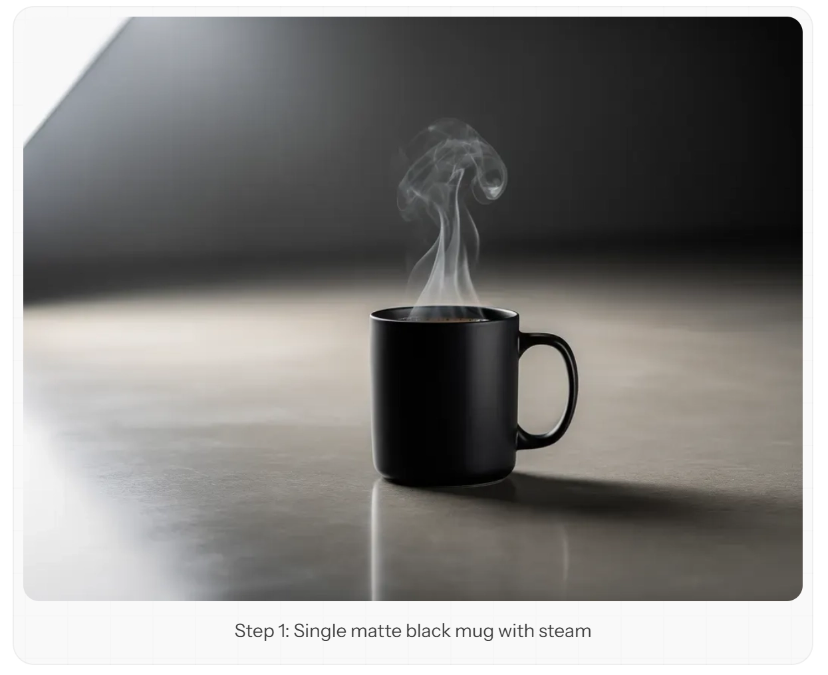
Step 1: Generate a Coffee Cup
{
    "scene": "Professional studio product photography setup with polished concrete surface",
    "subjects": [
        {
            "description": "Minimalist ceramic coffee mug with steam rising from hot coffee inside",
            "pose": "Stationary on surface",
            "position": "Center foreground on polished concrete surface",
            "color_palette": ["matte black ceramic"]
        }
    ],
    "style": "Ultra-realistic product photography with commercial quality",
    "color_palette": ["matte black", "concrete gray", "soft white highlights"],
    "lighting": "Three-point softbox setup creating soft, diffused highlights with no harsh shadows",
    "mood": "Clean, professional, minimalist",
    "background": "Polished concrete surface with studio backdrop",
    "composition": "rule of thirds",
    "camera": {
        "angle": "high angle",
        "distance": "medium shot",
        "focus": "Sharp focus on steam rising from coffee and mug details",
        "lens-mm": 85,
        "f-number": "f/5.6",
        "ISO": 200
    }
}

{
    "scene": "专业工作室产品摄影设置,带有抛光混凝土表面",
    "subjects": [
        {
            "description": "极简主义陶瓷咖啡杯,杯内热咖啡中升起的蒸汽",
            "pose": "静止于表面",
            "position": "位于抛光混凝土表面的中心前景",
            "color_palette": ["哑光黑色陶瓷"]
        }
    ],
    "style": "具有商业品质的超逼真产品摄影",
    "color_palette": ["哑光黑色", "混凝土灰色", "柔和白色高光"],
    "lighting": "三点式柔光箱布光,营造柔和、弥散的高光,无强烈阴影",
    "mood": "干净、专业、极简",
    "background": "带有工作室背景的抛光混凝土表面",
    "composition": "采用三分法构图",
    "camera": {
        "angle": "高角度",
        "distance": "中焦距",
        "focus": "对焦于咖啡上升的蒸汽以及咖啡杯的细节",
        "lens-mm": 85,
        "f-number": "f/5.6",
        "ISO": 200
    }
}
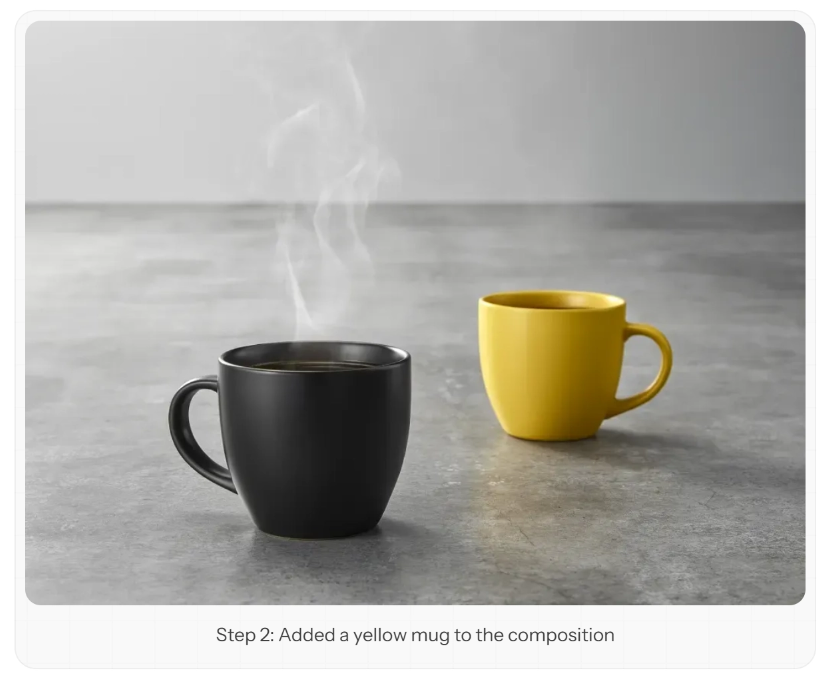
Step 2: Add a Second Mug in a Different Color
{
    "scene": "Professional studio product photography setup with polished concrete surface",
    "subjects": [
        {
            "description": "Minimalist ceramic coffee mug with steam rising from hot coffee inside",
            "pose": "Stationary on surface",
            "position": "Center foreground on polished concrete surface",
            "color_palette": ["matte black ceramic"]
        },
        {
            "description": "Minimalist ceramic coffee mug, matching design to the black mug",
            "pose": "Stationary on surface",
            "position": "Right side of the black mug on polished concrete surface",
            "color_palette": ["matte yellow ceramic"]
        }
    ],
    "style": "Ultra-realistic product photography with commercial quality",
    "color_palette": ["matte black", "matte yellow", "concrete gray", "soft white highlights"],
    "lighting": "Three-point softbox setup creating soft, diffused highlights with no harsh shadows",
    "mood": "Clean, professional, minimalist",
    "background": "Polished concrete surface with studio backdrop",
    "composition": "rule of thirds",
    "camera": {
        "angle": "high angle",
        "distance": "medium shot",
        "focus": "Sharp focus on steam rising from coffee and both mugs in frame",
        "lens-mm": 85,
        "f-number": "f/5.6",
        "ISO": 200
    }
}

{
    "scene": "专业工作室产品摄影设置,带有抛光混凝土表面",
    "subjects": [
        {
            "description": "极简主义陶瓷咖啡杯,杯内热咖啡中升起的蒸汽",
            "pose": "静止于表面",
            "position": "位于抛光混凝土表面的中心前景",
            "color_palette": ["哑光黑色陶瓷"]
        },
        {
            "description": "与黑色咖啡杯设计相匹配的极简主义陶瓷咖啡杯",
            "pose": "静止于表面",
            "position": "位于黑色咖啡杯右侧的抛光混凝土表面",
            "color_palette": ["哑光黄色陶瓷"]
        }
    ],
    "style": "具有商业品质的超逼真产品摄影",
    "color_palette": ["哑光黑色", "哑光黄色", "混凝土灰色", "柔和白色高光"],
    "lighting": "三点式柔光箱布光,营造柔和、弥散的高光,无强烈阴影",
    "mood": "干净、专业、极简",
    "background": "带有工作室背景的抛光混凝土表面",
    "composition": "采用三分法构图",
    "camera": {
        "angle": "高角度",
        "distance": "中焦距",
        "focus": "对焦于咖啡上升的蒸汽以及画面中的两个咖啡杯",
        "lens-mm": 85,
        "f-number": "f/5.6",
        "ISO": 200
    }
}
Step 3: Change the Color of the Steam
{
    "scene": "Professional studio product photography setup with polished concrete surface",
    "subjects": [
        {
            "description": "Minimalist ceramic coffee mug with bright red steam rising from hot coffee inside",
            "pose": "Stationary on surface",
            "position": "Center foreground on polished concrete surface",
            "color_palette": ["matte black ceramic", "bright red steam"]
        },
        {
            "description": "Minimalist ceramic coffee mug, matching design to the black mug",
            "pose": "Stationary on surface",
            "position": "Right side of the black mug on polished concrete surface",
            "color_palette": ["matte yellow ceramic"]
        }
    ],
    "style": "Ultra-realistic product photography with commercial quality",
    "color_palette": ["matte black", "matte yellow", "bright red", "concrete gray", "soft white highlights"],
    "lighting": "Three-point softbox setup creating soft, diffused highlights with no harsh shadows",
    "mood": "Clean, professional, minimalist",
    "background": "Polished concrete surface with studio backdrop",
    "composition": "rule of thirds",
    "camera": {
        "angle": "high angle",
        "distance": "medium shot",
        "focus": "Sharp focus on steam rising from coffee and both mugs in frame",
        "lens-mm": 85,
        "f-number": "f/5.6",
        "ISO": 200
    }
}

{
    "scene": "专业工作室产品摄影设置,带有抛光混凝土表面",
    "subjects": [
        {
            "description": "极简主义陶瓷咖啡杯,杯内热咖啡中升起明亮的红色蒸汽",
            "pose": "静止于表面",
            "position": "位于抛光混凝土表面的中心前景",
            "color_palette": ["哑光黑色陶瓷", "明亮红色蒸汽"]
        },
        {
            "description": "与黑色咖啡杯设计相匹配的极简主义陶瓷咖啡杯",
            "pose": "静止于表面",
            "position": "位于黑色咖啡杯右侧的抛光混凝土表面",
            "color_palette": ["哑光黄色陶瓷"]
        }
    ],
    "style": "具有商业品质的超逼真产品摄影",
    "color_palette": ["哑光黑色", "哑光黄色", "明亮红色", "混凝土灰色", "柔和白色高光"],
    "lighting": "三点式柔光箱布光,营造柔和、弥散的高光,无强烈阴影",
    "mood": "干净、专业、极简",
    "background": "带有工作室背景的抛光混凝土表面",
    "composition": "采用三分法构图",
    "camera": {
        "angle": "高角度",
        "distance": "中焦距",
        "focus": "对焦于咖啡上升的蒸汽以及画面中的两个咖啡杯",
        "lens-mm": 85,
        "f-number": "f/5.6",
        "ISO": 200
    }
}
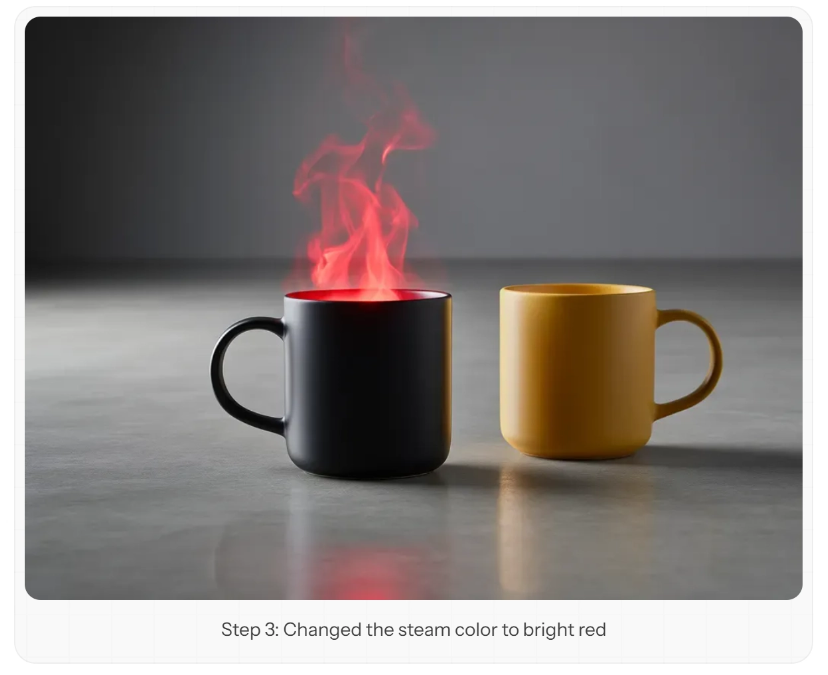
You can include JSON data directly in the prompt, or convert it into natural language. FLUX.2 supports both formats.
Hexadecimal Color Code Prompting
FLUX.2 supports precise color matching using hexadecimal codes. This is crucial for brand consistency and design work.
Basic Syntax
Use keywords such as "color" or "hex", followed by the code, to indicate a hexadecimal color:
The vase has color #02eb3c
The background is hex #1a1a2e
花瓶的颜色是: #02eb3c
背景的颜色是: #1a1a2e
Gradient Colors
Apply a gradient by specifying a starting color and an ending color:
Prompt: “A vase on a table in living room, the color of the vase is a gradient, starting with color #02eb3c and finishing with color #edfa3c. The flowers inside the vase have the color #ff0088” "There is a vase on the living room table. The vase is a gradient color, starting from #02eb3c and ending at #edfa3c. The flowers in the vase are #ff0088."
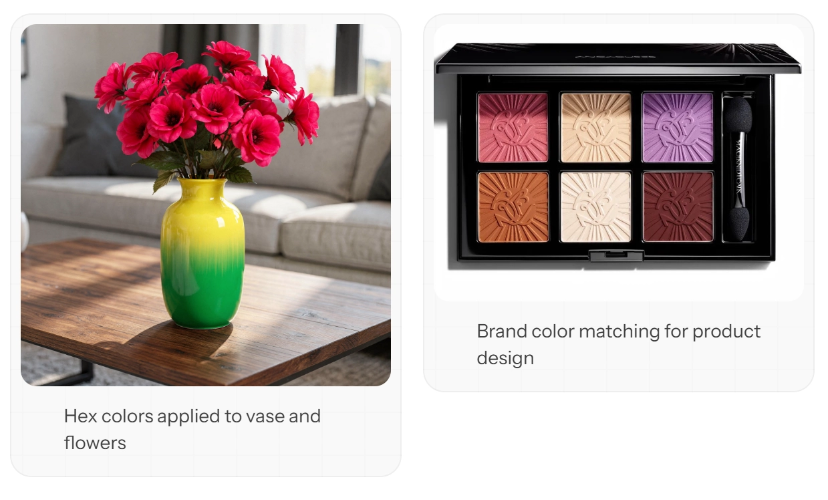
Colors in JSON Prompts
Combine hexadecimal colors with structured prompts for maximum control:
{
    "scene": "Makeup flat lay on marble surface",
    "subjects": [
        {
            "description": "eyeshadow palette",
            "colors": ["#E91E63", "#9C27B0", "#673AB7", "#3F51B5"]
        }
    ],
    "style": "beauty product photography",
    "lighting": "soft diffused overhead lighting"
}

{
    "scene": "大理石表面上的美妆平铺展示",
    "subjects": [
        {
            "description": "眼影盘",
            "colors": ["#E91E63", "#9C27B0", "#673AB7", "#3F51B5"]
        }
    ],
    "style": "美妆产品摄影",
    "lighting": "柔和的漫射顶光"
}
Hexadecimal codes work best when explicitly associated with a specific object. Vague descriptions such as "use #FF0000 somewhere" may lead to inconsistent results.
Infographics and Data Visualization
FLUX.2 can generate charts with clear typography and well-structured layouts.
Infographic Template
{
    "type": "infographic",
    "title": "Your Main Title",
    "subtitle": "Supporting context",
    "sections": [
        {
            "heading": "Section 1",
            "content": "Key information",
            "visual": "icon or chart type"
        }
    ],
    "color_scheme": ["#primary", "#secondary", "#accent"],
    "style": "modern, clean, corporate"
}

{
    "type": "信息图",
    "title": "主标题",
    "subtitle": "辅助说明",
    "sections": [
        {
            "heading": "第一部分",
            "content": "关键信息",
            "visual": "图标或图表类型"
        }
    ],
    "color_scheme": ["#主色", "#辅助色", "#强调色"],
    "style": "现代、简洁、商务"
}
Prompt example:
"Create a vertical infographic about coffee consumption worldwide. Title: 'Global Coffee Culture'. Include 3 sections with statistics, use icons for each country, color scheme #4A2C2A (brown) and #F5E6D3 (cream). Modern minimalist style with clean typography." "Create a vertical infographic about global coffee consumption. Title: 'Global Coffee Culture'. Include three sections, each displaying statistics, use an icon for each country, color scheme #4A2C2A (brown) and #F5E6D3 (beige). Adopt a modern minimalist style with clean typography."
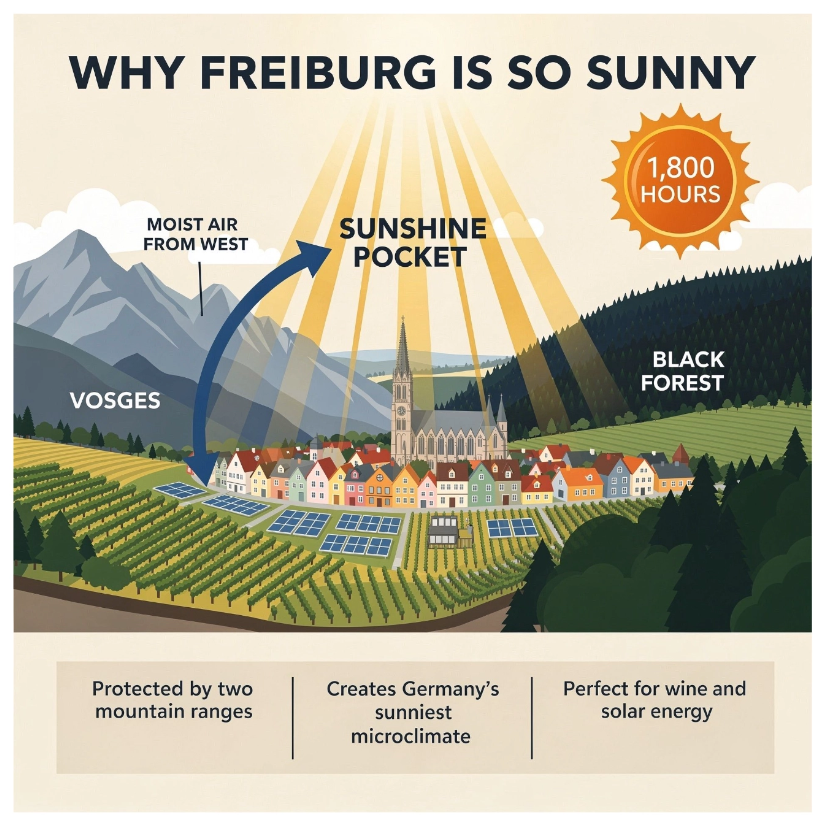
Typography and Design
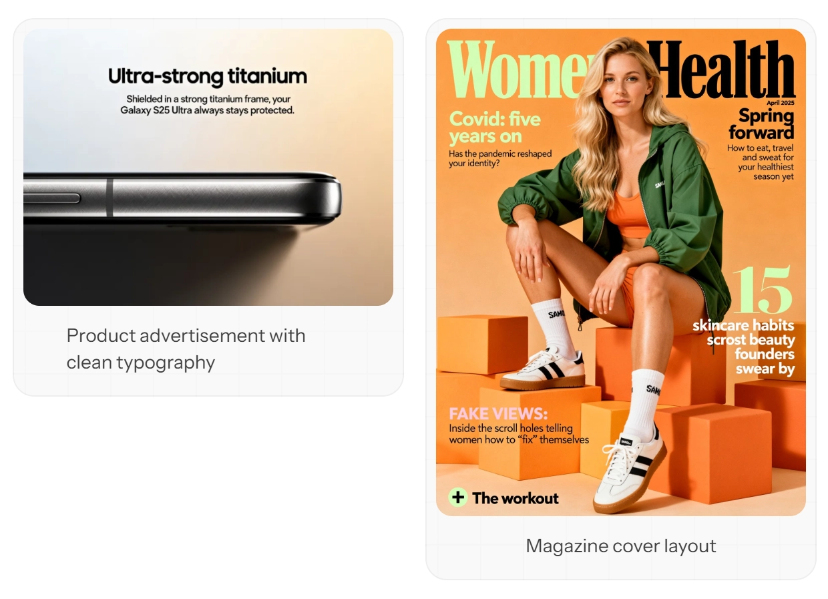
FLUX.2 excels at generating clean typography, product marketing materials, and magazine layouts.
Product Advertisement: "Samsung Galaxy S25 Ultra product advertisement, 'Ultra-strong titanium' headline, 'Shielded in a strong titanium frame, your Galaxy S25 Ultra always stays protected' subtext, close-up of phone edge showing titanium frame, dark gradient background, clean minimalist tech aesthetic, professional product photography" "Samsung Galaxy S25 Ultra product advertisement, headline 'Ultra-strong titanium', subheadline 'A sturdy titanium frame keeps your Galaxy S25 Ultra protected at all times', close-up of the phone edge showing the titanium frame, dark gradient background, clean minimalist tech aesthetic, professional product photography"
Magazine Cover: "Women's Health magazine cover, April 2025 issue, 'Spring forward' headline, woman in green outfit sitting on orange blocks, white sneakers, 'Covid: five years on' feature text, '15 skincare habits' callout, professional editorial photography, magazine layout with multiple text elements" "Women's Health magazine cover, April 2025 issue, headline 'Spring Returns', a woman in a green outfit sitting on orange blocks, wearing white sneakers, feature article 'COVID-19: Five Years Later', callout '15 Skincare Habits', professional editorial photography, magazine layout containing multiple text elements"
Multilingual Prompting
FLUX.2 has excellent multilingual understanding. You can prompt in your native language to get more culturally authentic results.
French: “Un marché alimentaire dans la campagne normande, des marchands vendent divers légumes, fruits. Lever de soleil, temps un peu brumeux”
Thai: “ตลาดอาหารเช้าในชนบทใกล้กรุงเทพฯ พ่อค้าแม่ค้ากำลังขายผักและผลไม้นานาชนิด บรรยากาศยามพระอาทิตย์ขึ้น มีหมอกจาง ๆ ปกคลุม สงบและอบอุ่น”
Korean: “서울 도심의 옥상 정원, 저녁 노을이 지는 하늘 아래에서 사람들이 작은 등불을 켜고 있다. 화려한 네온사인이 멀리 반짝이고, 정원에는 다양한 꽃들이 피어 있다. 분위기는 따뜻하고 낭만적이다
Chinese: "At a food market in the Normandy countryside, vendors are selling various vegetables and fruits. At sunrise, the weather is a bit foggy."
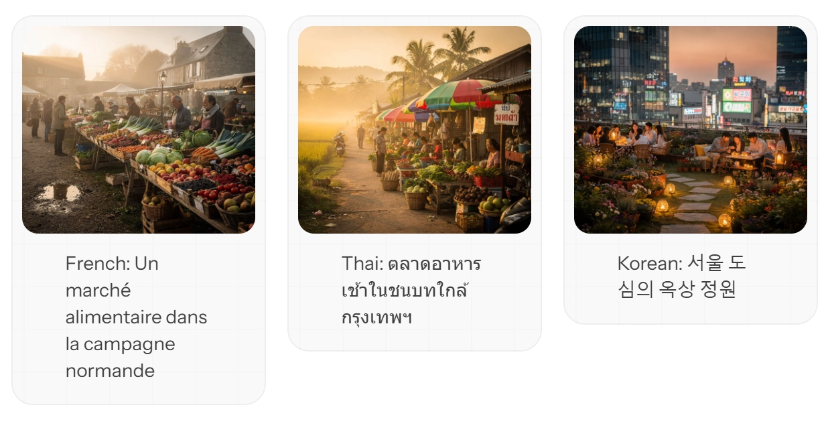
Prompting in the native language of the content you are creating often produces more culturally authentic results—local markets, architecture, and atmosphere can be presented more accurately.
Comics and Comic Strips
Create comic panels with a consistent style and coherent character depictions. The key is to meticulously depict the characters and maintain character consistency across all panels.
The Spreader's Story
Generate each panel separately while keeping the character description consistent:
Panel One Prompt: Crisis
Style: Classic superhero comic Character: Worried scientist frantically typing on glowing holographic keyboard, face illuminated by blue light showing deep concern Setting: Massive computer server room with sparking circuits and red warning lights flashing on monitors Text: ‘The AI models are corrupting! We need Diffusion Man!’ Mood: Tense, urgent + dramatic blue and red tones
Panel two prompt: transformation
“Style: Classic superhero comic with dynamic action lines and electric energy effects Character: Diffusion Man/Mild-mannered programmer (30 years old, brown skin tone, short natural fade haircut with black hair, black-framed glasses, light blue button-up shirt, athletic build, strong jawline) body begins to glow with swirling gradients of deep purple, electric blue, and hot pink energy, mathematical equations and neural network patterns flowing around him in glowing lines Setting: Small office with computer monitors displaying code and error messages Text: ‘When noise becomes signal, I am… DIFFUSION MAN!’ Mood: Powerful, transformative + dramatic backlighting and energy radiating outward in wavesdramatic backlighting and energy radiating outward in waves.
Panel three prompt: battle
“Style: Classic superhero comic with explosive action and dynamic composition Character: Diffusion Man (athletic 30-year-old with brown skin tone and short natural fade haircut with black hair, wearing sleek bodysuit with gradient patterns from deep purple to electric blue to hot pink, glowing neural network emblem on chest with interconnected nodes, short gradient cape, purple half-mask showing strong jawline and confident expression) extends both hands forward in powerful stance, shooting beams of structured noise and latent space energy at corrupted digital monsters made of glitching pixels and broken code Setting: Digital cyberspace environment with floating data cubes and cascading binary code Text: ‘Time to DENOISE this chaos!’ Mood: Intense, action-packed + bright energy flashes and electric effects”Style: Classic superhero comic style, explosive action, dynamic composition. Character: Diffusion Man (an athletic man around 30, dark skin, short natural fade haircut, black hair, wearing a sleek bodysuit withThere is a gradient pattern from deep purple to electric blue to bright pink, with a glowing neural network logo printed on the chest, nodes interconnected, wearing a short gradient cape, and a purple half-mask outlining a sharply defined jawline and a confident expression). His arms are stretched forward in a powerful pose, firing beams of structured noise and latent space energy at a corrupted digital monster made of glitch pixels and broken code. Scene: a digital cyberspace environment, with floating data cubes and cascading binary code. Text: "It's time to eliminate this chaotic noise!" Mood: tense and thrilling, with explosive action, accompanied by dazzling energy flashes and electric effects.
Panel four prompt: Victory
"Style: Classic superhero comic with warm, triumphant colors and clean composition Character: Diffusion Man (athletic 30-year-old with brown skin tone and short natural fade haircut with black hair, wearing sleek gradient bodysuit from deep purple to electric blue to hot pink, glowing neural network emblem on chest, short gradient cape flowing behind him, purple half-mask, strong jawline, confident heroic smile) stands heroically giving thumbs up gesture to grateful scientist beside him, her computer screens now showing stable green indicators and success messages Setting: Calm server room with soft blue ambient lighting and orderly data streams flowing smoothly in organized patterns Text: 'You saved us, Diffusion Man! The models are generating perfectly again!' Mood: Victorious, hopeful + golden sunset-like tones streaming through windows" Style: classic superhero comic style, with warm colors full of triumph and clean composition. Character: Diffusion Man (an athletic man around 30 years oldwith brown skin, a short black gradient hairstyle, wearing a tight suit with a gradient from deep purple, electric blue, and bright pink, with a glowing neural network logo printed on the chest, draped in a short gradient cape, wearing a purple half-mask, with sharply defined jawline, and a confident heroic smile on his face). He stands heroically, giving a thumbs-up to the grateful scientist beside him, whose computer screen shows stable green indicator lights and a success message. Scene: a tranquil server room, with soft blue ambient lighting and orderly data streams flowing smoothly. Text: "You saved us, Diffusion Man! The model is generating perfectly again!" Mood: triumphant joy, full of hope, with golden sunset afterglow streaming in through the window.
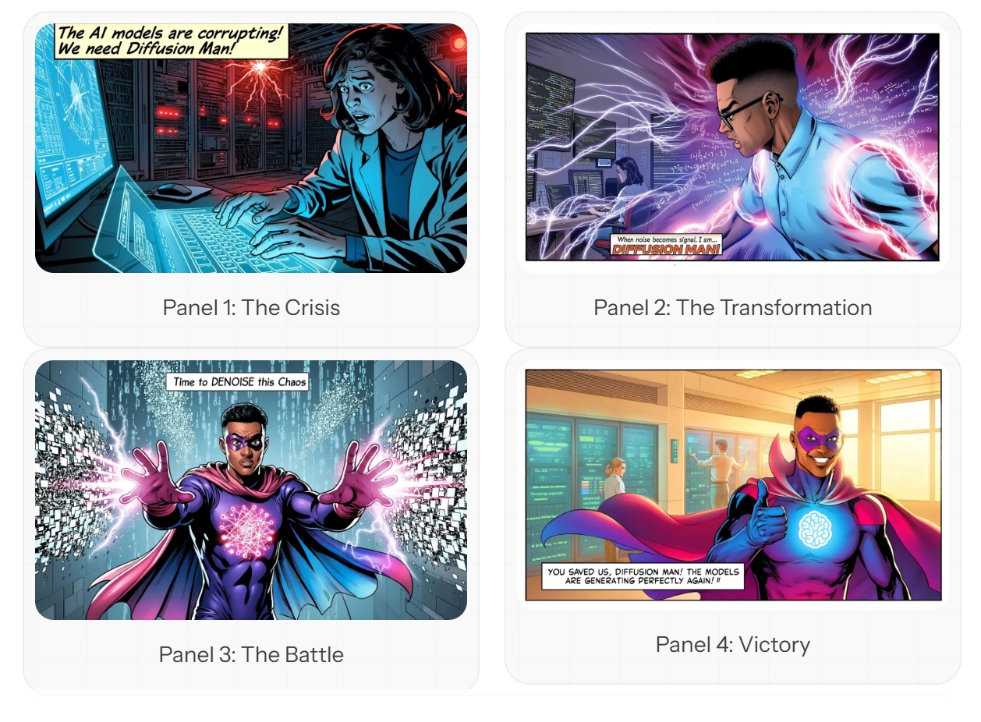
Character consistency: Note that the description of "Diffusion Man" maintains consistency in details across all panels—brown skin tone, short natural gradient hairstyle, gradient tight suit from purple to blue to pink, neural network logo, purple half-mask. Repeat these details in each panel prompt.
Photorealistic style
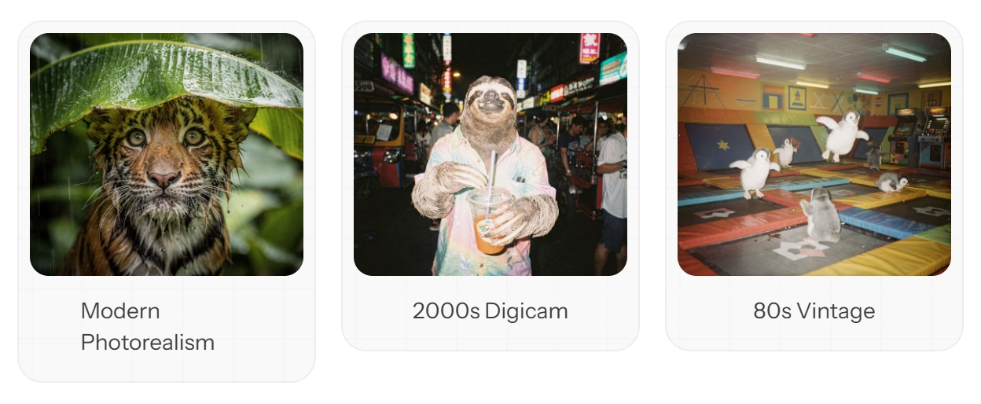
FLUX.2 excels at photorealistic image generation. Reference specific eras and techniques to create distinctive visual effects.
Style Reference Guide
| Style | Key Descriptors |
|---|---|
| Modern Digital | "Shot with Sony A7IV, sharp and clear image, high dynamic range" |
| 2000s digital camera | "Early digital camera, slight noise, flash photography, candid shot, 2000s digital camera style" |
| 80s retro style | "Film grain, warm tones, soft focus, 80s retro photo" |
| Analog film | "Shot on Kodak Portra 400 film, natural grain, natural colors" |
Modern Photorealism: "Soaking wet tiger cub taking shelter under a banana leaf in the rainy jungle, close up photo" Modern hyperrealism: "A soaking wet tiger cub taking shelter under a banana leaf in the jungle after the rain, close-up photo"
2000s Digicam: "Sloth out drinking in Bangkok at night in a street full of party folks, 2000s digicam style, people in the background fading" 2000s digital camera style: "At night, a sloth drinking on a street in Bangkok packed with party crowds, 2000s digital camera style, the crowd in the background gradually fading away"
80s Vintage: "A group of baby penguins in a trampoline park, having the time of their lives, 80s vintage photo" 80s vintage photo: "A group of baby penguins having a blast in a trampoline park, 80s vintage photo"
Camera and Lens Simulation
For realistic results, be sure to set the camera parameters specifically:
Shot on Hasselblad X2D, 80mm lens, f/2.8, natural lighting
使用哈苏 X2D 相机拍摄,80mm 镜头,光圈 f/2.8,自然光
Canon 5D Mark IV, 24-70mm at 35mm, golden hour, shallow depth of field
使用佳能 5D Mark IV 相机拍摄,镜头焦距 35mm,黄金时段,浅景深
Multi-Reference Image Editing
*[Pro version] The API has a combined input + output limit of 9MP. With 1MP output, you can use up to 8 reference images; with 2MP output, up to 7, and so on.
The multi-reference feature is very powerful and can be used for:
- Fashion shoots: pairing clothing items into stylish looks
- Interior design: placing furniture and decorations in a room
- Product compositing: combining multiple products into a scene
- Character consistency: maintaining character identity across various variations
Fashion editorial example (8 reference images)
Prompt: “A spiritual architectural photograph captured on expired Kodak Ektachrome 64 slide film cross-processed from 1987 with a 35mm spherical lens at f/5.6, featuring model standing before small forest chapel in clearing. The model wears the outfit, positioned on stone steps leading to wooden chapel, red creating stark contrast against weathered brown timber. Background shows traditional Schwarzwald chapel – dark wood construction with small bell tower, carved wooden door, religious paintings under eaves, surrounding clearing with wild flowers, tall firs creating natural cathedral, small cemetery with wooden crosses. Dappled forest light at 1/125. Cross-processed Ektachrome showing extreme color shifts – cyan-magenta split, warm wood tones pushed to orange-brown, oversaturated red, crushed black shadows, blown highlights, heavy grain creating mysterious atmosphere. Composition emphasizes sacred spaces and pilgrimage. Thomas Struth church interiors, Candida Höfer architectural documentation, religious tourism meets fashion editorial, spiritual Schwarzwald mysticism." "This is a Kodak Ektachrome 64 slide film photograph taken in 1987, using a 35mm spherical lens, aperture f/5.6, cross-processed. In the photo, the model stands in front of a small forest chapel in a forest clearing. The model is dressed in red, standing on the stone steps leading to the wooden chapel, the red clothing contrasting sharply with the weathered brown wood. The background shows a traditional Black Forest chapel—dark wooden structure with a small bell tower, carved wooden door, religious paintings under the eaves, a surrounding clearing full of wildflowers, towering firs forming a natural cathedral, and a small cemetery with a wooden cross. The photo uses a shutter speed of 1/125 second, with dappled forest light at the time of shooting. The cross-processed Ektachrome film shows extreme color shifts—cyan and magenta separation, warm wood tones pushed to orange-brown, reds oversaturated, blacks crushed, highlights blown out, and heavy grain creating a mysterious atmosphere. The composition emphasizes sacred space and pilgrimage. Thomas Struth church interiors, Candida Höfer architectural documentation, religious tourism meets fashion editorial style, and the mystical spirit of the Black Forest."
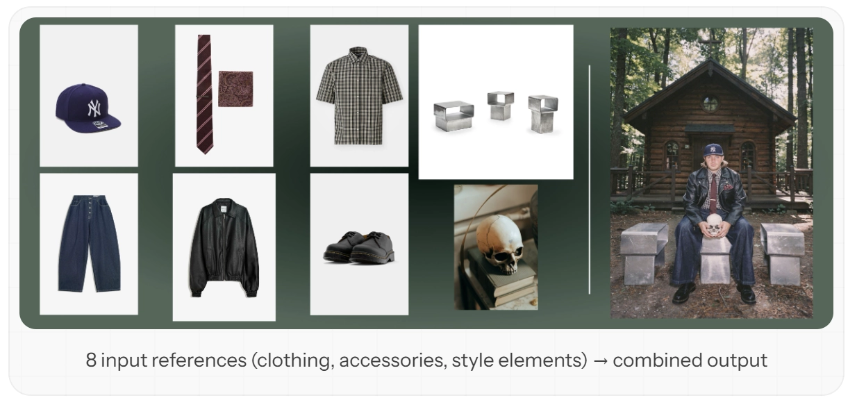
In multi-reference image editing mode, you need to clearly describe the specific purpose of each reference image. The model can blend clothing items, accessory elements, and style features from different reference images into a coherent, unified scene based on your prompt.
Instant Upsampling
FLUX.2 provides a prompt_upsampling parameter that can automatically optimize your prompt for better results. It is very useful for the following cases:
- Rapid iteration without writing detailed prompts
- Exploring creative variations
- When you have a basic concept but want richer output
Prompt upsampling technology can automatically add detail and context to your prompts. While the model expands visual elements, your original creative intent is fully preserved.
Best Practices Summary
- Control structure: When you need precise control over multiple elements, use JSON-structured prompts. Start simple and gradually increase complexity as needed.
- Be specific with colors: Always associate hex codes with specific objects. "This car's code is #FF0000" works better than "use red #FF0000 in the image."
- Describe what you want: FLUX.2 has no negative prompts. For example, instead of saying "no blur," say "always in sharp focus." Instead of saying "no people," describe an "empty scene."
- Reference cameras and styles: For realistic photographic results, specify the camera model, lens, and film type. "Shot with a Fujifilm X-T5, 35mm f/1.4 lens" produces more realistic results than "professional photo."
- Use your native language: Please describe in the language that best captures the cultural context you need. For example, use French for Paris scenes, and Japanese for anime styles.
- Multi-layer multi-reference carefully: When using multiple input images, clearly describe the role of each image: image 1 represents the subject, image 2 represents the style, and image 3 represents the background.
Quick Reference
| Technique | When to use | Key syntax |
|---|---|---|
| JSON prompts | Complex scenes, automation | {"scene": "...", "style": "..."} |
| Hex colors | Brand promotion, precise matching | color #FF5733orhex #FF5733 |
| Camera reference | Photorealism | shot on [camera], [lens], [settings] |
| Style era | Looks from a specific period | 80s vintage,2000s digicam |
| Multi-reference | Composite images | [pro]: 8, [flex]: 10, [dev]: ~6 |
English original text
Master FLUX.2 prompting with structured JSON, hex colors, and multi-reference techniques
FLUX.2 delivers exceptional prompt following and supports advanced techniques like structured JSON prompting, precise hex color control, and multi-reference image editing. This guide covers everything you need to create stunning results.
No negative prompts: FLUX.2 does not support negative prompts. Focus on describing what you want, not what you don’t want.
JSON Structured Prompting
FLUX.2 excels at interpreting structured JSON prompts, giving you precise control over every aspect of your image. This is particularly powerful for production workflows and automation.
The Base Schema
{
    "scene": "overall scene description",
    "subjects": [
        {
            "description": "detailed subject description",
            "position": "where in frame",
            "action": "what they're doing"
        }
    ],
    "style": "artistic style",
    "color_palette": ["#hex1", "#hex2", "#hex3"],
    "lighting": "lighting description",
    "mood": "emotional tone",
    "background": "background details",
    "composition": "framing and layout",
    "camera": {
        "angle": "camera angle",
        "lens": "lens type",
        "depth_of_field": "focus behavior"
    }
}
Building a Prompt Step by Step
Let’s build a product shot incrementally to see how each element contributes.
Step 1: Generating a coffee mug
{
    "scene": "Professional studio product photography setup with polished concrete surface",
    "subjects": [
        {
            "description": "Minimalist ceramic coffee mug with steam rising from hot coffee inside",
            "pose": "Stationary on surface",
            "position": "Center foreground on polished concrete surface",
            "color_palette": ["matte black ceramic"]
        }
    ],
    "style": "Ultra-realistic product photography with commercial quality",
    "color_palette": ["matte black", "concrete gray", "soft white highlights"],
    "lighting": "Three-point softbox setup creating soft, diffused highlights with no harsh shadows",
    "mood": "Clean, professional, minimalist",
    "background": "Polished concrete surface with studio backdrop",
    "composition": "rule of thirds",
    "camera": {
        "angle": "high angle",
        "distance": "medium shot",
        "focus": "Sharp focus on steam rising from coffee and mug details",
        "lens-mm": 85,
        "f-number": "f/5.6",
        "ISO": 200
    }
}
Step 2: Adding a second mug in a different color
{
    "scene": "Professional studio product photography setup with polished concrete surface",
    "subjects": [
        {
            "description": "Minimalist ceramic coffee mug with steam rising from hot coffee inside",
            "pose": "Stationary on surface",
            "position": "Center foreground on polished concrete surface",
            "color_palette": ["matte black ceramic"]
        },
        {
            "description": "Minimalist ceramic coffee mug, matching design to the black mug",
            "pose": "Stationary on surface",
            "position": "Right side of the black mug on polished concrete surface",
            "color_palette": ["matte yellow ceramic"]
        }
    ],
    "style": "Ultra-realistic product photography with commercial quality",
    "color_palette": ["matte black", "matte yellow", "concrete gray", "soft white highlights"],
    "lighting": "Three-point softbox setup creating soft, diffused highlights with no harsh shadows",
    "mood": "Clean, professional, minimalist",
    "background": "Polished concrete surface with studio backdrop",
    "composition": "rule of thirds",
    "camera": {
        "angle": "high angle",
        "distance": "medium shot",
        "focus": "Sharp focus on steam rising from coffee and both mugs in frame",
        "lens-mm": 85,
        "f-number": "f/5.6",
        "ISO": 200
    }
}
Step 3: Change the color of the steam
{
    "scene": "Professional studio product photography setup with polished concrete surface",
    "subjects": [
        {
            "description": "Minimalist ceramic coffee mug with bright red steam rising from hot coffee inside",
            "pose": "Stationary on surface",
            "position": "Center foreground on polished concrete surface",
            "color_palette": ["matte black ceramic", "bright red steam"]
        },
        {
            "description": "Minimalist ceramic coffee mug, matching design to the black mug",
            "pose": "Stationary on surface",
            "position": "Right side of the black mug on polished concrete surface",
            "color_palette": ["matte yellow ceramic"]
        }
    ],
    "style": "Ultra-realistic product photography with commercial quality",
    "color_palette": ["matte black", "matte yellow", "bright red", "concrete gray", "soft white highlights"],
    "lighting": "Three-point softbox setup creating soft, diffused highlights with no harsh shadows",
    "mood": "Clean, professional, minimalist",
    "background": "Polished concrete surface with studio backdrop",
    "composition": "rule of thirds",
    "camera": {
        "angle": "high angle",
        "distance": "medium shot",
        "focus": "Sharp focus on steam rising from coffee and both mugs in frame",
        "lens-mm": 85,
        "f-number": "f/5.6",
        "ISO": 200
    }
}
You can include the JSON directly in your prompt, or flatten it into natural language. FLUX.2 understands both formats.
HEX Color Code Prompting
FLUX.2 supports precise color matching using hex codes. This is essential for brand consistency and design work.
Basic Syntax
Signal hex colors with keywords like “color” or “hex” followed by the code:
    "vase_color": "#02eb3c",
    "background_color": "#1a1a2e"
Gradient Colors
Apply gradients by specifying start and end colors:
Prompt: “A vase on a table in living room, the color of the vase is a gradient, starting with color #02eb3c and finishing with color #edfa3c. The flowers inside the vase have the color #ff0088”
Color in JSON Prompts
Combine hex colors with structured prompts for maximum control:
{
    "scene": "Makeup flat lay on marble surface",
    "subjects": [
        {
            "description": "eyeshadow palette",
            "colors": ["#E91E63", "#9C27B0", "#673AB7", "#3F51B5"]
        }
    ],
    "style": "beauty product photography",
    "lighting": "soft diffused overhead lighting"
}
Hex codes work best when clearly associated with specific objects. Vague references like “use #FF0000 somewhere” may produce inconsistent results.
Infographics and Data Visualization
FLUX.2 can generate infographics with clean typography and structured layouts.
Infographic Template
{
    "type": "infographic",
    "title": "Your Main Title",
    "subtitle": "Supporting context",
    "sections": [
        {
            "heading": "Section 1",
            "content": "Key information",
            "visual": "icon or chart type"
        }
    ],
    "color_scheme": ["#primary", "#secondary", "#accent"],
    "style": "modern, clean, corporate"
}
Example Prompt:
“Create a vertical infographic about coffee consumption worldwide. Title: ‘Global Coffee Culture’. Include 3 sections with statistics, use icons for each country, color scheme #4A2C2A (brown) and #F5E6D3 (cream). Modern minimalist style with clean typography.”
Typography and Design
FLUX.2 excels at generating clean typography, product marketing materials, and magazine layouts.
Product Ad: “Samsung Galaxy S25 Ultra product advertisement, ‘Ultra-strong titanium’ headline, ‘Shielded in a strong titanium frame, your Galaxy S25 Ultra always stays protected’ subtext, close-up of phone edge showing titanium frame, dark gradient background, clean minimalist tech aesthetic, professional product photography”
Magazine Cover: “Women’s Health magazine cover, April 2025 issue, ‘Spring forward’ headline, woman in green outfit sitting on orange blocks, white sneakers, ‘Covid: five years on’ feature text, ‘15 skincare habits’ callout, professional editorial photography, magazine layout with multiple text elements”
Multi-Language Prompting
FLUX.2 has excellent multi-language understanding. You can prompt in your native language for more culturally authentic results.
French: “Un marché alimentaire dans la campagne normande, des marchands vendent divers légumes, fruits. Lever de soleil, temps un peu brumeux”
Thai: “ตลาดอาหารเช้าในชนบทใกล้กรุงเทพฯ พ่อค้าแม่ค้ากำลังขายผักและผลไม้นานาชนิด บรรยากาศยามพระอาทิตย์ขึ้น มีหมอกจาง ๆ ปกคลุม สงบและอบอุ่น”
Korean: “서울 도심의 옥상 정원, 저녁 노을이 지는 하늘 아래에서 사람들이 작은 등불을 켜고 있다. 화려한 네온사인이 멀리 반짝이고, 정원에는 다양한 꽃들이 피어 있다. 분위기는 따뜻하고 낭만적이다”
Prompting in the native language of the content you’re creating often produces more culturally authentic results—local markets, architecture, and atmosphere are rendered with greater accuracy.
Comic Strips and Sequential Art
Create consistent comic panels with character continuity. The key is to define your character in detail and maintain that description across panels.
The Diffusion Man Story
Generate each panel separately while keeping character descriptions consistent:
Panel 1 Prompt: The Crisis
“Style: Classic superhero comic Character: Worried scientist frantically typing on glowing holographic keyboard, face illuminated by blue light showing deep concern Setting: Massive computer server room with sparking circuits and red warning lights flashing on monitors Text: ‘The AI models are corrupting! We need Diffusion Man!’ Mood: Tense, urgent + dramatic blue and red tones”
Panel 2 Prompt: The Transformation
“Style: Classic superhero comic with dynamic action lines and electric energy effects Character: Diffusion Man/Mild-mannered programmer (30 years old, brown skin tone, short natural fade haircut with black hair, black-framed glasses, light blue button-up shirt, athletic build, strong jawline) body begins to glow with swirling gradients of deep purple, electric blue, and hot pink energy, mathematical equations and neural network patterns flowing around him in glowing lines Setting: Small office with computer monitors displaying code and error messages Text: ‘When noise becomes signal, I am… DIFFUSION MAN!’ Mood: Powerful, transformative + dramatic backlighting and energy radiating outward in waves”
Panel 3 Prompt: The Battle
“Style: Classic superhero comic with explosive action and dynamic composition Character: Diffusion Man (athletic 30-year-old with brown skin tone and short natural fade haircut with black hair, wearing sleek bodysuit with gradient patterns from deep purple to electric blue to hot pink, glowing neural network emblem on chest with interconnected nodes, short gradient cape, purple half-mask showing strong jawline and confident expression) extends both hands forward in powerful stance, shooting beams of structured noise and latent space energy at corrupted digital monsters made of glitching pixels and broken code Setting: Digital cyberspace environment with floating data cubes and cascading binary code Text: ‘Time to DENOISE this chaos!’ Mood: Intense, action-packed + bright energy flashes and electric effects”
Panel 4 Prompt: Victory
“Style: Classic superhero comic with warm, triumphant colors and clean composition Character: Diffusion Man (athletic 30-year-old with brown skin tone and short natural fade haircut with black hair, wearing sleek gradient bodysuit from deep purple to electric blue to hot pink, glowing neural network emblem on chest, short gradient cape flowing behind him, purple half-mask, strong jawline, confident heroic smile) stands heroically giving thumbs up gesture to grateful scientist beside him, her computer screens now showing stable green indicators and success messages Setting: Calm server room with soft blue ambient lighting and orderly data streams flowing smoothly in organized patterns Text: ‘You saved us, Diffusion Man! The models are generating perfectly again!’ Mood: Victorious, hopeful + golden sunset-like tones streaming through windows”
Character Consistency: Notice how Diffusion Man’s description stays detailed and consistent across panels—brown skin tone, short natural fade haircut, gradient bodysuit from purple to blue to pink, neural network emblem, purple half-mask. Repeat these details in every panel prompt.
Photorealistic Styles
FLUX.2 excels at photorealistic generation. Reference specific eras and techniques for distinctive looks.
Style Reference Guide
| Style | Key Descriptors |
|---|---|
| Modern Digital | ”shot on Sony A7IV, clean sharp, high dynamic range” |
| 2000s Digicam | ”early digital camera, slight noise, flash photography, candid, 2000s digicam style” |
| 80s Vintage | ”film grain, warm color cast, soft focus, 80s vintage photo” |
| Analog Film | ”shot on Kodak Portra 400, natural grain, organic colors” |
- Modern Photorealism: “Soaking wet tiger cub taking shelter under a banana leaf in the rainy jungle, close up photo”
- 2000s Digicam: “Sloth out drinking in Bangkok at night in a street full of party folks, 2000s digicam style, people in the background fading”
- 80s Vintage: “A group of baby penguins in a trampoline park, having the time of their lives, 80s vintage photo”
Camera and Lens Simulation
Be specific about camera settings for authentic results:
Shot on Hasselblad X2D, 80mm lens, f/2.8, natural lightingCanon 5D Mark IV, 24-70mm at 35mm, golden hour, shallow depth of fieldMulti-Reference Image Editing
*[pro] API has a 9MP total limit for input+output. At 1MP output you can use up to 8 reference images, at 2MP output up to 7, and so on.
Multi-reference is powerful for:
- Fashion shoots: Combine clothing items into styled outfits
- Interior design: Place furniture and decor in rooms
- Product composites: Combine multiple products in scenes
- Character consistency: Maintain identity across variations
Fashion Editorial Example (8 references)
Prompt:“A spiritual architectural photograph captured on expired Kodak Ektachrome 64 slide film cross-processed from 1987 with a 35mm spherical lens at f/5.6, featuring model standing before small forest chapel in clearing. The model wears the outfit, positioned on stone steps leading to wooden chapel, red creating stark contrast against weathered brown timber. Background shows traditional Schwarzwald chapel – dark wood construction with small bell tower, carved wooden door, religious paintings under eaves, surrounding clearing with wild flowers, tall firs creating natural cathedral, small cemetery with wooden crosses. Dappled forest light at 1/125. Cross-processed Ektachrome showing extreme color shifts – cyan-magenta split, warm wood tones pushed to orange-brown, oversaturated red, crushed black shadows, blown highlights, heavy grain creating mysterious atmosphere. Composition emphasizes sacred spaces and pilgrimage. Thomas Struth church interiors, Candida Höfer architectural documentation, religious tourism meets fashion editorial, spiritual Schwarzwald mysticism.”
For multi-reference editing, describe how each input should be used. The model combines clothing items, accessories, and style references into a cohesive scene based on your prompt.
Prompt Upsampling
FLUX.2 offers a prompt_upsampling parameter that automatically enhances your prompt for better results.
- Quick iterations without crafting detailed prompts
- Exploring creative variations
- When you have a basic concept but want richer output
Prompt upsampling adds detail and context to your prompt automatically. Your original intent is preserved while the model expands on visual elements.
Best Practices Summary
- Structure for Control:Use JSON structured prompts when you need precise control over multiple elements. Start simple and add complexity as needed.
- Be Specific with Colors:Always associate hex codes with specific objects. “The car is #FF0000” works better than “use red #FF0000 in the image.”
- Describe What You Want:FLUX.2 has no negative prompts. Instead of “no blur,” say “sharp focus throughout.” Instead of “no people,” describe an “empty scene.”
- Reference Camera and Style:For photorealism, specify camera models, lenses, and film stocks. “Shot on Fujifilm X-T5, 35mm f/1.4” produces more authentic results than “professional photo.”
- Use Native Languages:Prompt in the language that best describes your desired cultural context. French for Parisian scenes, Japanese for anime styles.
- Layer Multi-Reference Carefully:When using multiple input images, clearly describe the role of each: subject from image 1, style from image 2, background from image 3.
Quick Reference
| Technique | When to Use | Key Syntax |
|---|---|---|
| JSON Prompts | Complex scenes, automation | {"scene": "...", "style": "..."} |
| Hex Colors | Brand work, precise matching | color #FF5733 or hex #FF5733 |
| Camera References | Photorealism | shot on [camera], [lens], [settings] |
| Style Eras | Period-specific looks | 80s vintage, 2000s digicam |
| Multi-Reference | Composite images | [pro]: 8, [flex]: 10, [dev]: ~6 |