
What is Yunjie AI
Yunjie AI is an open-source onlineAI painting tool, integrating multiple creative image generation functions such as text-to-image, image-to-image, conditional image generation, and model training. Users can quickly generate creative artwork through simple text descriptions or by uploading images. The platform aims to help creators and design enthusiasts improve painting and design efficiency, making artistic creation convenient, flexible, and intelligent. Yunjie AI supports multiple artistic styles and is suitable for users of different skill levels.
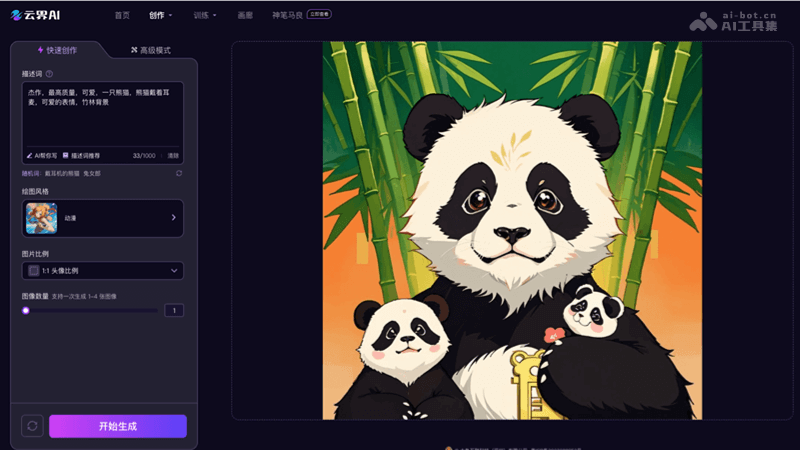
Main Features of Yunjie AI
- Text-to-Image: Automatically generates corresponding images based on the text descriptions provided by the user.
- Image-to-Image: Based on an existing image uploaded by the user, performs style transfer or content modification.
- Conditional Image Generation: Supports users in setting specific conditions, and AI generates images according to the conditions.
- Model Training: Users train their own AI models to generate images in a specific style or theme.
- Creative QR Codes: Combines artistic design and practical functionality to generate visually appealing QR codes.
- Light and Shadow Art: Creates art text based on light and shadow effects, suitable for designs that enhance visual impact.
How to Use Yunjie AI
- Register and Log In: Visit the official website of Yunjie AI (yunjie.art), register and log in
- Choose a Creation Mode: Choose a creation mode according to your needs, such as Quick Creation, Advanced Mode, etc.
- Enter a Description or Upload an Image:
- In Quick Creation mode, enter descriptive text or keywords.
- In Image-to-Image mode, upload the image to be transformed or edited.
- Choose Style and Parameters: According to the creation goal, choose an art style or image effect. Set other parameters, such as image ratio, color scheme, level of detail, etc.
- Generate the Image: Click the generate button, and Yunjie AI will begin the creation process based on the input and selections.
- Edit and Adjust: View the generated image and use the provided tools to edit and adjust it.
- Download or Share: Download to save locally. Or choose to share the work to the Yunjie AI community or social media.
Application Scenarios of Yunjie AI
- Social Media Content Creation: Users quickly generate attractive images for social media posts, advertisements, or marketing materials.
- Graphic Design: Designers use Yunjie AI to generate unique graphics, patterns, or backgrounds for posters, flyers, greeting cards, and other graphic design projects.
- Game and App Development: Developers use AI to generate game assets, user interface elements, or in-app illustrations.
- Anime and Illustration: Artists use Yunjie AI to create anime-style character designs or illustrations, improving creation efficiency.
- Digital Art and Galleries: Digital artists use AI technology to explore new art styles and forms of expression and create digital artworks.
- Education and Academic Research: Teachers and students use Yunjie AI for visualized teaching or auxiliary research projects, transforming complex concepts into intuitive images.