
What is YouTube Dubbing
YouTube Dubbing is a browser extension for watching foreign videos online. Based on intelligent synchronized dubbing and AI subtitle technology, it translates subtitles and directly plays the translated content, eliminating the hassle of staring at subtitles and removing the language barrier to watching foreign videos. YouTube Dubbing supports one-click translation playback, multi-browser and multi-device use, and is compatible with multiple video platforms such as YouTube and Udemy. It offers multilingual translation and multiple voice styles, and includes member features such as speed playback and background audio retention. The extension is free, but upgrading to a membership provides higher translation quality and a better audio-video synchronization experience.
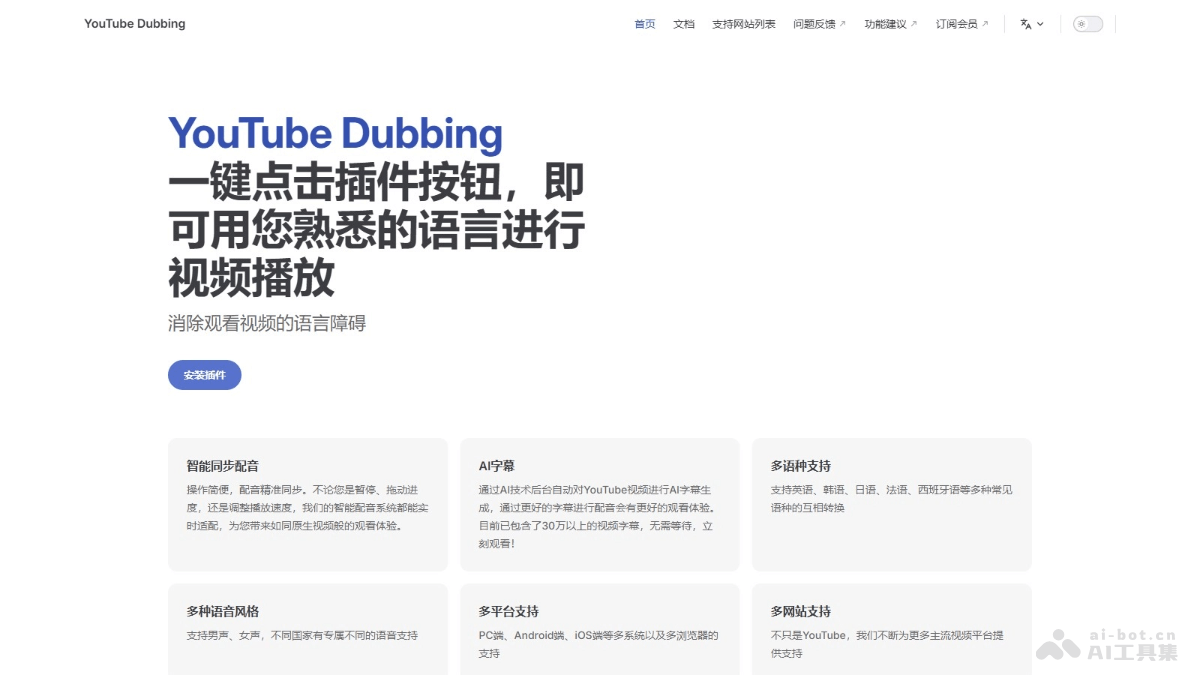
Main features of YouTube Dubbing
- One-click translation playback: Users only need to click the play button to translate the video into a familiar language and play it.
- AI subtitle generation: Automatically generates AI subtitles for YouTube videos in the background, improving the viewing experience.
- Multilingual support: Supports mutual conversion between multiple languages such as English, Korean, Japanese, French, and Spanish.
- Multiple voice styles: Provides multiple voice styles such as male and female voices, with dedicated voice support for different countries.
- Multi-platform support: Suitable for multiple systems such as PC, Android, and iOS, as well as multiple browsers.
- Multi-site support: Supports video platforms such as YouTube, Udemy, Bilibili, and Gamedev.tv.
- Multiple voice options: Users choose different voice libraries according to the target language.
- Speed playback support: Supports users directly adjusting the playback speed on the video, and the extension adapts automatically.
- Retain background audio: Member feature, retains the video's background audio.
- Speaker recognition: Member feature, recognizes different speakers in the video and assigns a different voice to each person.
- Display translated subtitles: Users manually enable the display of translated subtitles.
- Webpage text dubbing: Supports dubbing of text content on webpages.
- Volume adjustment: Supports adjusting the original audio volume and the target voice volume; there are restrictions on the iOS system.
How to use YouTube Dubbing
- Install the extension: Visit YouTube Dubbing'sofficial website, and according to the browser type (Chrome, Firefox, Safari, etc.), follow theguideto download and install the extension.
- Register and log in: Register an account and log in according to the prompts.
- Choose a language: Open the video you want to watch, click the YouTube Dubbing extension icon in the browser toolbar, and choose the target language you want to translate into.
- Enable dubbing and subtitles: In the extension interface, select the dubbing option, and the extension will automatically dub the video. If you need subtitles, select the option to display translated subtitles.
- Adjust settings: Adjust settings such as playback speed and volume as needed. If you are a member, use advanced features such as retaining background audio and speaker recognition.
- Watch the video: After setting up, start watching the video and enjoy synchronized dubbing and subtitle services.
- Usage help:
- If you encounter problems during installation or use, check thegetting started tutorial。
- provided by YouTube Dubbing. For installation and usage tutorials for PC, iOS, and Android, visit the corresponding pages provided on the official website.
YouTube Dubbing product pricing
- Free plan:Watch up to 5 videos per day, based on YouTube's built-in subtitle translation, video translation and dubbing.
- Monthly membership: ¥69/month, all features of free users, unlimited video watching, priority use of plugin-exclusively optimized subtitles for translation, speaker recognition (you can specify different voices for different speakers), retain background audio, unlimited use of the gemini model.
- Annual membership: ¥569/year, the package includes the same as the monthly membership.
YouTube Dubbing use cases
- Language learning: Students and language enthusiasts watch foreign-language videos to improve their listening and speaking skills.
- International education: Teachers and students access international educational resources, such as courses on Udemy, eliminating language barriers.
- Entertainment and leisure: Watch entertainment videos on platforms such as YouTube and Bilibili without worrying about language barriers.
- International news: Users can more easily access and understand international news and reports.
- Business and meetings: Business professionals translate communication content in business meetings or international cooperation.