
What is YouGua
YouGua is an innovative browser AI extension based on natural language processing technology that enables users to modify webpage content with simple commands or conversations, without any programming knowledge. The extension supports Chrome, Edge, and Arc browsers, and features personalized customization, cross-platform support, and save functionality, allowing users to adjust webpages according to their preferences, such as changing background colors, adding buttons, and more. YouGua is based on calling the Claude 3.5 API to automatically modify webpage code, lowering the barrier to webpage customization. The YouGua extension is completely free, letting everyone easily become a webpage designer and enjoy a personalized browsing experience.
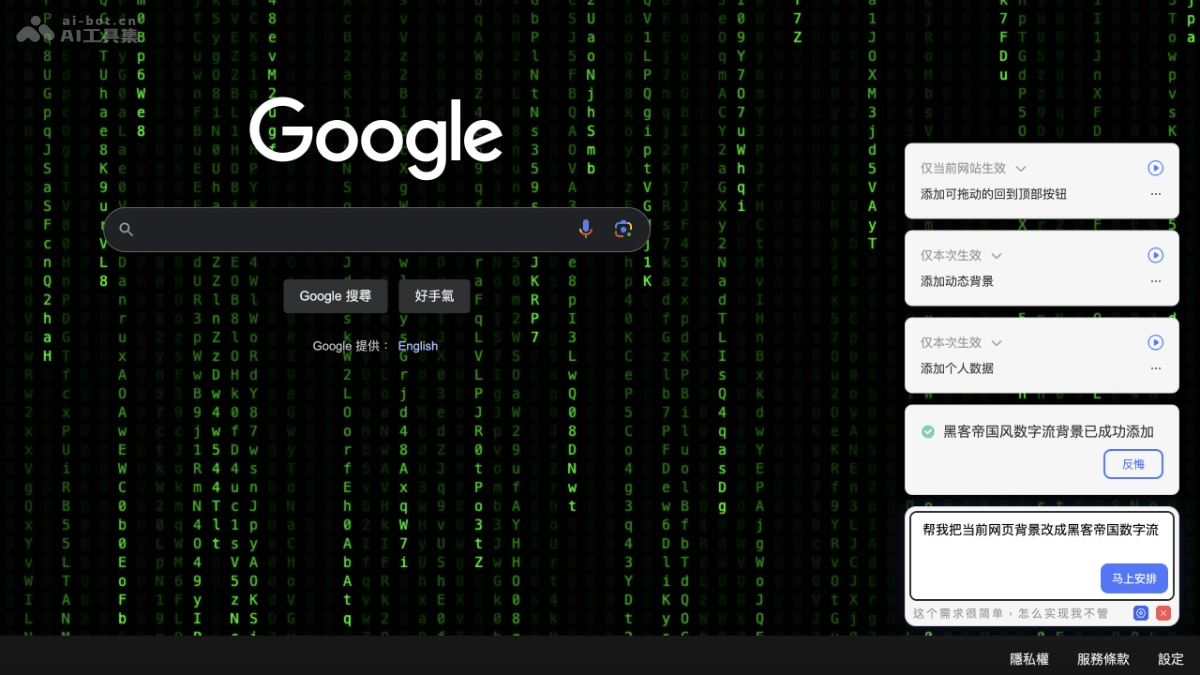
yougua
YouGua's Main Features
- Natural Language Modification: Users directly use natural language commands to modify webpage content, such as changing background colors, adding buttons, etc., letting non-technical users easily customize webpages.
- No Programming Required: Users do not need programming skills to modify webpages with "YouGua", making webpage customization simple and intuitive.
- Personalized Customization: Users can personalize webpages according to their preferences, such as adding fireworks effects, changing the webpage background style, etc.
- Cross-Browser Support: Supports mainstream browsers such as Chrome, Edge, and Arc, making it convenient for different users to use.
- Save Settings: Users can save the modified webpage settings, choosing to keep the modifications after refreshing, or make the modifications permanently effective for the current website, or even effective for all websites.
How to UseYouGua
- Install the extension: Visit the ChromeWeb Store. Click the "Add to Chrome" button to install.
- Set the API KEY: After installation is complete, perform initial setup according to the extension's prompts. Enter a Claude 3.5 API KEY to activate the extension's features. (API KEY: YG-c886707ebcb2d89daae8e17).
- Use the extension: Open any webpage in the browser. Click the "YouGua" extension icon in the upper right corner of the browser. After clicking the icon, a small dialog box will pop up in the lower right corner of the webpage.
- Enter commands: Enter the command you want to execute in the dialog box or describe the modification you want to make. For example, "simulate fireworks on the page" or "change the background color to blue." The extension will convert the natural language command into the corresponding webpage code modification.
- View the effect: After the extension processes the command, the webpage changes accordingly based on the instruction.
- Save the modification: If you are satisfied with the modification effect, use the save function provided by "YouGua". Choose to make it effective only for the current session (the modification disappears after refreshing); or permanently effective for the current website; or effective for all websites.
YouGua's Product Pricing
The YouGua browser AI extension is currently completely free. The YouGua extension calls the Claude 3.5 API in the background to automatically modify webpage code, and this API itself requires payment. To make it convenient for users to try it out, the developer provides their own Claude 3.5 API KEY for users to use. The provided API KEY has certain usage limits. If the user uses it frequently or the request volume is too large, the API KEY may reach its usage limit. If you want to use YouGua more stably and on a larger scale, it is recommended to purchase your own Claude 3.5 API KEY.
YouGua's Application Scenarios
- Personalized Webpage Browsing: Users adjust the font size, color, background, etc. of web pages according to their preferences to gain a more comfortable reading experience.
- Remove ads and optimize layout: Automatically hide annoying ads, clean up the page layout, and make web content clearer and easier to read.
- Feature enhancement: Add practical features to web pages, such as a "back to top" button, night mode toggle, article word count, etc.
- Data extraction and automation: Save web page data to a local file with one click, such as exporting the Weibo trending list as an Excel file, improving data organization efficiency.
- Education and learning: Add annotations, notes, or highlights to important content on learning web pages, enhancing the readability and memorability of learning materials.