
What is Yeri AI
Yeri AI is AI image generation、AI video generation, photo effects, and creative editing in one all-in-one online creation platform. It integrates text-to-image, image-to-image,text-to-video、image-to-video, AI image editor, background removal, outpainting, image upscaling, and a variety of photo effect templates, so users do not need to switch between multiple tools and can complete the full content production workflow from inspiration to final output in the same workspace. The platform has newly integrated the GPT Image 2 model, supporting 4K resolution output and reliable text rendering, making it especially suitable for poster design, product visuals, and multilingual layout scenarios.
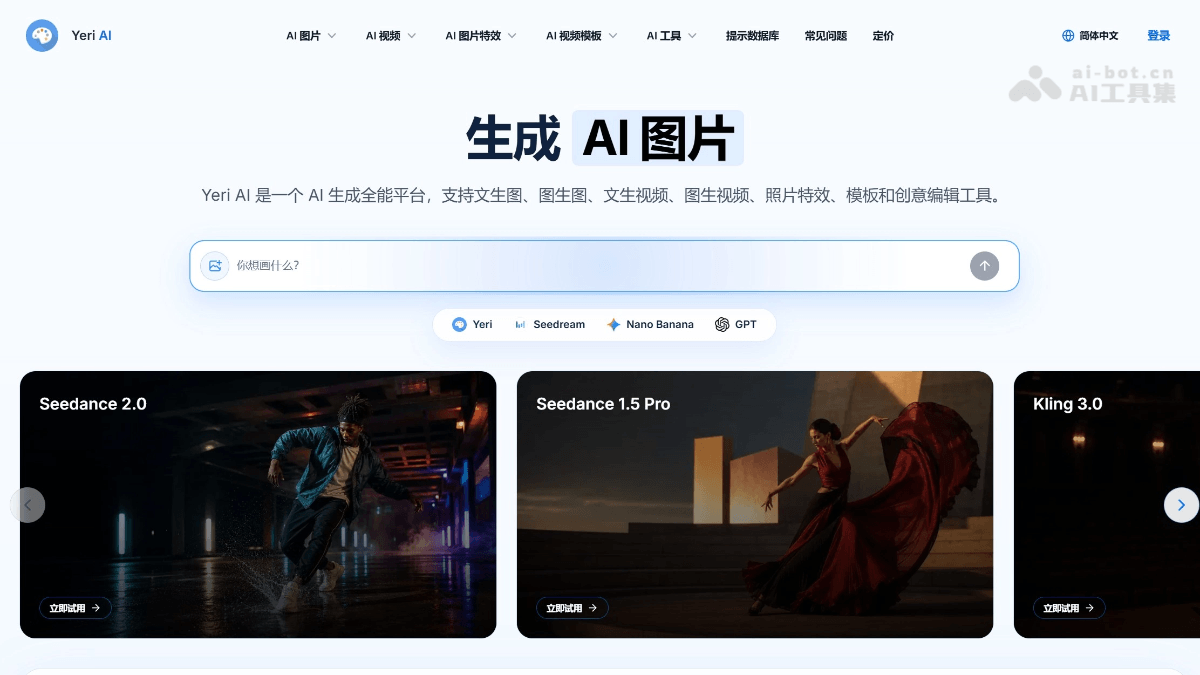
Main Features of Yeri AI
-
AI Image Generator: Supports text-to-image and image-to-image, allowing quick testing of prompts, styles, ratios, and product scenes for concept sketches and refined variant creation.
-
AI Video Generator: Supports text-to-video and image-to-video, enabling the creation of new scenes from text or guiding camera movement, rhythm, and composition based on reference frames.
-
GPT Image 2 Model: A 4K image generation model optimized for reliable text rendering, supporting layout design for posters, product visuals, and 32+ languages.
-
Photo Effects and Templates: Provides guided effects such as portrait style transfer, product scenes, and poster covers, as well as dynamic templates that can be quickly applied.
-
AI Image Editor: Includes tools such as background removal, image upscaling, outpainting, and detail optimization for final touch-ups of assets.
-
Prompt Database: Contains a massive collection of prompt examples to help users quickly gain creative inspiration and optimize generation results.
-
Unified Workspace: Image generation, video generation, editing, and effects tools share the same creative space, supporting seamless transitions and project reuse.
How to Use Yeri AI
-
Visit the Platform: Visit the Yeri AI official website https://yeri.ai/zh-cn,注册账号,进入统一创作工作区。
-
Choose a Creation Mode: Use the "AI Image Generator" for text-to-image or image-to-image, or choose the "AI Video Generator" for text-to-video/image-to-video.
-
Enter a Prompt: Enter a prompt or upload a reference image, adjust parameters such as style, ratio, and model, then click generate to obtain multiple variants.
-
Create Effects: If effect processing is needed, go to "Photo Effects" and select templates such as portrait, product, or poster for style transfer.
-
Image Editing: Use the "AI Image Editor" for background removal, outpainting, upscaling, or detail optimization to complete the final work.
-
Video Generation: Send static assets directly to the AI Video Generator to generate matching dynamic versions and complete a cross-media workflow.
Core Advantages of Yeri AI
-
Full-Chain Integration: Integrates static image generation, dynamic video generation, and effects editing into one web platform, avoiding the efficiency loss caused by switching between multiple tools.
-
GPT Image 2 Text Rendering Capability: Achieves highly accurate text layout in AI image generation, solving the traditional AI drawing pain point of "garbled text" and directly producing usable posters.
-
4K Ultra HD Output: Supports high-resolution image generation to meet the needs of printing, display, and professional visual assets.
-
Image-to-Video Reference Frame Guidance: Allows users to upload a reference image as the first frame of a video, precisely controlling consistency of characters, scenes, and style.
-
Zero-Barrier Quick Start: Provides a rich set of preset templates and effects, enabling clearly styled output without complex prompt engineering.
-
Safe and Compliant Creative Environment: The platform explicitly prohibits NSFW content, and generated content is private by default, ensuring creative safety.
Yeri AI Competitor Comparison
| Comparison Dimension | Yeri AI | Leonardo.ai | Krea AI |
|---|---|---|---|
| Product Positioning | All-in-one AI generation platform, integrating image/video/editing in the same workspace | AI creative suite, focused on game assets, character consistency, and model training | Real-time AI creative console, emphasizing interactive generation and aggregation of 60+ models |
| Image Generation | Text-to-image, image-to-image, GPT Image 2 (4K output + reliable text rendering) | Multiple models including Phoenix, FLUX, GPT-Image-1, Veo 3; Alchemy refinement engine | Krea 2 (12 billion parameters, Raw/Turbo dual modes), Flux, and 60+ other models; real-time canvas (<50ms response) |
| Video Generation | Text-to-video, image-to-video | MotionAI image-to-video | Third-party models such as Veo 3.1, Kling, Runway, Hailuo, Wan; Motion Transfer |
| Editing and Post-Production | Background removal, outpainting, upscaling, AI image editor | Background removal, outpainting, cutout, real-time canvas editing | Background removal, image enhancement (integrating Topaz Photo AI/Gigapixel), 22K upscaling, 8K/120fps video enhancement |
| Exclusive Differentiation | 9 million+ prompt library, unified workspace, private generation, photo effect templates | Character consistency engine, LoRA training (50 model slots), 3D texture generation, community model library | Real-time canvas interaction, model aggregator, Nodes workflow automation, LoRA fine-tuning (Max tier supports 2,000 images) |
Yeri AI Application Scenarios
-
E-commerce Product Visuals: Generate high-quality product scene images, detail page assets, and 360° dynamic showcase videos.
-
Social Media Content: Batch-produce image-text and short video content for platforms such as Instagram, Xiaohongshu, and TikTok.
-
Poster and Layout Design: Use GPT Image 2's text rendering capability to directly generate posters, flyers, and covers with precise text.
-
Advertising Creative Testing: Quickly generate multiple versions of ad images and video drafts for A/B testing and proposal presentations.
-
Personal Creation and Avatars: Use photo effects to convert real-person photos into artistic styles such as Ghibli animation style, or generate personalized avatars.
-
Unified Brand Materials: Through image-to-image and reference frame features, maintain consistency in style, color tone, and composition across a series of visual assets.