
What Is Xuanbao
Xuanbao is an efficientintelligent writing tooldesigned specifically for work scenarios. It has powerful AI writing capabilities and offers more than 60 writing applications, enabling one-click generation of texts such as meeting summaries, official documents, press releases, and activity records, and supports keyword optimization and multi-style adjustments. Xuanbao has 100,000+ beautifully designed templates, covering trending topics and industry needs, supports saving and categorized management of custom templates, and templates are updated daily. It supports synchronization between mobile phones and computers, unlimited editing, and allows inserting components such as images, text, location, and audio into articles. It can automatically match the best template based on keywords or scenarios entered by users, track data such as image-text readership and forwarding rates in real time, and generate visual reports.
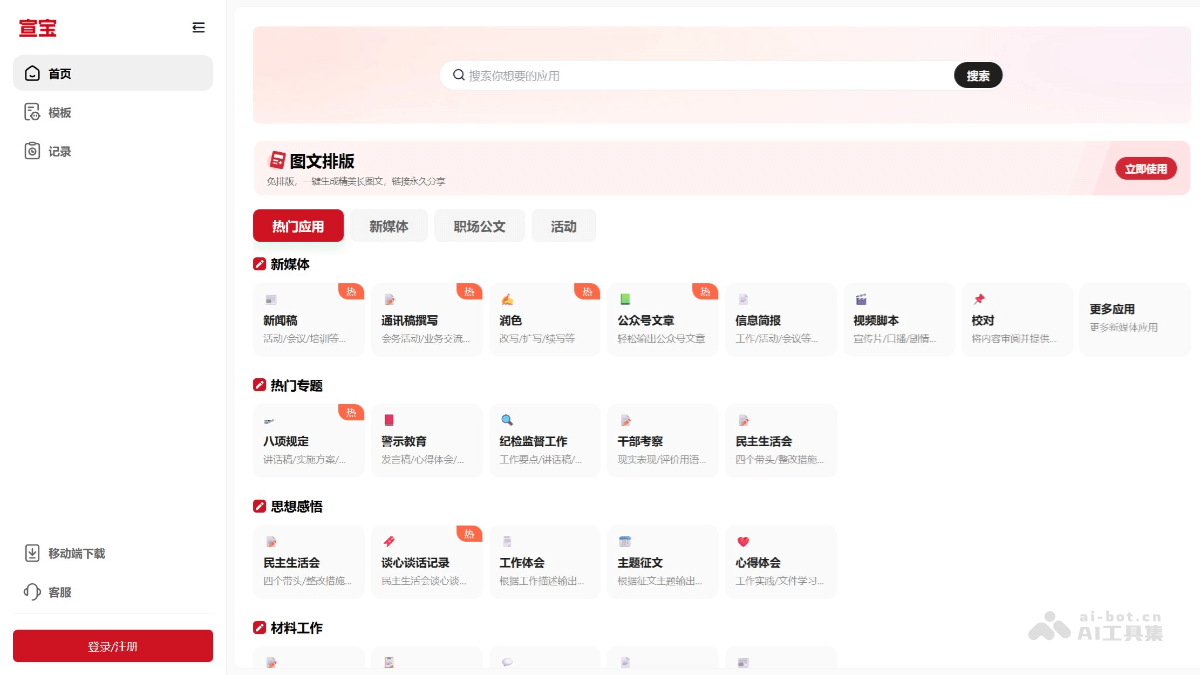
Main Features of Xuanbao
- AI Writing: Provides 60+ AI writing applications, enabling one-click generation of multiple types of copy such as meeting summaries, official documents, press releases, activity records, summary reports, and proposal writing, and supports keyword optimization and multi-style adjustments. Intelligently recommends templates, automatically matching the best template based on keywords or scenarios entered by users.
- Massive Templates: Has 100,000+ beautifully designed templates, covering trending topics and industry needs, supports saving and categorized management of custom templates, and templates are updated daily.
- Multi-Device Synchronization: Supports synchronization between mobile phones and computers, unlimited editing, and allows inserting components such as images, text, location, and audio into articles.
- Communication Effect Analysis: Tracks data such as image-text readership and forwarding rates in real time, and generates visual reports.
- Offline Editing and Emergency Mode: Documents can still be edited offline in a no-network environment, and will automatically synchronize after data recovery.
- Government Scenario Adaptation: Designed specifically for government agencies, providing compliant electronic letter templates and a policy publicity material library, with built-in sensitive word filtering and review reminder functions.
- Multi-Format Export and Sharing: Supports export in formats such as PDF, Word, and H5 links, and one-click sharing to platforms such as WeChat and Weibo.
How to Use Xuanbao
- Register and Log In: Visit Xuanbao's official website:https://xuanbaoapp.com/,使用手机号码或邮箱注册账号登录,或在官方应用商店,搜索“Xuanbao, download the latest version and install it.
- Use AI Writing
-
Select a Writing Scenario: After entering the main interface, select the required writing scenario, such as meeting summary, official document, or press release.
-
Enter Keywords: Enter the relevant topic or keywords in the writing interface.
-
Generate Copy: Click the "Generate" button, and Xuanbao will quickly generate copy based on the entered keywords.
-
Edit and Revise: The generated copy can be further edited and revised to meet specific needs.
-
- Use Templates
-
Select a Template: Select a suitable template from the template library; templates cover multiple scenarios, such as policy interpretation and event promotion.
-
Custom Templates: Frequently used templates can be saved as custom templates and managed by category.
-
-
Multi-Format Export: Supports exporting documents in multiple formats such as PDF, Word, and H5 links.
-
One-Click Sharing: Share generated graphics and text to platforms such as WeChat and Weibo with one click.
-
Intelligent template recommendations: Automatically match the best template based on the entered keywords or scenario.
Xuanbao's application scenarios
- Government scenarios: Xuanbao is customized for government publicity and new media design needs, providing compliant electronic letter templates and a policy publicity material library, with built-in sensitive word filtering and review reminder functions to ensure content security and compliance.
-
Official account posts: Quickly generate official account articles and improve content creation efficiency.
-
Meeting summaries: Generate meeting minutes with one click and save organizing time.
-
Activity records: Record the activity process for convenient follow-up publicity and summarization.
-
Materials work: Quickly generate various work materials and improve work efficiency.