
What is Xiaoku AI Cloud
Xiaoku AI Cloud is an AI application platform for the architecture industry, integrating inspiration generation, model training, and community sharing functions. Based on its self-developed AI architecture large model, Xiaoku AI Cloud provides designers with intelligent assistance throughout the entire process from concept to construction drawings, using text-to-image and image-to-image technology to generate architectural design solutions with one click, supports personalized style model training, and supports users in sharing ideas and models in the community. Xiaoku AI Cloud promotes the digital transformation of the architecture industry, improves design efficiency, and stimulates innovation potential.
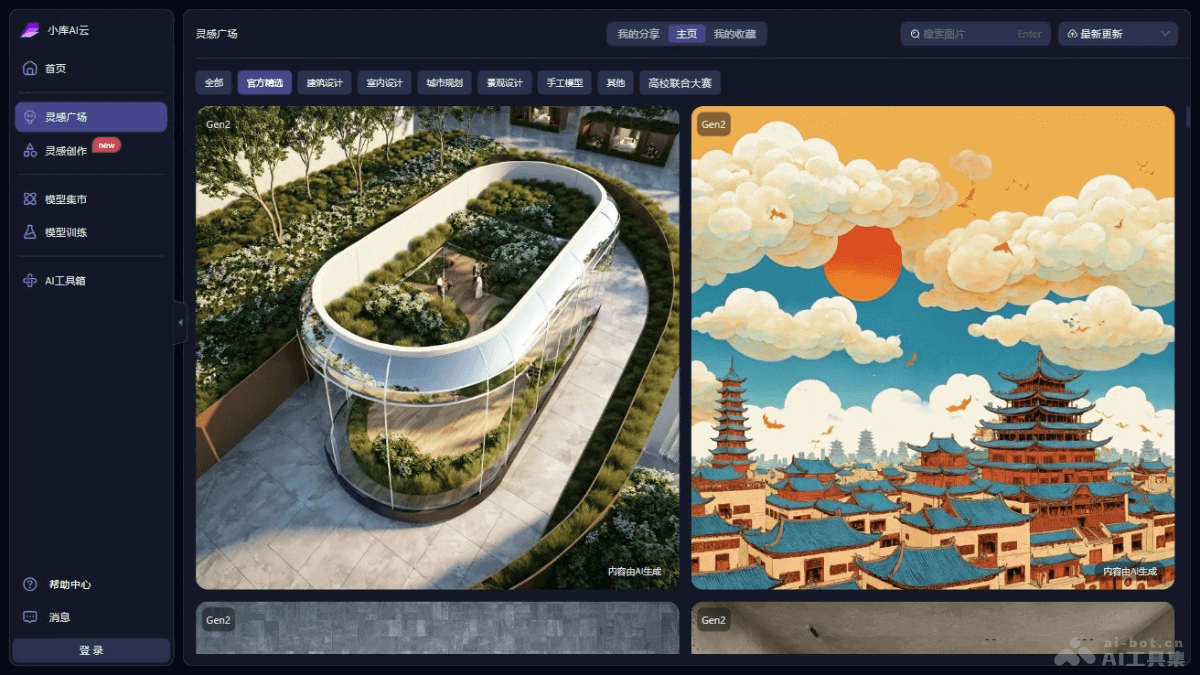
Main functions of Xiaoku AI Cloud
- Inspiration generation:
- Text-to-image/image-to-image: Users generate architectural design solutions based on input text descriptions or uploaded images, enabling the rapid transformation of inspiration.
- Easy mode and exploration mode: Provide operation options of different complexity. Easy mode is suitable for beginners to get started quickly, while exploration mode provides advanced users with more custom parameters for more refined control.
- Image editing and generation: Supports users in editing generated images, such as replacing local materials or styles, to meet specific design needs.
- Model training:
- Custom style models: Users upload their own datasets to train personalized AI models and generate architectural images with specific styles.
- Automatic mode and advanced mode: Provide training options of different difficulty levels. Automatic mode simplifies the operation process, while advanced mode provides more advanced parameter settings.
- Creation and sharing community:
- Inspiration Square: A community platform where users share and display design works, promoting the exchange and collision of inspiration.
- Model Marketplace: Users share and sell AI models they have trained, realizing the monetization of knowledge and skills.
- Alchemist Program: Encourages users to become experts in model training. Xiaoku Technology provides computing power, data, and traffic support to promote model innovation and sharing within the community.
How to use Xiaoku AI Cloud
- Registration and login: Visit Xiaoku AI Cloud'sofficial website. Create an account or log in with an existing account.
- Familiarize yourself with the interface: Browse the user interface and learn about the different function modules and tools.
- Inspiration generation:
- Select mode: Choose "Easy mode" or "Exploration mode" as needed.
- Enter prompts: In easy mode, select templates and combination tags; in exploration mode, enter more specific keywords and parameters.
- Upload images: If you need to generate a design based on a specific image, upload the image and set the relevant parameters.
- Generate design: Click generate, and Xiaoku AI Cloud will generate a design solution based on the input parameters or uploaded images.
- Edit and adjust: Edit the generated image, such as replacing materials, styles, etc., to meet design needs.
- Model training:
- Prepare dataset: Collect and prepare image datasets for training.
- Select training mode: Choose automatic mode or advanced mode as needed.
- Upload data and train: Upload the dataset to the platform to start the training process.
- Model iteration: Continue adding images based on an existing model to enrich model details.
- Creation and Sharing Community:
- Share works: Share design works in the Inspiration Square and communicate with other users.
- Model trading: Publish and sell trained models in the Model Marketplace.
- Plugin usage: If integration with modeling software such as SketchUp or Rhino is needed, download and install the XKool AI Cloud plugin to achieve a seamless workflow.
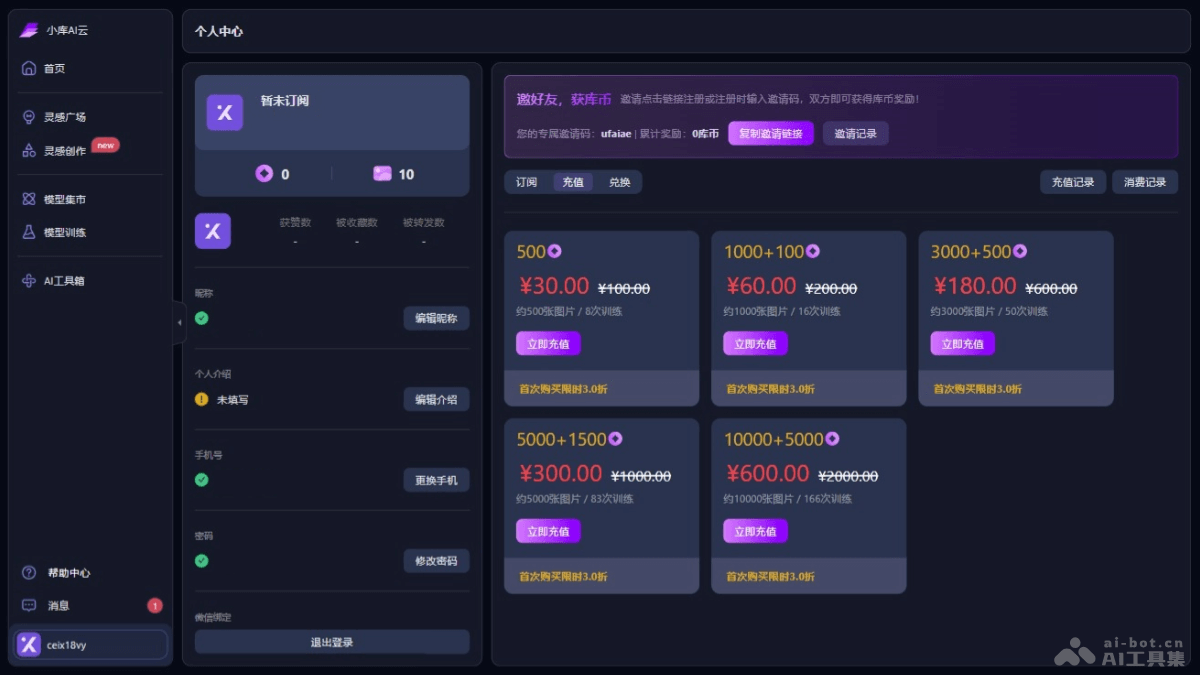
Product pricing of XKool AI Cloud
- 500 Kucoin:30 yuan, about 500 images / 8 trainings
- 1000 Kucoin + 100 Kucoin(bonus):60 yuan, about 1000 images / 16 trainings
- 3000 Kucoin + 500 Kucoin(bonus):180 yuan, about 3000 images / 50 trainings
- 5000 Kucoin + 1500 Kucoin(bonus):300 yuan, about 5000 images / 83 trainings
- 10000 Kucoin + 5000 Kucoin(bonus):600 yuan, about 10000 images / 166 trainings
Application scenarios of XKool AI Cloud
- Architectural design: Quickly generate architectural concept drawings and schematic designs, helping designers explore different design styles and layouts. Generate architectural renderings that meet specific design requirements, such as style, function, environment, etc.
- Urban planning: Assist urban planners in simulating and planning urban spatial layouts and generating urban design proposals. Simulate the impact of urban development on the environment and provide support for planning decisions.
- Interior design: Provide interior designers with rapid interior layout and style matching solutions. Generate interior design renderings, including furniture placement, decorative style, etc.
- Landscape design: Assist landscape designers in creating landscape planning drawings and renderings. Simulate the impact of different vegetation and environmental elements on the landscape.
- Architectural education and research: In architectural education, serve as a teaching tool to help students understand design principles and practice. Support architectural research, such as the restoration of historical buildings and the exploration of future architecture.