
What is Wuhr AI Ops
Wuhr AI Ops is an intelligent operations management platform that simplifies complex operations tasks through AI technology. The platform integrates a multimodal AI assistant, supports natural language interaction to execute operations commands, and can switch between K8s cluster and Linux system command environments with one click. The platform features real-time monitoring, log analysis, CI/CD management, user permission management, and more, and supports unified management of local and remote hosts. The platform uses ELK log analysis and Grafana performance monitoring, provides visual pipeline configuration and multi-environment deployment support, and helps operations teams achieve efficient, intelligent operations management.
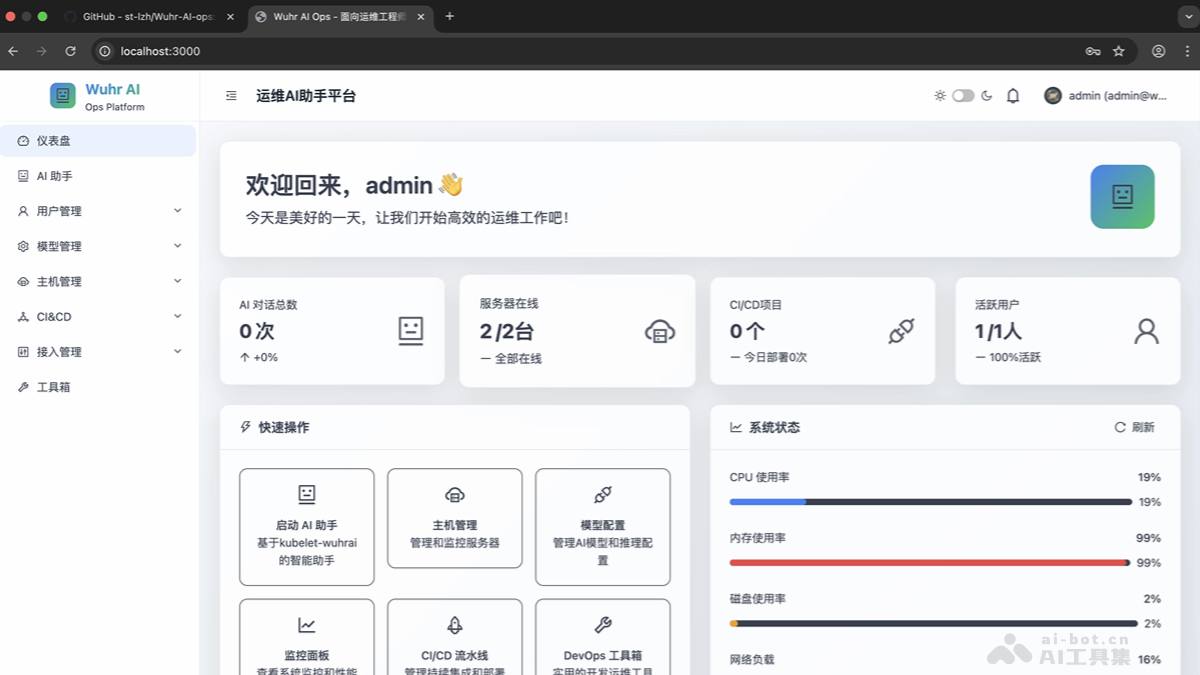
Main Features of Wuhr AI Ops
- Intelligent AI Assistant: Integrates multimodal AI models, supports natural language interaction and K8s/Linux command switching, and provides remote host command execution and session management.
- Real-Time Monitoring and Log Analysis: Integrates ELK log analysis and Grafana monitoring, and supports real-time log search, performance monitoring, and custom alert rules.
- CI/CD Management: Provides code building, test automation, Jenkins integration, and containerized deployment support, with deployment approval and rollback mechanisms.
- User Permission Management: Role-based access control, supporting user registration approval, fine-grained permission assignment, and operation audit logs.
- Host Management: Unified management of local and remote servers, supporting SSH connection configuration, status monitoring, and batch operations.
- Model Management: Supports access to multiple AI providers, and provides API key management and model performance testing.
- Access Management: Supports ELK and Grafana integration to enable log aggregation, search, and custom monitoring dashboard configuration.
- Toolbox: Provides common operations tools such as system diagnostics, network testing, file transfer, and batch operations.
How to Use Wuhr AI Ops
- System Requirements:
-
Operating System:Linux/macOS/Windows
-
Node.js: >= 18.0.0 (20.0+ recommended)
-
npm: >= 8.0.0 (10.0+ recommended)
-
Docker:>= 20.10.0
-
Docker Compose:>= 2.0.0
-
Memory:>= 4GB
-
Hard Disk: >= 20GB available space
-
- Clone the Project:
git clone https://github.com/st-lzh/wuhr-ai-ops.git
cd wuhr-ai-ops- Installation and Deployment:
- One-Click Installation Script:
- Domestic Users: Run the Chinese installation script.
- One-Click Installation Script:
./install-zh.sh-
-
- International Users: Run the English installation script.
-
./install-en.sh-
- Manual Installation:
- Configure Environment Variables:
- Manual Installation:
cp .env.example .env
# 编辑.env文件,配置数据库和AI API密钥-
-
- Configure npm Registry (Domestic Users):
-
npm config set registry https://registry.npmmirror.com/-
-
- Download the kubelet-wuhrai Tool:
-
wget -O kubelet-wuhrai https://wuhrai-wordpress.oss-cn-hangzhou.aliyuncs.com/kubelet-wuhrai
chmod +x kubelet-wuhrai-
- Start the Database Service:
docker-compose up -d postgres redis pgadmin
sleep 30-
- Install Dependencies:
npm install-
- Database Initialization:
npx prisma migrate reset --force
npx prisma generate
npx prisma db push-
- Initialize Users and Permissions:
node scripts/ensure-admin-user.js
node scripts/init-permissions.js
node scripts/init-super-admin.ts-
- Initialize Preset Models:
node scripts/init-preset-models.js-
- Initialize ELK Templates:
node scripts/init-elk-templates.js-
- Build and Start the Application:
npm run build
npm start- Access Address: Main Applicationhttp://localhost:3000
- Default Account:
-
Username:admin
-
Email:admin@wuhr.ai
-
Password:Admin123!
-
Project Address of Wuhr AI Ops
- GitHub Repository:https://github.com/st-lzh/Wuhr-AI-ops
Application Scenarios of Wuhr AI Ops
- Data Center Operations: Use the AI assistant to quickly troubleshoot and resolve faults, and combine real-time monitoring and log analysis modules to promptly discover performance bottlenecks and anomalies.
- Cloud Platform Operations: , through the CI/CD management module, realize automated deployment and updates of containerized applications, and combine with the monitoring module to ensure the stable operation of the cloud platform.
- Enterprise IT Operations: Use the AI assistant to perform daily operations tasks, and combine with the user permission management module to ensure the security and compliance of operations tasks.
- Development and Testing Environment Management: The AI assistant quickly configures and manages the development environment, and combines with the real-time monitoring module to ensure the stability of the development and testing environment.
- Troubleshooting and Emergency Response: Quickly obtain fault information, use the log analysis module to quickly locate the root cause of the problem, combine with the real-time monitoring module to track system status in real time, and take emergency measures promptly.