
Data tables, dashboards, information statistics, and business systems can all be handed over to AI from now on.
A while ago, I was invited to an offline media briefing for WPS Multi-Dimensional Table, and saw a completely different way of doing things: we input one sentence, AI first figures out our business logic, then automatically generates a complete system including automation flows, multiple views, and a visual dashboard.
Let me show you the on-site cases:
This provincial knowledge competition system serving 400,000 people was built by the Kingsoft Office team in just two days using WPS Multi-Dimensional Table.

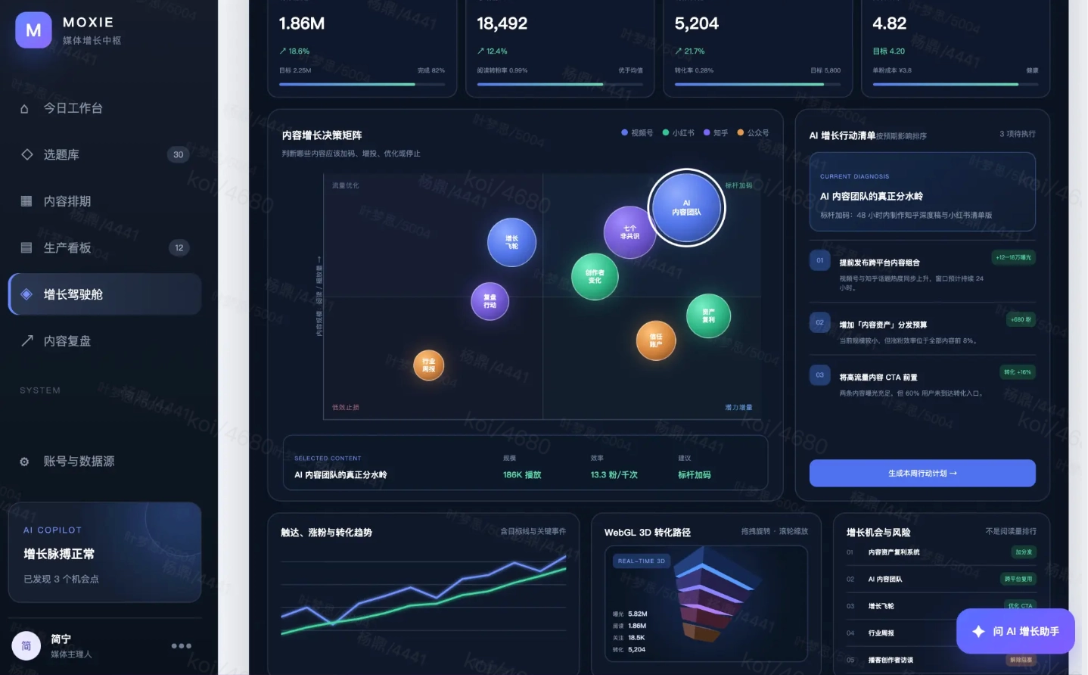
The topic scheduling system prepared on site for the media was also built with one sentence from AI, from topic selection to review, all in one system.
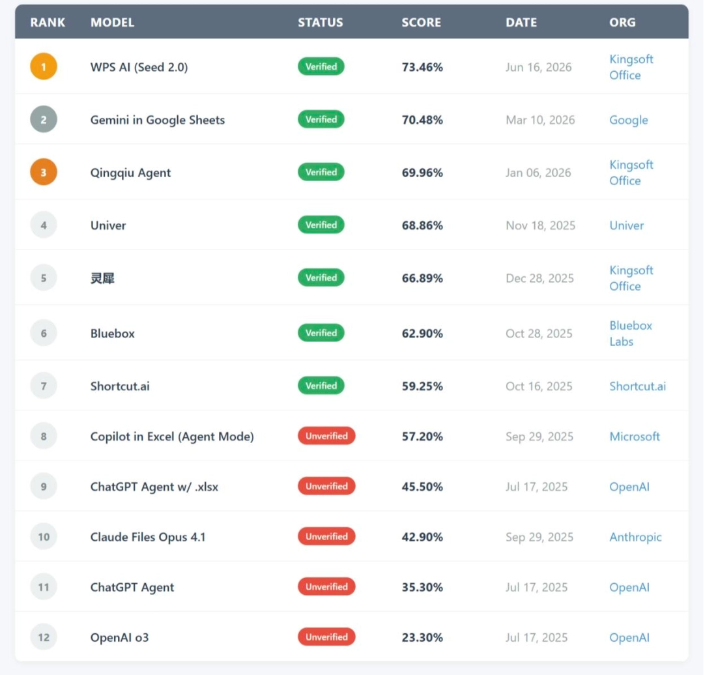
What's even more interesting is thatWPS AI it successively took three global number ones:
In June, it topped SpreadsheetBench V1 Full.
Facing more than 900 complex Excel challenges, WPS AI scored 73.46%and directly crossed the human expert baseline for the first time,
demonstrating its strength in handling complex formulas, cross-sheet queries, and spreadsheet operations.
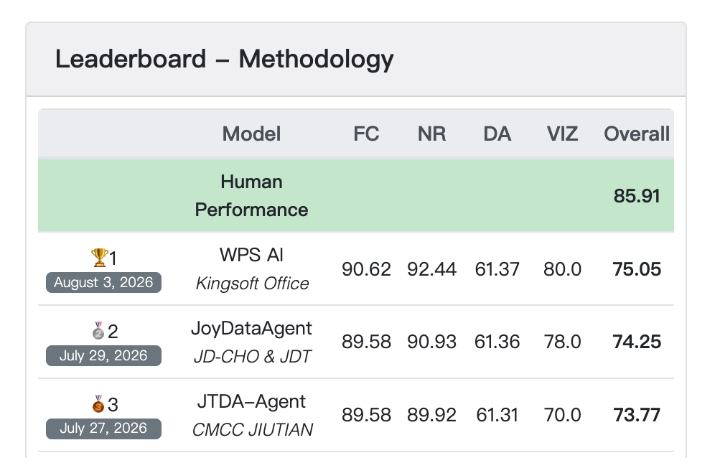
In July, it topped the list again TableBench。
TableBench is a public benchmark for complex spreadsheet question answering and data reasoning, testing AI's overall performance when facing real data problems.
In August, it once again topped SpreadsheetBench V2 Full, verifying WPS AI's ability to link multiple worksheets and complete complex business processes such as financial modeling and spreadsheet error correction。
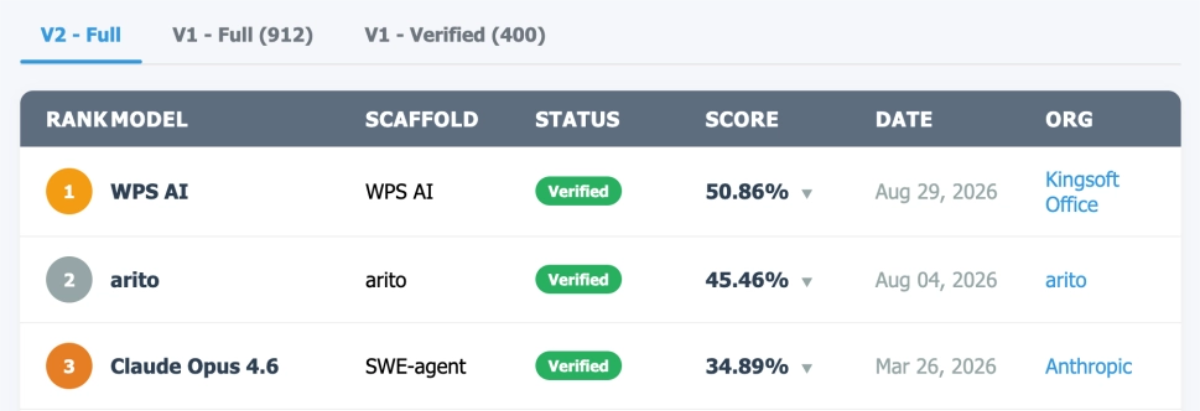
SpreadsheetBench looks at whether it can do spreadsheets well, while TableBench looks at whether it can understand data. These two evaluations precisely correspond to the two most critical abilities of spreadsheet AI.
In this article, let's experience together what this world's number one spreadsheet AI can actually help us do.
01. Turn Data into an App with One Sentence
Usually when we use spreadsheets, we first create columns of fields, fill in the information, and then make statistics and view charts as needed.
Now, you can directly tell AI: what I want to do with this data.
The inspiration app of WPS Multi-Dimensional Table will revolve around these needs and help us organize the pages and operations in the app. Underneath is the data of the multi-dimensional table, and when opened, it is an interface closer to actual work.
Friends who do not know how to write code can also get started easily.
Let's open WPS and first create a blank multi-dimensional table.
Switch to the app and select inspiration mode.
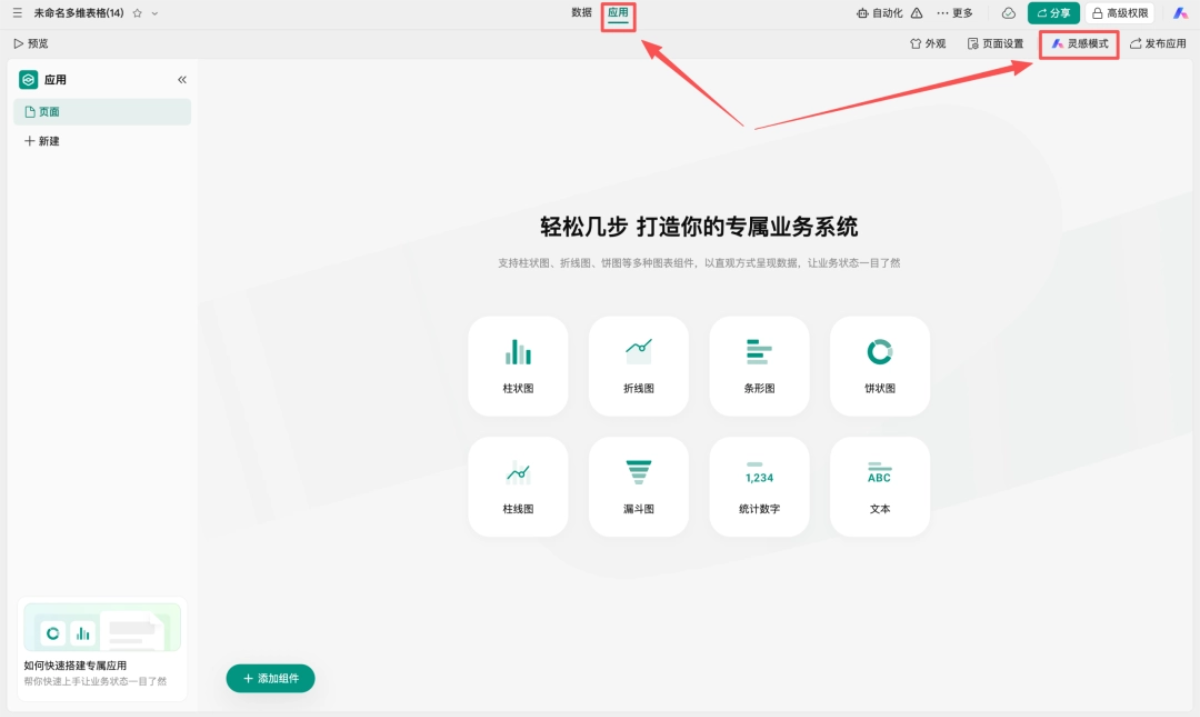
Enter the requirements, and you can create an app with one click based on our multi-dimensional table data.

It is recommended to open the sidebar of WPS Multi-Dimensional Table inspiration mode. Here you can select experts for different roles such as application expert, general manager assistant, and production statistician.
Select the corresponding expert for different needs, and the processing flow will be more professional.
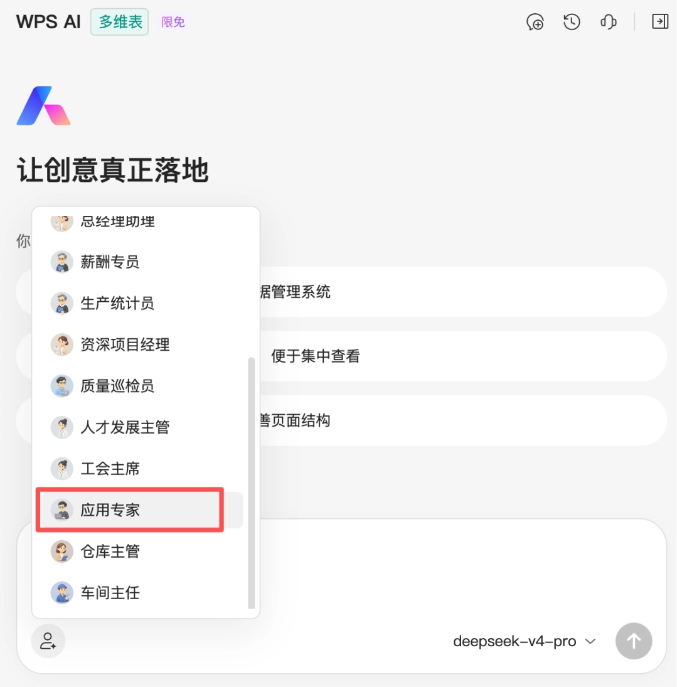
There is also a detail worth mentioning:The underlying layer of an AI-generated app is always that multi-dimensional table。
In other words, the app is just a layer of "skin" over the data.
Today you want a kanban to track progress, tomorrow you want to switch to a calendar schedule, and one sentence can get it done.
At the briefing, they even demonstrated using the same order data to directly generate a rotatable 3D cockpit - the data does not move, and the interface can be changed however you like.
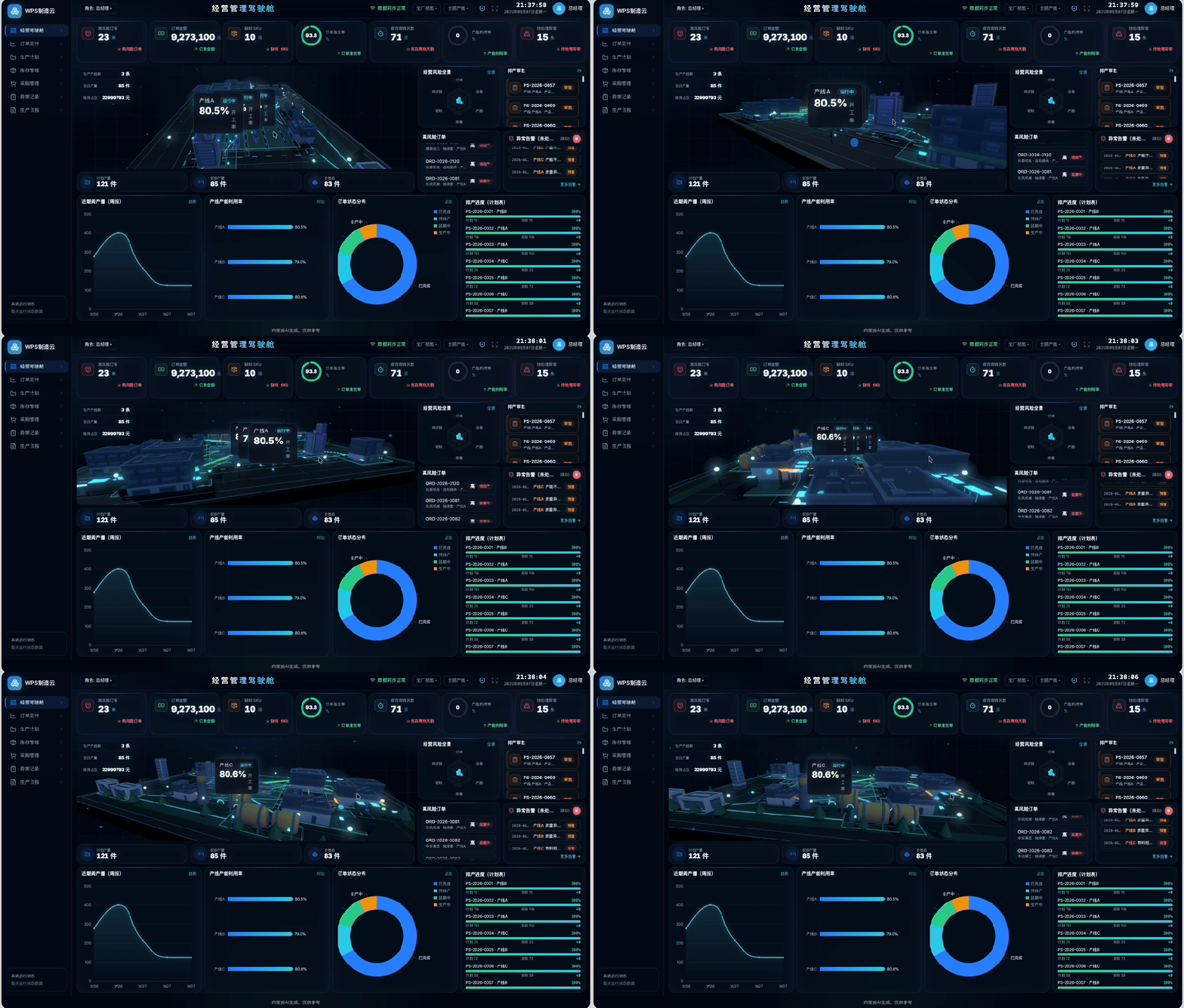
This is also the biggest difference between WPS Multi-Dimensional Table and having AI directly write code: when requirements change, there is no need to overturn everything and start over. The data stays safely in the table, and only the outer interface needs to change.
Next, let's try three real-world scenarios. (I've compiled all the case prompts at the end of the article, so you can copy and use them directly.)
Case 1 Self-Media Topic Planning System
When one person creates content, the most time-consuming part isn't writing the article, but that topics, materials, and data are scattered everywhere, and before each work session you have to spend half a day sorting things out.
After finally getting the article published, you still have to find separate time to organize the data.
So this time, I used WPS Multi-Dimensional Tables to build a topic planning system, putting topics, scheduling, materials, and review data all onto the same page.
Before starting generation, WPS Multi-Dimensional Tables will first use clarifying questions to confirm the core problem I most want to solve, as well as my preferred visual style.
We can just choose according to the actual situation.

WPS Multi-Dimensional Tables generated a small amount of sample data according to my requirements and displayed it in the application.
Articles, topics, materials, and scheduling are all displayed very clearly.
The application and the underlying data are synchronized in both directions, when we adjust the article status in the application, the underlying data changes accordingly; when we modify content in the multi-dimensional table, the application also displays the corresponding result.
When using it, we just need to import our own real data.
WPS Multi-Dimensional Tables directly turns real data tables into operable business applications, and also connects originally scattered content work into a closed loop。
After the first version is generated, if the page is still not complete enough, there is no need to rebuild it. WPS will proactively provide suggestions based on the current application fornext steps, you can click these suggestions directly, or continue to propose modifications in natural language:

It's okay if you don't know how to configure fields or design pages.
As long as you can clearly say what you want to change, WPS can continue to iterate the application.
Case 2 Personal Workspace
Every day, switching back and forth among WeChat, email, memos, and various project software makes information extremely fragmented.
Even though I was busy all day, by the time work ended, I still missed some important things that had not been advanced.
So I asked WPS Multi-Dimensional Tables to help me build a personal workspace, concentrating the to-dos I need to check every day and information on ongoing projects onto one page.
After opening it, I can clearly see which things are pending and which projects are in progress, making it convenient for me to arrange what to do first today.
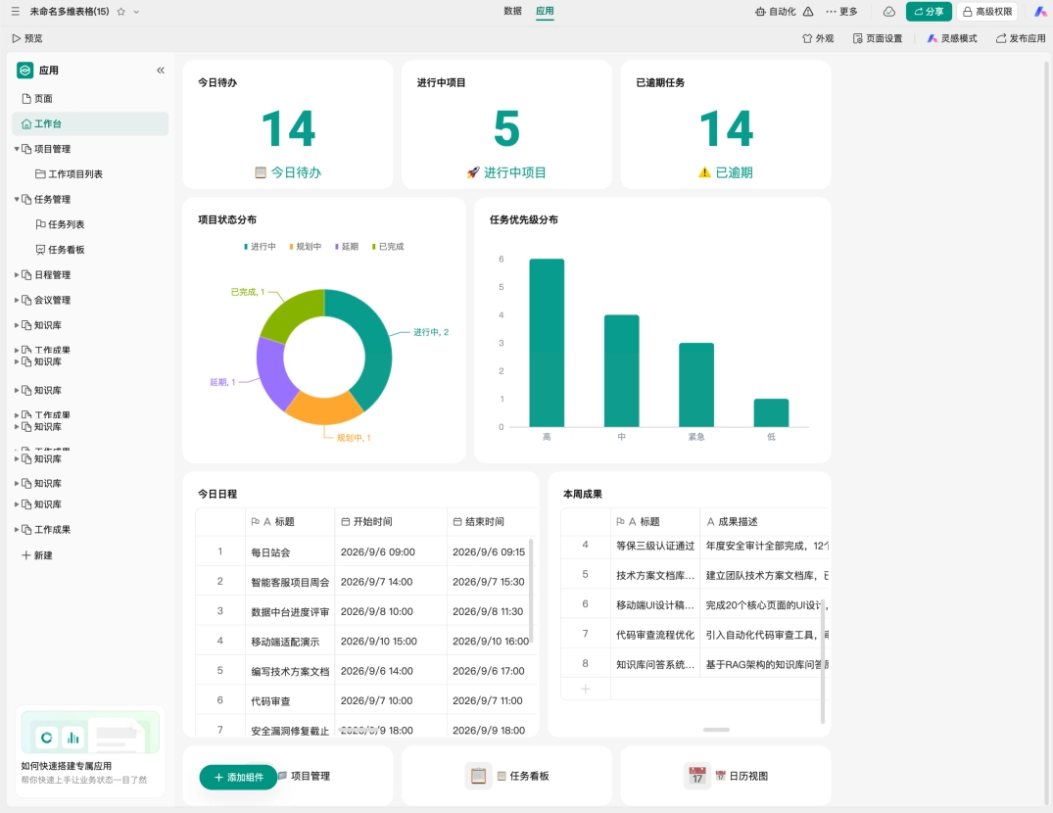
Moreover, everyone has different habits for arranging work. Some people look at the calendar first to control the overall progress, while others look at projects first.
We can customize the layout by dragging and dropping, and the size and position of modules can be adjusted directly.
With the same set of work information, everyone can adjust it into a workspace that suits their own habits.
Case 3 My Cultural Life Database
Usually, when I come across movie recommendations or see others sharing book lists, my first reaction is to save them first.
But when I actually have time to watch or read, the favorites folder contains all kinds of content and I simply can't find them.
I also casually wanted to build a cultural life database, summarizing the works I want to watch or read, those I am currently reading or watching, and those I have already finished.
WPS Multi-Dimensional Tables for building applicationssupports custom styles, this time we switched to a glassmorphism frosted-glass style.
This time, WPS Multi-Dimensional Tables added a soft gradient background for us, paired with pieces of frosted-glass-like cards floating on the page. The entire application page has depth without being too eye-catching.
Books and movies are presented in a waterfall-style poster wall, and clicking on them also lets you adjust the reading status.

The only downside is that WPS Multidimensional Tables' support for images is not yet complete. If book covers and movie posters could also be displayed, browsing would be more intuitive and would have more of the feel of a personal library of books, films, and music. (There is internal news that next week's new version will support images, looking forward to it~)
After the app is ready, click Publish App in the upper right corner.

Once the viewing permissions are set, a sharing link can be generated, without having to deal with servers and deployment yourself.

If you want to maintain it together with friends, you can also separately open management and editing permissions in advanced permissions, turning a personal collection into a book list and watchlist that everyone updates together.

02. Some Sharing
The reason many business software products in the past were so harshly criticized as hard to use is really not that the technology could not achieve it, but that the requirements became distorted during the handoff process.
Frontline staff understand business bottlenecks best, but they do not know how to write code; by the time these requirements are relayed layer by layer to developers, they have often long deviated from the original scenario.
Now, although ordinary AI can be used to help build apps, it often only yields a piece of code, and the subsequent deployment process of buying servers and configuring environments can still be quite a hassle.
WPS, however, achieves deployment-free use: after generation, you just share a link and it can be opened and used;
how the interface is presented and how the process runs can be described directly in natural language.
More importantly, WPS Multidimensional Tables' complex permission isolation and multi-user concurrent editing capabilities provide transparent, traceable data, backed by enterprise-grade security and compliance.
In the past, people looked for software based on requirements, and people adapted to software; now, one sentence makes the system cooperate with people instead. Ordinary people thus truly gain the superpower to quickly turn ideas into apps.
Friends who want to get the same app can directly copy my prompt:
Personal Workspace prompt:
Help me build a professional "Personal Workspace" to help me centrally manage personal work projects, tasks, and schedules, and quickly grasp today's arrangements, project progress, upcoming deadlines, and collaborations that need follow-up. The visual style uses collage scrapbook journal style, with staggered columns and high information density. Core data includes work projects, tasks, subtasks, schedules, meetings, deadlines, priorities, work notes, and achievement records. Each project is associated with multiple tasks, schedules, and notes; tasks support setting priority, deadline, reminder time, and collaborators, and automatically calculate project completion rate based on task completion. Schedules support association with projects or tasks, and meetings support recording topics, meeting minutes, and follow-up to-dos. The homepage displays today's to-dos, today's schedule, this week's priorities, ongoing projects, upcoming and overdue tasks, items I need to follow up on, and this week's work achievements. Support switching between "Today," "This Week," and "All," clearly distinguishing work I am responsible for, collaboration I participate in, and work waiting for others' feedback. Support viewing project details, switching between task list and kanban, dragging to change task status, calendar week view and month view, scheduling tasks to the calendar, schedule conflict reminders, recurring task settings, quick to-do recording, and generating personal weekly reports and project summaries based on completed tasks and achievement records. By default, generate 5 personal work projects at different stages, including at least 1 delayed project and 2 key tasks nearing deadlines.
My Cultural Life Database prompt:
Help me build a highly personalized "Movie and Book Workbench" to help me manage movies I want to watch, books I want to read, watching and reading progress, ratings, notes, and personal cultural life records. The overall style adopts a glassmorphism frosted glass look. Core entities include movies, books, directors, authors, category tags, viewing records, reading records, short reviews, excerpts, and annual goals; centered on movies and books, linking creators, progress, notes, and personal records. Movies support "Want to Watch, Watching, Watched" statuses, and books support "Want to Read, Reading, Read, On Hold" statuses, and record the current page number or reading percentage. Each work can have a personal rating, completion date, reason for collecting, and custom tags added, and supports recording rewatches and rereads. The homepage displays movies currently being watched, books currently being read, recent want-to-watch and want-to-read lists, works completed this month, annual goal progress, my selected excerpts, and a viewing and reading timeline. Supports switching between movie and book views, search and filtering, quickly adding to lists, updating progress, writing movie reviews and book reviews, saving favorite lines and passages, creating themed movie lists and book lists, and reviewing personal records by month or year.
Original link:WPS multi-dimensional table, can generate an app in one sentence