
What is Weights
Weights is an AI creation platform that creates various types of multimedia content based on AI technology. Users can create a variety of works for free on the platform, including voice covers, chorus,text-to-speech, images, videos,music, and interactive chat with AI characters. Weights' goal is to provide users with a simple and easy-to-use creation environment that inspires creative inspiration. Users share their works with the community, communicate and interact with other creators, and gain inspiration and feedback. The Weights platform is not only suitable for beginners to get started quickly, but also provides experienced creators with rich creation tools and resources to help users create higher-quality works.
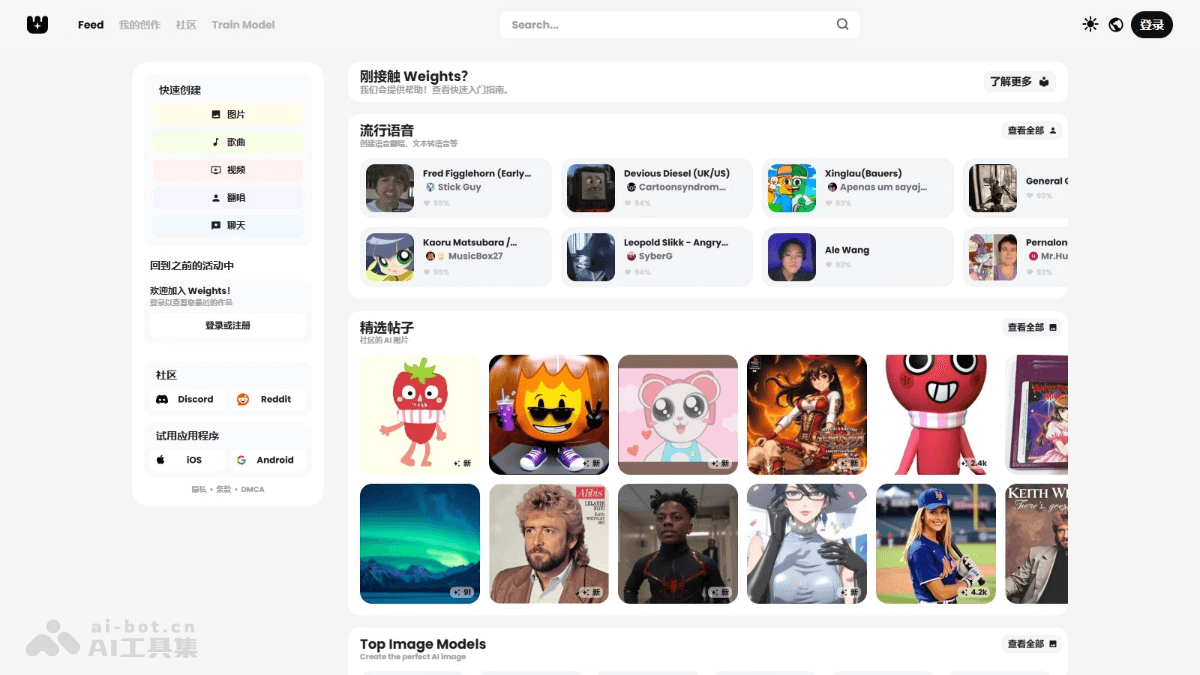
Main Features of Weights
- Voice Covers: Users apply their own voice to existing songs to create personalized cover versions.
- Chorus: Collaborate with others to create chorus works, increasing the richness and interactivity of the music.
- Text-to-Speech: Convert text content into speech, suitable for creating audiobooks, voice messages, and more.
- Image Creation: Generate high-quality images based on descriptions or inspiration prompts to meet visual creation needs.
- Video Production: Combine multiple elements to create video content, such as animations, short films, and more.
- Music Creation: Use AI technology to create original music, covering different styles and genres.
- Chat with AI Characters: Interact with virtual characters and experience the fun of intelligent conversation.
- Community Sharing and Interaction: Users can share their created works with the community and showcase their creative achievements.
- Train Models: Users use their own data to train new voice or image models.
How to Use Weights
- Register an Account:
- Web: Visit Weights'official website, and complete registration and login by following the prompts.
- Mobile Devices: iOS device users visitthe Apple App Store, Android users visitthe Google Play Store. Complete the download and login by following the prompts.
- Choose a Creation Type: According to your interests and needs, choose the type you want to create. For example, if you want to generate an image, click the "Image" option.
- Create
- Describe or Choose Inspiration: In the pop-up creation modal, describe the content you want to create, or choose an idea from the provided inspiration library.
- Generate Work: After entering a description or choosing inspiration, click the "Generate" button, and the system will automatically generate the work.
- View and Share Works
- View Works: Created works are saved in "My Creations". Access them through "Create -> My Creations" in the navigation bar (desktop), or click the "My Creations" tab (mobile) to view them.
- Share Works: Share to the community. On the "My Creations" page, click the "Create Post" button, fill in the work description, and click "Post" to publish the work to the community.
- Community Interaction
- Browse the Community: In the community, browse other users' works to get inspiration and feedback.
- Comment and Communicate: Interact with other creators, comment on works, and share opinions and suggestions.
Application Scenarios of Weights
- Entertainment and Creation: Music enthusiasts generate personalized music works, such as creating a unique song or producing a piece of background music, share them in the community, get feedback and inspiration, and interact and collaborate with other music creators.
- Language Learning: Language learners generate speech files with standard pronunciation for use in listening practice and pronunciation imitation, helping improve language learning results.
- Marketing and Promotion: Enterprises produce creative advertising videos, combining multiple elements such as images, audio, and text to create attractive advertising content, and publish it to platforms such as social media to enhance brand awareness and product sales.
- Content Creation: Content creators generate images or videos related to the article theme, serving as illustrations or images for blogs or articles, enhancing the visual appeal and expressiveness of the content, and attracting more readers' attention and reading.
- Social Interaction: Users create personalized blessing videos or audio for friends or family, combining images, music, and text to express blessings and emotions, increasing the fun and personalization of interaction.