
What Is Yuelu
Yuelu is anAI speech-to-text tool, based on Hithink RoyalFlush's intelligent speech, natural language processing, and other AI technologies. It can quickly and accurately convert voice recordings into text, supports multiple languages and dialects, and has a recognition accuracy of over 95%. Yuelu features speaker distinction, intelligent summaries, multilingual translation, floating subtitles, and more, making it suitable for meeting notes, interviews, learning, and other scenarios. Yuelu supports synchronization across mobile phones, tablets, web pages, and computers, allowing users to view and edit transcriptions anytime and anywhere. It providesvoice cloningand AI singing and other special features to meet personalized needs.
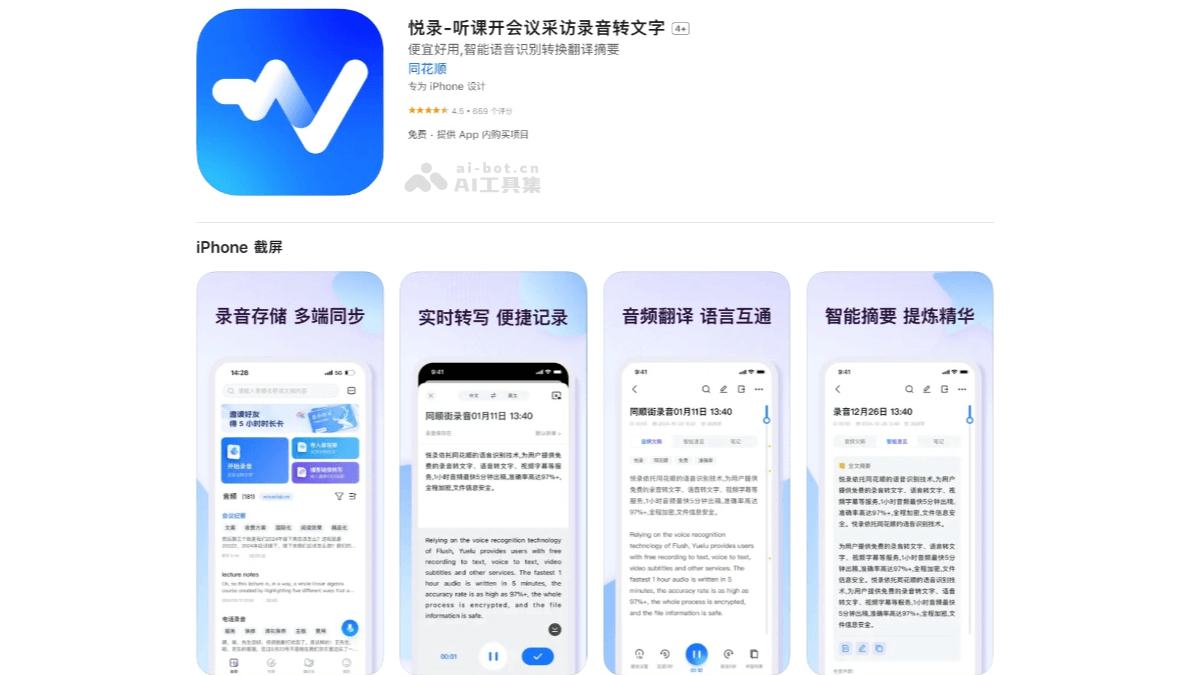
Yuelu's Main Features
- Recording-to-Text: Quickly and accurately converts voice recordings into text, supports multiple languages and dialects, and has high recognition accuracy.
- Speaker Distinction: In multi-person conversation scenarios, automatically distinguishes the speech of different speakers, making it convenient to organize meeting notes or interview content.
- Intelligent Summary: Automatically extracts key information from documents and generates intelligent summaries, helping users quickly grasp the main points.
- Multilingual Translation: Supports translation in multiple languages, meeting the needs of cross-language communication.
- Floating Subtitles: Displays transcribed text content in real time during recording, making it convenient for users to check immediately.
- Text Editing and Search: Supports online editing and content search, making it convenient for users to organize and find information.
- Voice Cloning and AI Singing: Can imitate timbre and pitch to achieve high-quality singing effects and meet personalized needs.
- Multi-Device Synchronization: Supports synchronization across mobile phones, tablets, web pages, and computers, making it convenient for users to use anytime and anywhere.
- Safe and Reliable: Uses high-level encrypted cloud storage to ensure user data security.
How to Use Yuelu
- How to Use on Mobile
- Download and Install: VisitApple AppStoreor search for "Yuelu" in your phone's app store, then download and install the latest version.
- Register and Log In: After opening the APP, register and log in using your mobile phone number.
- Start Recording: Tap the "microphone" button at the bottom of the home page to start recording. After recording is complete, tap "Save" to generate audio and a text document.
- Import Audio to Convert to Text: Tap "Import audio/video" and choose local audio or import from a third-party app. After selecting the language, tap "Submit" and wait for transcription to complete.
- Voice Quick Notes: Tap "60-second voice quick notes" in the lower right corner to quickly record important information.
- Document Editing and Viewing: Transcribed documents support online editing and export in Word or TXT format. In the "Listening List", you can listen to the recording while viewing the text.
- How to Use on Web
- Log In to the Official Website: Visit Yuelu'sofficial website。
- Upload Audio: Tap "Recording-to-Text" and upload the audio file you need to convert.
- Start transcription: Click "Start transcription" and wait for the transcription to complete.
- View and edit: After transcription is complete, you can view the transcript in the task list and edit it
Yuelu's application scenarios
- Class notes: Students can transcribe class recordings into text for easy review and organization.
- Academic research: Help researchers organize recordings of academic lectures and seminars to improve research efficiency.
- Meeting minutes: In multi-person meetings, Yuelu can transcribe meeting content in real time, distinguish different speakers, and facilitate subsequent organization and archiving.
- Interview recordings: Journalists or self-media creators can quickly transcribe interview recordings into text to improve work efficiency.
- Voice cloning and AI singing: Users can use the voice cloning feature to generate personalized audio, applying it to fields such as audiobooks and virtual hosts.