
What is VideoRAG
VideoRAG is a retrieval-augmented generation (Retrieval-Augmented Generation) technology for long video understanding. By extracting visually aligned auxiliary text from videos, it helps Large Video Language Models (LVLMs) better understand and process long video content. Specifically, VideoRAG uses open-source tools to extract information such as audio, text, and object detection from video data, and inputs this information as auxiliary text together with video frames and user queries into existing LVLMs. This method has low computational overhead, is easy to implement, and is compatible with any LVLM. In multiple long video understanding benchmarks, VideoRAG has demonstrated significant performance improvements.
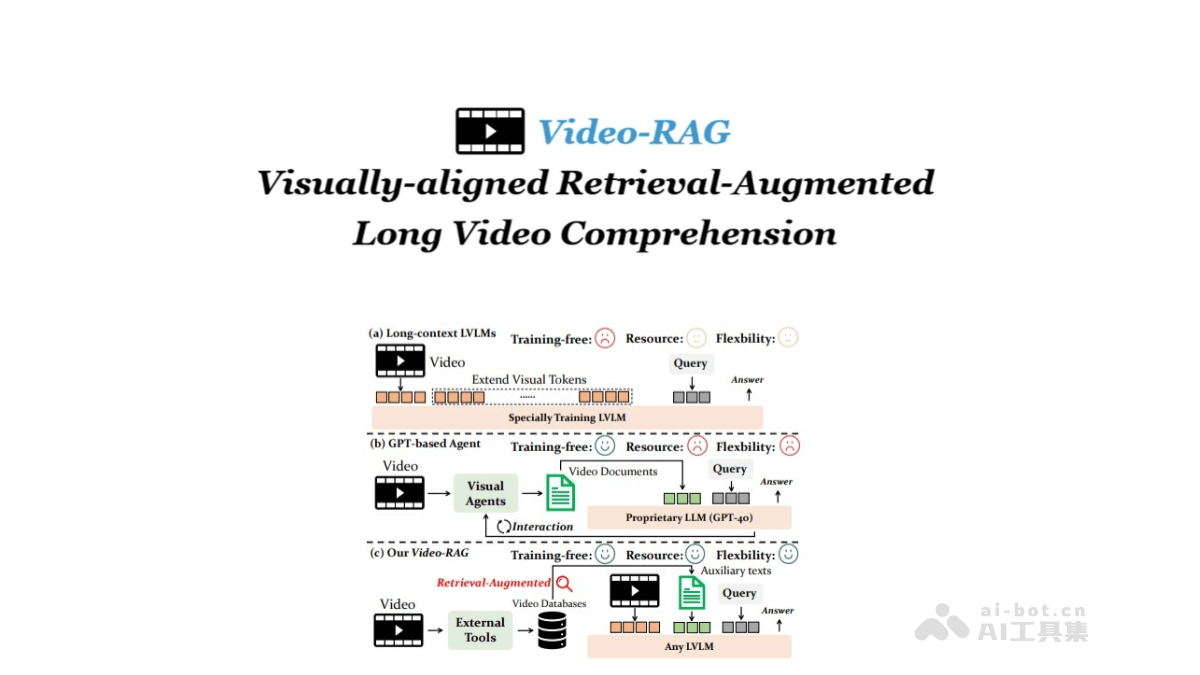
Main Features of VideoRAG
- Retrieval-Augmented Generation: Through retrieval-augmented generation (RAG) technology, VideoRAG can extract auxiliary text related to user queries from long videos, helping the model better understand and generate responses.
- Multimodal Information Extraction: Based on open-source tools (such as EasyOCR, Whisper, and APE), VideoRAG extracts multiple types of auxiliary text from videos, including optical character recognition (OCR), automatic speech recognition (ASR), and object detection (DET) information.
- Lightweight and Efficient: VideoRAG adopts a single-retrieval approach, featuring lightweight and low computational overhead, and is easy to integrate with existing Large Video Language Models (LVLMs).
Technical Principles of VideoRAG
- Auxiliary Text Extraction: Based on open-source tools, it extracts multiple types of auxiliary text information from videos, including optical character recognition (OCR), automatic speech recognition (ASR), and object detection (DET), etc. It separately processes the video's text, audio, and visual content to generate text descriptions aligned with video frames.
- Retrieval Module: The extracted auxiliary text information is stored in a vector database, and retrieval technology is used to find the text segments most relevant to the user query from the database. This is achieved by matching the feature vectors of the user query and video content with the text vectors in the database.
- Generation Module: The retrieved auxiliary text is input together with the video frames and user query into an existing Large Video Language Model (LVLM). The model generates a response to the user query based on this information. The auxiliary text provides additional contextual information, helping the model better understand and generate answers related to the video content.
- Cross-Modal Alignment: Through the introduction of auxiliary text, VideoRAG promotes cross-modal alignment between video frames and user queries, enabling the model to more accurately focus on key frames relevant to the query.
Project Address of VideoRAG
- Project Official Website:https://video-rag.github.io
- Github Repository:https://github.com/Leon1207/Video-RAG-master
- arXiv Technical Paper:https://arxiv.org/pdf/2411.13093
Application Scenarios of VideoRAG
- Video Question Answering System: VideoRAG can be used to build a video question answering system, helping users ask questions about long video content and obtain accurate answers.
- Video Content Analysis and Understanding: In scenarios that require in-depth analysis and understanding of long video content, VideoRAG can assist in identifying and interpreting key information in videos.
- Education and Training: In the field of education, VideoRAG can help students and teachers better understand and analyze teaching video content. Or teachers can use VideoRAG to analyze teaching videos and optimize teaching content.
- Entertainment and Media Content Creation: In the entertainment and media industry, VideoRAG can be used for the creation and editing of video content. VideoRAG can help creators quickly find video clips and information related to a theme, improving creative efficiency.
- Enterprise internal knowledge management: Enterprises can use VideoRAG to manage and retrieve long video content such as internal training videos and meeting recordings, making it convenient for employees to quickly obtain the information they need and improving work efficiency.