
What is VideoDoodles
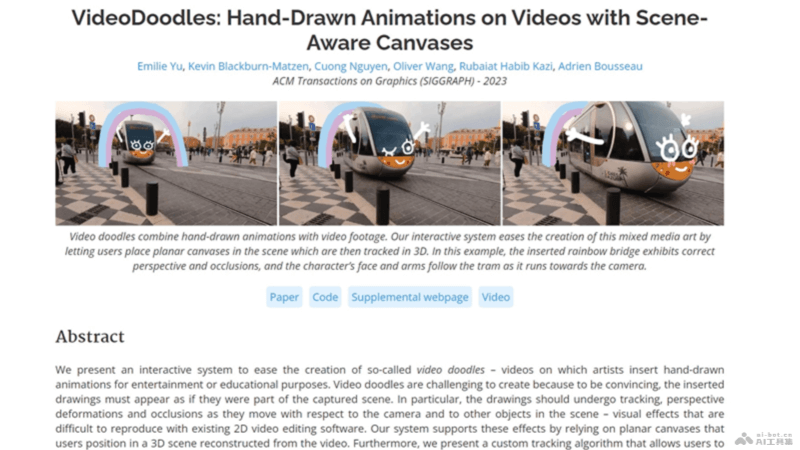
VideoDoodles is an AI video editing framework launched by Adobe in collaboration with multiple universities. It allows users to easily insert hand-drawn animations into videos, achieving seamless integration with the video content. By preprocessing video frames, the system provides a flat canvas on which users can draw animations over the video, and the system automatically handles perspective and occlusion effects. VideoDoodles' tracking algorithm enables animations to follow objects in the video, simplifying the animation production process.
Main Features of VideoDoodles
- Hand-drawn Animation Insertion: Users can add hand-drawn style animation elements to videos.
- Automatic Integration: Animations blend seamlessly with video content without the need for complex post-processing.
- 3D Scene Drawing: Flat canvases are placed in 3D space, achieving automatic rendering of perspective and occlusion effects.
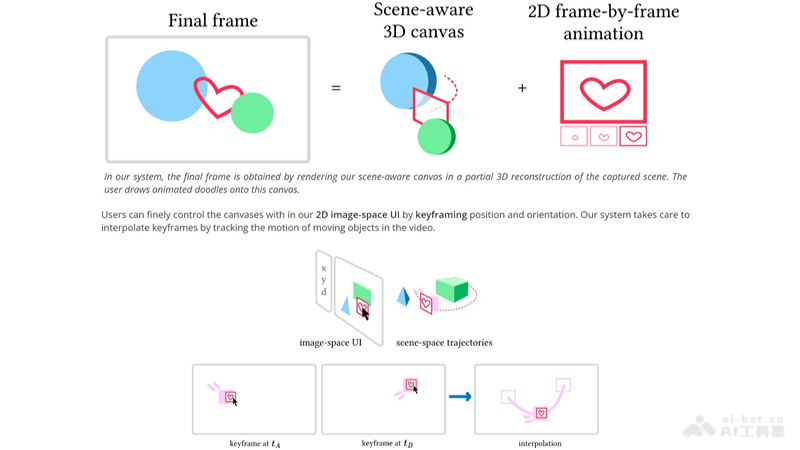
- Keyframe Control: The start and end states of an animation are set through keyframes, and the system automatically generates the intermediate animation.
- Dynamic Object Tracking: A custom algorithm enables animations to follow dynamic objects in the video.
Technical Principles of VideoDoodles
- Video Preprocessing: VideoDoodles analyzes the input video and extracts the camera pose, depth map, and optical flow information for each frame, laying the foundation for subsequent animation compositing.
- Flat Canvas Mapping: Users place a virtual flat canvas in 3D space, and the canvas can be mapped to a specific area of the video. VideoDoodles uses camera pose and depth map information to automatically render the canvas with correct perspective and occlusion effects.
- Tracking Algorithm: VideoDoodles uses a custom tracking algorithm, and the canvas can follow static or dynamic objects in the video. Users can control the position and orientation of the canvas by setting keyframes, and the system automatically calculates the optimal 3D trajectory.
- 3D Position and Orientation Tracking:
- Position Tracking: A keyframe-based 2D tracking algorithm that builds a directed graph to search for the object's trajectory, keeping the relative position between the canvas and the object consistent.
- Orientation Tracking: Users can specify the rotation matrix of the canvas in keyframes, and an optimization algorithm is used to keep the canvas orientation consistent with the direction of the moving object.
- Automated Animation Generation: Once users draw animation elements on keyframes, VideoDoodles automatically generates the entire animation process without the need for users to draw frame by frame.
- User Interface Design: VideoDoodles provides an intuitive user interface that allows users to easily select, draw, and adjust animation elements.
VideoDoodles Project Address
-
GitHubRepository:https://github.com/adobe-research/VideoDoodles
Application Scenarios of VideoDoodles
- Social Media Content Creation: Users can add interesting hand-drawn animations to their social media videos, increasing the appeal and interactivity of the videos.
- Educational Video Production: Teachers or educators can add animations to instructional videos to explain complex concepts or processes in a more vivid way.
- Commercial Advertising: Advertisers can use VideoDoodles to create attractive animated ads for products or services, improving the creativity and memorability of the ads.
- Film and video post-production: Video editors can use VideoDoodles in film or video post-production to add unique visual effects to their work.