
What is Tuying
Tuying is anAI commercial photography toolthat serves the e-commerce apparel sector. Based on AIGC technology, it helps users quickly, efficiently, and economically create high-quality product images. Tuying can automatically generate commercial photography content for real scenes or specific needs based on materials without the need for actual scene shooting, reducing costs and improving efficiency. The platform provides model and scene customization services, as well as a massive selection of models free from copyright risks, meeting personalized needs. Tuying is suitable for advertising creativity, printing and publishing, apparel and fashion, and many other industries, driving a leap forward in commercial visuals.
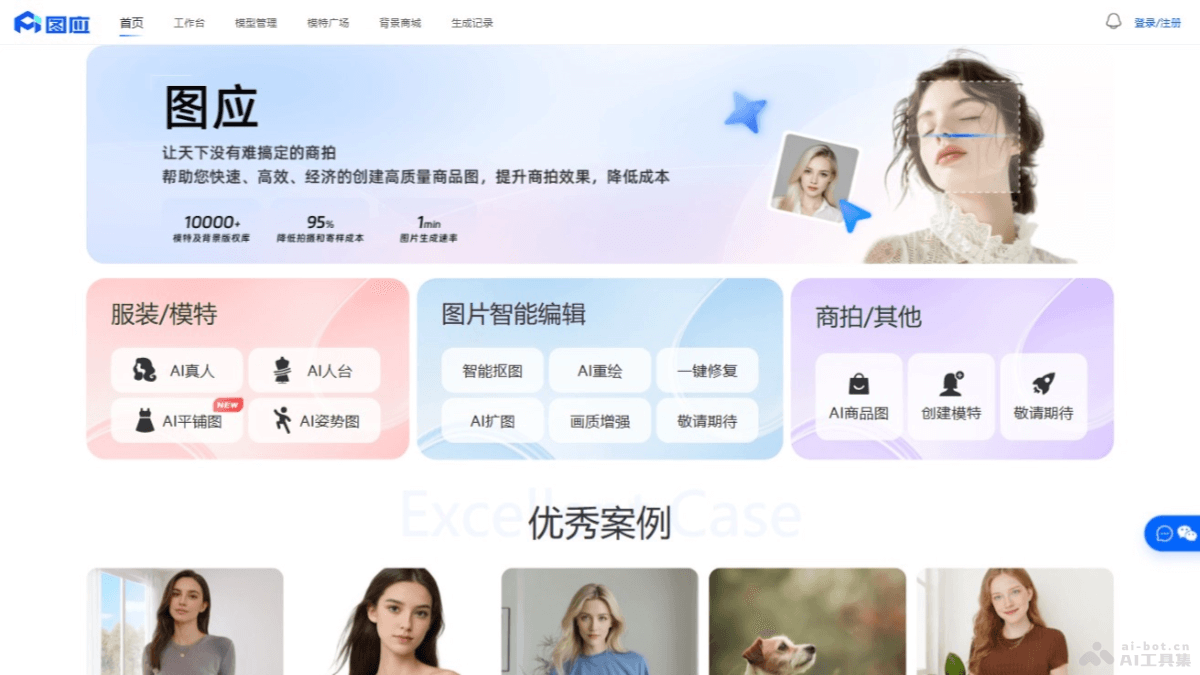
Main features of Tuying
- AI portrait generation of real models: Performs fusion processing based on materials, embedding model expression while preserving specified features, and automatically generates commercial photography content for real scenes or specified needs.
- AI real-person image conversion: Converts AI real-person images into real model images with different skin tones, ethnicities, appearances, and hair colors.
- Image editing: Provides image editing functions, including intelligent cutout and intelligent retouching.
- AI flat image try-on: Puts flat images onto model images without actual shooting.
How to use Tuying
- Register and log in: Visit Tuying'sofficial website. Create an account or log in with an existing account.
- Understand the services: Browse the website to learn about the various services and functions provided by Tuying AI. Watch introduction videos or read user guides to better understand how to operate.
- Upload materials: According to the required service (such as model customization, scene customization, etc.), upload the corresponding material images. Make sure the material images meet Tuying's upload requirements, such as file format, dimensions, etc.
- Select functions: Choose the corresponding functions according to your needs, such as model image conversion, flat image try-on, intelligent cutout, etc.
- Customization options: Set customization options in the selected function, such as choosing model features, background style, lighting color, etc.
- Generate images: After confirming all settings, submit the task to generate images. Tuying uses AI technology to process materials and generate the required images.
- Preview and edit:
- View a preview of the generated images.
- If needed, use the editing tools provided by Tuying for fine-tuning.
- Download and use:
- If you are satisfied with the generated images, you can download them.
- Use the downloaded images in commercial displays, advertising, marketing materials, etc.
Application scenarios of Tuying
- Advertising and creative design industry: Use AI-assisted creative design to break through manpower limitations and achieve large-scale personalized advertising production.
- Printing and publishing industry: Improve content production and editing efficiency, automatically generate attractive illustrations and layouts, and shorten production cycles.
- Apparel and fashion industry: Quickly generate diverse wearing effects without actual model shooting, accelerate new product launch speed, and reduce shooting costs.
- E-commerce and retail industry: Enhance product professionalism and appeal, quickly create product display images from multiple angles and scenes, and revolutionize product display and the customer shopping experience.
- Entertainment industry: Upload real photos of real people, select faces, backgrounds, or problem descriptions to generate various new images, widely used in the entertainment field.