
What is TrackGo
TrackGo is an advanced controllable AI video generation technology that provides users with a flexible and precise mechanism to control the motion of objects in videos through free-form masks and arrows. The core of the technology is TrackAdapter, an efficient and lightweight adapter that can be seamlessly integrated into pre-trained video generation models. The design of TrackAdapter is based on observations of the model's temporal self-attention layers, and it can accurately activate regions corresponding to motion in videos. TrackGo achieves state-of-the-art performance on key metrics, including video quality, image quality, and motion fidelity.
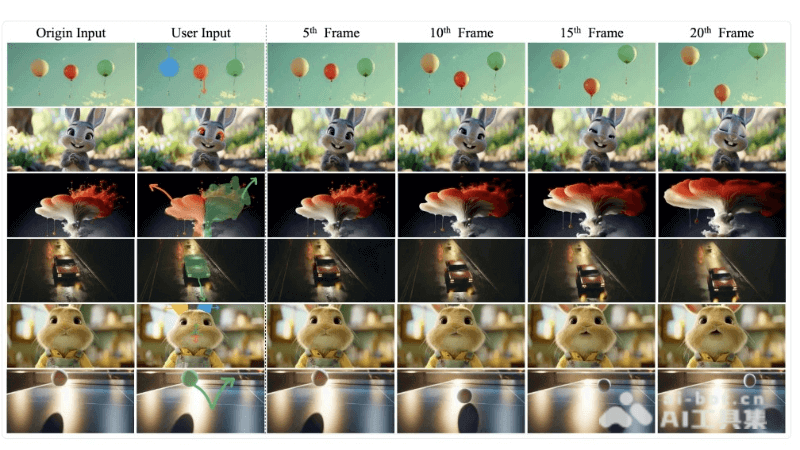
Main Features of TrackGo
- Via shape masks and arrows: Users can specify target objects or parts in videos by freely drawing masks and use arrows to indicate the desired motion trajectories, achieving precise control over video content.
- TrackAdapter Technology: An innovative adapter integrated into the temporal self-attention layers of video generation models, it activates motion regions in videos by adjusting attention maps, improving control accuracy.
- Efficient Performance: While maintaining efficient computation, TrackGo achieves fine-grained control over video generation and reduces additional computational overhead.
- Advanced Evaluation Metrics: Video quality, image quality, and motion fidelity are measured through key metrics such as FVD, FID, and ObjMC, ensuring that generated videos meet high standards.
Technical Principles of TrackGo
- User Input Parsing: Users specify target objects in videos through free-form masks and use arrows to indicate the motion trajectories of these objects.
- Point Trajectory Generation: The system automatically extracts point trajectories from user-defined masks and arrows. These point trajectories serve as precise blueprints for video generation and guide subsequent video frame generation.
- Attention Map Manipulation: TrackAdapter identifies and activates regions corresponding to motion based on attention maps generated by temporal self-attention layers, achieving precise control over specific parts of video frames.
- Dual-Branch Architecture: TrackAdapter introduces an additional self-attention branch in the temporal self-attention layers, working in parallel with the original branch, focusing on the motion of target regions while the original branch continues to process other regions.
TrackGo Project Address
- GitHub Repository:https://zhtjtcz.github.io/TrackGo-Page/
- arXiv Technical Paper:https://arxiv.org/pdf/2408.11475
How to Use TrackGo
- User Interface Input: Users provide the initial frame through TrackGo's user interface and use free-form mask tools to mark the target objects or parts in the video that they want to control.
- Specify Motion Trajectories: Users draw arrows to specify the motion trajectories of objects within the masks. The direction and position of the arrows will guide the movement paths of the objects in the video.
- Point Trajectory Generation: TrackGo automatically extracts point trajectories from the masks and arrows input by users. The point trajectories define the precise paths of object motion in the video.
- Model Processing: The extracted point trajectories are input into the pre-trained video generation model through TrackAdapter. TrackAdapter adjusts the model's temporal self-attention layers according to the point trajectories, achieving precise control over video content.
- Video Generation: The model generates a series of video frames based on the input point trajectory and the guidance of TrackAdapter, creating a coherent video that matches the user-specified motion.
Application Scenarios of TrackGo
- Film and Television Production: In the post-production of films or TV series, TrackGo can be used to generate or modify specific scenes, such as adding or adjusting the motion of objects, without the need for reshooting.
- Animation Production: Animators can use TrackGo to control the precise movements of animated characters or objects, improving the efficiency and quality of animation production.
- Virtual Reality (VR) and Augmented Reality (AR): In VR or AR applications, TrackGo can generate dynamic video content synchronized with user interaction, enhancing the immersive experience.
- Game Development: Game designers can use TrackGo to create complex game animations and special effects, making game characters and environments more vivid.