
What is ToonCrafter
ToonCrafter is an open-source cartoon animation video intermediate frame generation tool developed by researchers from Tencent AI Lab, The Chinese University of Hong Kong, and City University of Hong Kong. It breaks through the assumption of linear motion in traditional cartoon animation production and adopts innovative generative interpolation technology. With only two keyframe images, it can automatically generate intermediate dynamic frames and create smooth animation effects. Compared with traditional animation production methods that require frame-by-frame drawing, ToonCrafter greatly improves animation production efficiency, reduces the workload of animators, and shortens production time, while maintaining animation quality and creativity.
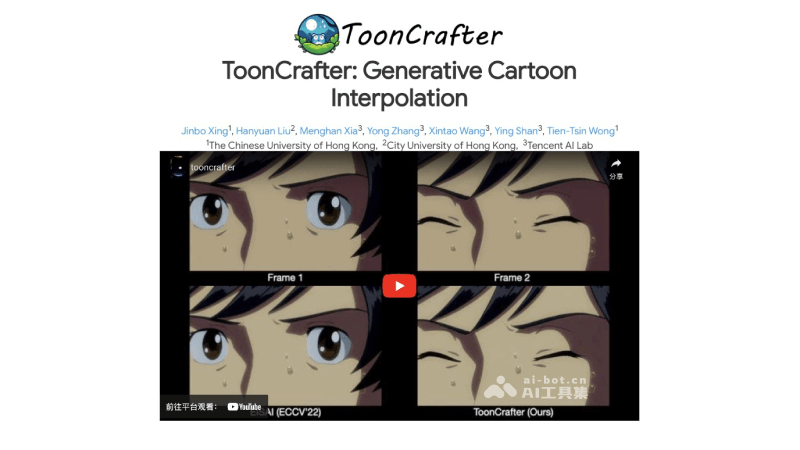
ToonCrafter's Features
- Generative Cartoon Interpolation:ToonCrafter uses deep learning models to automatically infer and generate intermediate frames from two given keyframe images, achieving smooth transitions and dynamic effects in cartoon animation. This interpolation method not only fills the gaps between frames, but can also simulate complex motion patterns, such as character actions and scene changes.
- Detail Preservation and Enhancement:ToonCrafterIt adopts advanced dual-reference 3D decoder technology to ensure that image details are preserved or even enhanced during the generation of new frames. This mechanism is especially suitable for cartoon animation, because it usually contains clear lines and vivid colors, and detail blurring and distortion need to be avoided during interpolation.
- Supports Sketch-Guided Animation:ToonCrafter provides a sketch encoder that allows users to guide animation generation through simple sketch input. Users can specify certain aspects of the animation, such as a character's motion trajectory or emphasis on a specific style, thereby achieving personalized animation effects.
- Occlusion Region Handling:ToonCrafter can effectively identify and handle occlusion situations in animation, such as when one character or object partially or completely occludes another. The tool can reasonably infer the motion and changes in occluded regions and generate frames that conform to visual logic.
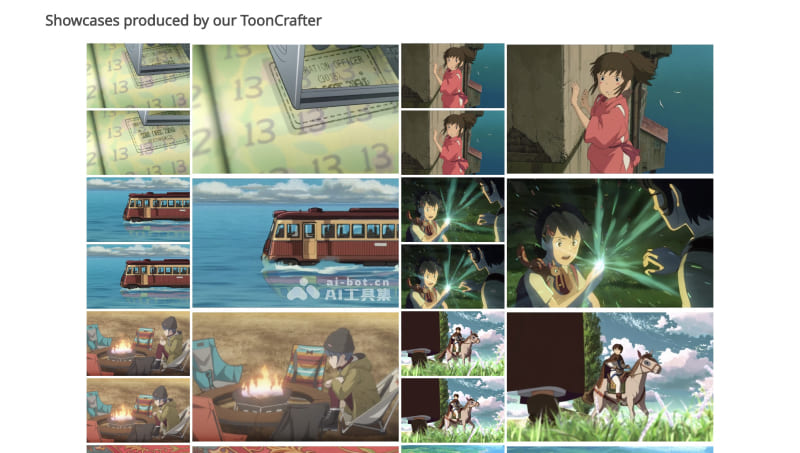
- Multiple Application Scenarios:ToonCrafter has a wide range of applications. It can not only be used to generate complete cartoon animation videos, but is also suitable for generating animation from cartoon sketch line art, as well as coloring and stylizing existing animations, providing diversity in animation production.
ToonCrafter's Official Website Entry
- Official project homepage:https://doubiiu.github.io/projects/ToonCrafter/
- GitHub code repository:https://github.com/ToonCrafter/ToonCrafter
- Hugging Face Demo:https://huggingface.co/spaces/Doubiiu/tooncrafter
- arXiv technical paper:https://arxiv.org/abs/2405.17933v1
ToonCrafter's Technical Principles
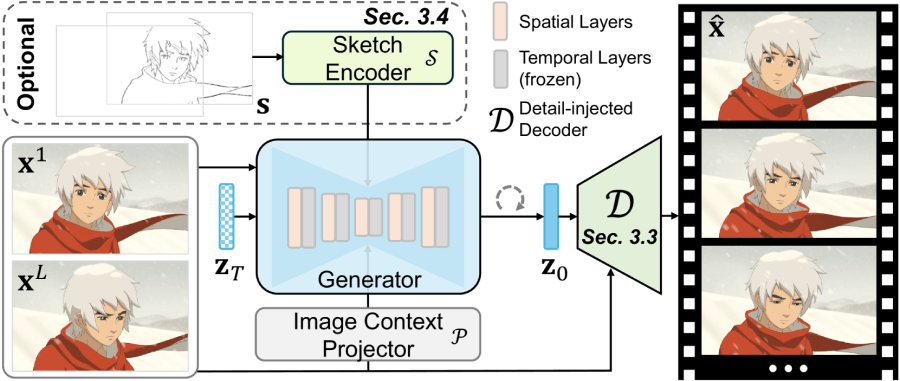
- Generative Interpolation Framework: ToonCrafter adopts a novel generative interpolation method. Unlike traditional correspondence-based interpolation methods, it does not rely on explicit inter-frame correspondences, but instead generates frames by learning latent representations of video data.
- Domain Adaptation (Toon Rectification Learning):Through a domain adaptation strategy, ToonCrafter can adapt the motion priors of real videos to the cartoon video domain, solving the domain gap problem and avoiding the accidental synthesis of non-cartoon content.
- Dual-Reference 3D Decoder:Using a dual-reference 3D decoder, ToonCrafter can compensate for detail loss caused by latent space compression. This decoder injects the detail information of the input image into the latent representation of the generated frame through a hybrid attention residual learning mechanism (HAR).
- Hybrid Attention Residual Learning Mechanism (HAR):During the decoding process, HAR injects the features of the input image into the shallow layers of the decoder through a cross-attention mechanism, while using residual learning in the deep layers to enhance detail recovery.
- Pseudo-3D Convolution:To enhance temporal coherence, ToonCrafter introduces pseudo-3D convolution in the decoder, which helps improve consistency between frames in a time series.
- Sketch Encoder:An independent sketch encoder is provided, allowing users to control the motion and style of the generated animation by inputting sketches, increasing the interactivity and controllability of the generation process.
- Diffusion Models:ToonCrafter is based on diffusion models, a type of generative model that gradually adds noise to data and then learns the reverse process to remove the noise and recover the data. In video generation, this allows continuous video frames to be generated from random noise.
- Iterative Denoising Process:When generating each frame, ToonCrafter progressively refines the generated image through an iterative denoising process, recovering clear frames from noise.
- End-to-End Training and Optimization:The various components of ToonCrafter are trained and optimized in an end-to-end manner, ensuring the coordinated operation of the entire interpolation process and the quality of the final generated video.
- Multimodal Input Support:In addition to the start and end frames, ToonCrafter also supports multimodal inputs such as sketches and reference images to enhance the expressiveness and controllability of the generated animation.
How to Use and Experience ToonCrafter
Method 1: Online Demo Experience
- Visit the Hugging Face online Demo,https://huggingface.co/spaces/Doubiiu/tooncrafter
- Add the input image in Input Image
- Enter the prompt and adjust the Seed value, steps, FPS, etc.
- Finally, click the Generate button to generate the video
Method 2: Local Code Deployment
Developers can choose to deploy and run ToonCrafter locally. The specific steps are as follows:
- Get the Code:Visit ToonCrafter'sproject page, or use Git commands to clone or download the code locally.
git clone https://github.com/ToonCrafter/ToonCrafter.git - Environment Preparation: Install the required Python environment and dependency libraries via Anaconda
conda create -n tooncrafter python=3.8.5 conda activate tooncrafter pip install -r requirements.txt - Download the pretrained model: Download the pretrainedToonCrafter_512 modeland
model.ckptplace it incheckpoints/tooncrafter_512_interp_v1/model.ckpt。 - Run from the command line
sh scripts/run.sh - Run the local Gradio interface: You can also choose to run the local Gradio UI with the command
python gradio_app.py - Then follow the operation steps of the online version above to input images and set parameters for generation.