
What is Today AI
Today AI is a personal AI Agent operating system launched by Qi Junyuan, former founder of Teambition. The product can connect to computers, local files, text messages, calendars, and various cloud services, continuously building long-term user memory and achieving a leap from passive response to proactive action. Unlike traditional AI assistants, Today AI proactively perceives user status, pushes daily briefings, and schedules and executes tasks, positioning itself as an exclusive digital partner that understands what you think and acts before you.
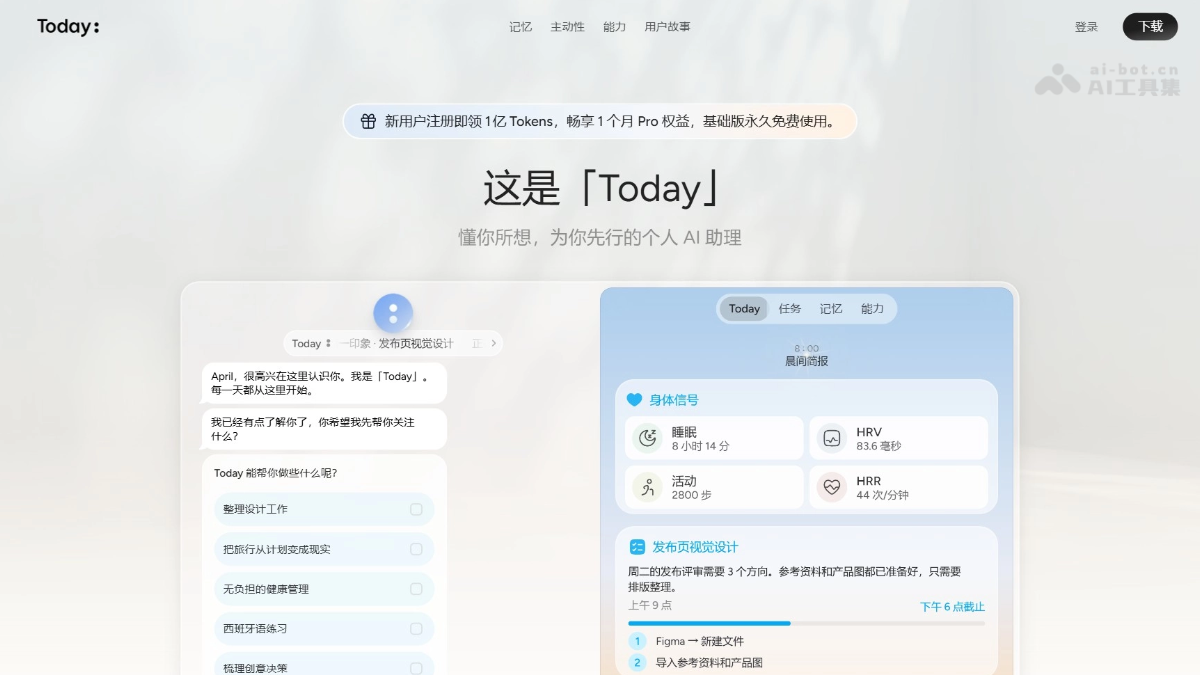
Main features of Today AI
-
All-platform information access: After obtaining user authorization, Today AI can connect to computers, local files, text messages, calendars, email, Notion, GitHub, and various cloud services, unifying information scattered across different applications and devices into a personal system.
-
Long-term memory building: Today AI continuously organizes and analyzes user data to form long-term understanding and a personal profile of the user, without requiring the user to repeatedly explain background information each time.
-
Proactive service: Based on its understanding of user status, Today AI proactively pushes daily briefings, schedules task arrangements, and calls on computers and external services to complete actual operations.
-
Conversation and search: Today AI supports chat Q&A and information search, and deeply connects these capabilities into a unified system that operates around the individual user.
-
Personalized settings: Today AI supports users in customizing the AI assistant's name and choosing an avatar, creating a personalized digital partner with a sense of exclusivity.
How to use Today AI
-
Obtain and install: Visit the Today AI official website https://todayai.cn/,完成安装后可开始使用。
-
Personalized settings: During the onboarding process, customize an exclusive name for the AI assistant, and choose or upload an avatar to establish a personalized identity.
-
Authorized access: Authorize access as needed to computers, local files, text messages, calendars, email, Notion, GitHub, and various third-party cloud services.
-
Data integration: After authorization is complete, Today AI will automatically begin continuously integrating and analyzing your all-platform data, gradually building a long-term user profile.
-
Daily use: In daily use, interact with the AI through chat at any time, letting it proactively push daily briefings, schedule tasks, and execute actual operations.
Core advantages of Today AI
-
Proactive action: Today AI is positioned as acts before you ask, able to proactively perceive user status, push briefings, and schedule tasks, achieving a leap from passive response to proactive service.
-
All-platform integration: Supports access to computers, local files, text messages, calendars, email, Notion, GitHub, and various cloud services, unifying information scattered across different applications and devices.
-
Long-term memory: Today AI continuously organizes user data, building long-term understanding and a personal profile about the user, without requiring the user to repeatedly explain background information each time.
-
System-level positioning: Today AI is an operating system that runs around the individual, connecting conversation, search, task execution, and other capabilities into the same personal system.
-
Top team and capital: The product is built by Qi Junyuan, founder of Teambition and former head of ByteDance Doubao PC, and has received investment from top institutions such as StepFun, IDG, Sequoia, and 5Y Capital.
Today AI's Comparison with Similar Competitors
| Comparison Dimensions | Today AI | Microsoft Copilot |
|---|---|---|
| Product Positioning | Personal AI Agent Operating System | Office and Productivity AI Assistant |
| Core Logic | Builds long-term memory around an individual's all-device data, proactively perceiving life and work status | Provides real-time assistance based on the Microsoft ecosystem (Windows, Office, Edge) |
| Data Access | Cross-platform services such as computers, local files, text messages, calendars, Notion, GitHub, etc. | Mainly integrates Microsoft applications (Outlook, Teams, Word) and web pages |
| Memory Capability | Long-term user profile, continuously understanding personal habits and proactively scheduling tasks | Session-level or document-level context, focusing on real-time understanding during task execution |
| Proactive Capability | Proactively pushes daily briefings, schedules across applications, and executes personal life and work tasks | Requires users to actively invoke it (sidebar/shortcut keys), mainly reactive assistance |
| Ecosystem Scope | Independent App, attempting to connect multiple platforms and third-party services | Deeply bound to the Windows and Microsoft 365 ecosystem |
| Differentiation Summary | A cross-platform personal butler that "proactively manages everything for you once it knows you" | "The Microsoft office assistant you can summon at any time while working" |
Today AI's Application Scenarios
-
Morning Information Integration: When the user wakes up, Today AI automatically aggregates emails, calendars, text messages, and project progress, generating a daily briefing so users can quickly grasp the day's status.
-
Cross-Platform Task Management: Today AI connects Notion, GitHub, calendars, and local files, automatically tracking project progress and reminding users of to-dos, with no need for users to manually switch between multiple applications.
-
Intelligent Schedule Scheduling: Based on the user's long-term habits and current status, Today AI proactively suggests meeting times, adjusts schedule conflicts, and sends relevant preparation materials.
-
File and Knowledge Retrieval: Today AI integrates local computer files and cloud documents, allowing users to quickly locate the needed materials through natural language without needing to remember specific storage locations.
-
Automated Execution: After understanding the user's intent, Today AI can directly call on the computer and external services to complete operations, such as organizing folders, sending emails, or updating project status.