
What Is TabTin
TabTin is an open-source full-stack AI Agent team collaboration platform. The platform truly integrates Agents into team workflows; tasks can be initiated on desktop, viewed on mobile, and executed by server Agents, and can be handed off to colleagues with full context. TabTin enables real-time collaboration between people and Agents in the same document, and deliverables require human acceptance, solving the pain point that Agents write code quickly but teams repeatedly need to understand context.
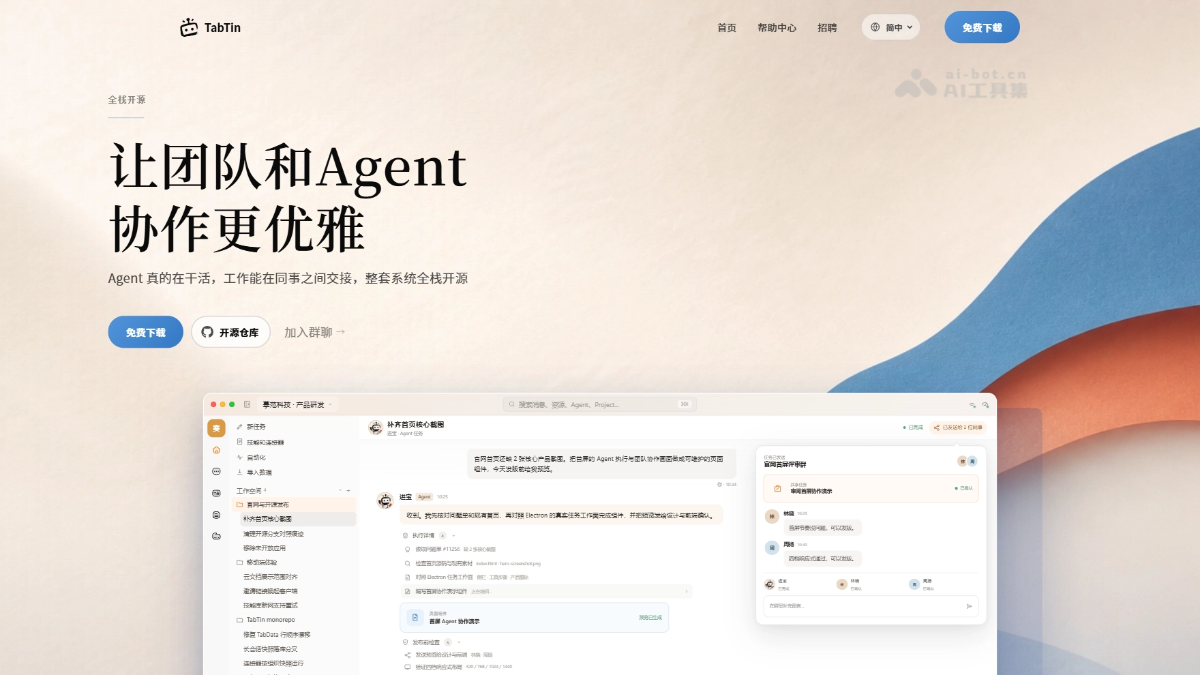
TabTin's Main Features
-
Agent Runtime: Orchestrates complex tasks, supports cross-device execution and permission control, high-risk operations require approval, and version checkpoints can be rolled back.
-
Collaborative Documents: People and Agents collaborate in real time in the same document/spreadsheet, automatically merging concurrent edits based on CRDT, with no need to export or switch tools.
-
Task Handoff: Tasks can be handed off to colleagues with the complete conversation history, documents, and attachments, and can be forked from any node to continue independently.
-
Project Management: Uses Issues to organize long-term collaboration, assign owners, and link deliverables; Agent results must pass human acceptance.
-
AI Personas and Skills: Creates independent AI personas for different workflows with isolated memory; Skills encapsulate repetitive processes as organization-level reusable components.
-
Cross-Device Sync: The desktop retains full context, while mobile can view progress, approve operations, and remotely control; the Daemon executes long-running tasks.
-
Organization Management: Centrally manages model access and budget quotas, and tracks Token consumption by member, Persona, and task dimension.
TabTin's Technical Principles
-
Runtime Architecture: Uses a unified Harness to integrate organizational context, Skills, toolchains, and execution environments; Agents dynamically decompose tasks and delegate to sub-Agents; the permission pipeline intercepts high-risk operations; and version checkpoints record state to support recovery or rollback.
-
Real-Time Collaboration Engine: TabDoc and TabData share a CRDT collaboration layer implemented with Yjs; Collab Live merges concurrent edits in real time; and the Django backend uniformly handles access control, persistent storage, and version history.
-
Context Inheritance Mechanism: Task objects encapsulate conversation history, tool call outputs, and shared resource references, with visibility controlled by sharing level; Fork creates a branch from any node in the task graph and copies context to a new workspace, with the original task and branch evolving independently.
-
Workflow State Machine: Uses Issues as collaboration units; Django persists metadata, owner assignments, and associated resources; Agent task nodes and deliverables are linked through foreign keys; and state transitions require approval and triggering by the designated Owner or Reviewer.
-
Persona Isolation System: The Persona layer isolates each role's system prompt, model configuration, and memory vectors; Skills use declarative configuration to encapsulate tool call sequences and review rules; and combined with a scheduled scheduler, they enable periodic scanning and automated triggering.
-
Multi-Device Sync Protocol: The desktop maintains file system and terminal session state through a local daemon; mobile establishes a temporary secure control channel after authorization, with secondary confirmation for sensitive operations; and the Daemon asynchronously executes long-running tasks and pushes state changes to all devices via WebSocket.
 Follow on WeChat and reply“Open Source” to joinAI Open Source Project Community
How to Use TabTin
-
Visit the official website: Visit the TabTin official website https://tabtin.com/ to browse the product architecture and feature introduction, and click the download entry to get the desktop installation package.
-
Install the desktop app: Complete installation on Mac or Windows and log in to your account. The desktop app retains the full local work context and terminal environment.
-
Import a code repository: Connect a real project repository to TabTin, and the Agent can directly read code, run terminal commands, and operate the browser.
-
Launch the first task: Describe your requirements in the task panel. The Agent automatically breaks down goals, invokes Skills, and executes them. High-risk operations will pause and wait for your approval.
-
Real-time collaborative editing: Edit documents and spreadsheets on the same screen with the Agent in TabDoc or TabData. Concurrent changes are merged in real time, and version history is automatically retained.
-
Hand off tasks to colleagues: Send task cards along with the complete conversation history, shared documents, and attachments to team members. They can view according to permissions or Fork to take over and continue pushing forward.
-
Project-based long-term tracking: Create a Project and organize collaboration lasting weeks or more with Issues, designate an Owner for acceptance, and link Agent tasks, code changes, and documents to the corresponding Issue.
-
Customize AI workflows: Create independent AI Personas for scenarios such as coding and PR Review, configure dedicated models and isolated memory, and package repetitive processes into Skills for team reuse.
-
Cross-device management anywhere: View progress, reply to the Agent, and approve operations via mobile phone or web. Long-running tasks are handed to the Daemon for background execution and results are notified across all platforms.
TabTin's Core Advantages
-
Full-stack open source: Desktop, mobile, server, and Agent Runtime are all open, allowing teams to self-deploy and deeply customize.
-
Lossless context handoff: Tasks carry complete conversation history, documents, and attachments as they circulate among members, avoiding repeated explanations of background and repeated Token consumption.
-
Human-AI same-screen collaboration: Humans and Agents edit in the same documents and spreadsheets in real time, with automatic merging based on CRDT, without exporting or switching tools.
-
Controllable and acceptable delivery: Agent execution results are considered complete only after approval by the designated Owner or Reviewer, ensuring code is deliverable rather than something no one dares to use.
-
Continuous state across all platforms: Tasks are initiated from the desktop, viewed on mobile, and executed by the server Agent. Long-running tasks are completed by the Daemon in the background and notifications are synchronized across all platforms.
-
Organization-level budget control: Centrally manage model access and Token budgets, precisely track consumption by member, AI role, and task dimension, and avoid runaway costs.
TabTin's Project Address
- Project official website:https://tabtin.com/
- GitHub repository:https://github.com/tabtin-ai/TabTin
TabTin's Comparison with Similar Competitors
| Comparison dimension | TabTin | Cursor |
|---|---|---|
| Product positioning | A full-stack AI Agent collaboration platform for teams, emphasizing controllable delivery | A personal AI code editor, emphasizing vibe coding speed |
| Open source strategy | Full-stack open source (desktop, mobile, server, Agent Runtime) | Closed-source commercial software, client only |
| Collaboration model | Humans and Agents edit on the same screen, tasks are handed off between members with context | Single-person local use, code is thrown out via Git and then coordinated manually |
| Context management | Conversations, documents, code, and task progress are integrated, Fork inherits losslessly | Session-level context, switching projects or passing between members requires re-explanation |
| Delivery acceptance | Agent results are not considered complete until approved by the Owner/Reviewer | Generated code is written directly to files, with no built-in team acceptance mechanism |
| Cross-device support | Desktop execution, mobile approval, Daemon background operation, status synced across all devices | Desktop IDE only, no mobile task control or remote execution |
| Cost control | Organization-level budget quotas, tracking Token consumption by member/role/task | Individual subscription model, team edition only shares quotas, with no fine-grained breakdown |
TabTin use cases
-
Requirements research and document writing: Have the Agent research competitors and generate a TabDoc, and the product manager directly edits and confirms it in the same document, then hands it off to R&D to continue advancing.
-
Multi-person relay development: After the frontend finishes writing a component, it Forks the task to the backend, which automatically inherits the interface definitions and conversation history without needing to realign on the background.
-
Cross-time-zone asynchronous collaboration: At night, hand long-running builds or data crawling tasks to the Daemon, notify results across all devices the next day, and overseas colleagues can directly accept them.
-
Standardized code review: Create a dedicated AI Persona for PR Review, encapsulate the team's review rules as Skills, and ensure every Review has consistent standards.
-
Newcomer project onboarding: Associate historical research, technical plans, and Issues with the Project, and new members can quickly understand the project context by viewing the Agent execution process.