
What is Subtitle Talk
Subtitle Talk is an online tool designed specifically for self-media creators, providingtext-to-speech, video synthesis, and audio-text alignment functions. Users can freely synthesize realistic voiceovers and subtitle videos online, producing high-quality content without appearing on camera. Regular users can submit 10 free speech synthesis tasks per day. Subtitle Talk supports voiceover correction, available free to member users. Subtitle Talk is committed to helping self-media creators quickly test ideas and realize their creativity, greatly shortening video production time and improving creative efficiency.
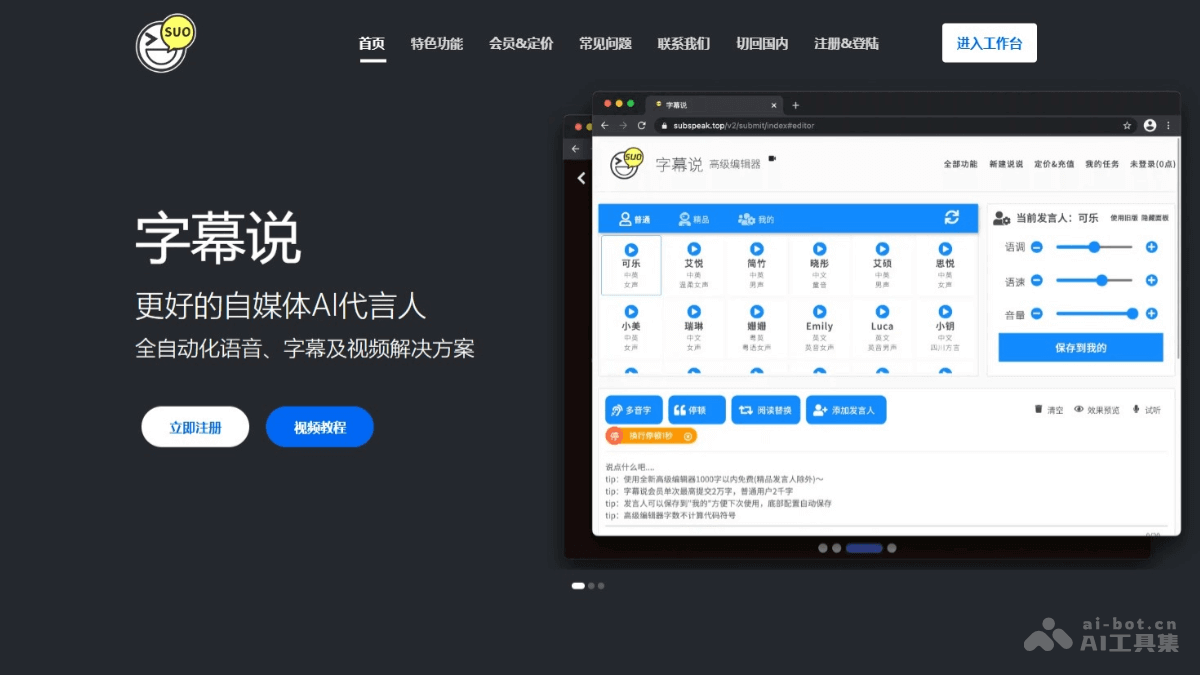
Main Features of Subtitle Talk
- Speech Synthesis: Supports users in inputting text to quickly generate audio with multiple speakers and synchronized subtitle files. Supports polyphonic character recognition, multilingual speakers, traditional-simplified character conversion, and subtitle translation.
- Audio-Text Alignment: The system automatically aligns the generated speech with the original text, generating synchronized subtitles to ensure precise matching between speech and subtitles.
- Voiceover Correction: Optimize and adjust the generated speech and subtitles to achieve better results.
- Video Synthesis: Users combine the generated speech and subtitles with video materials to produce complete video content, completing video production without appearing on camera.
- Subtitle Translation: Users upload SRT format subtitle files to obtain translated subtitles or bilingual subtitles.
How to Use Subtitle Talk
- Registration and Login: Visit Subtitle Talk'sofficial websiteand complete registration and login as required.
- Speech Synthesis
- On the speech synthesis page, input or paste the text you want to convert to speech.
- Select the appropriate voice type and speaker (such as male voice, female voice, etc.).
- Submit the speech synthesis task.
- Audio-Text Alignment
- Upload the text and generated speech files to the audio-text alignment function.
- The system automatically aligns the speech with the text, generating synchronized subtitles.
- Check and adjust the accuracy of the subtitles to ensure the matching degree between speech and subtitles.
- Voiceover Correction(Member feature): Adjust the speech rate, intonation, etc. as needed to achieve better results.
- Video Synthesis
- Upload your video materials to the video synthesis function.
- Combine the generated speech and subtitles with the video materials.
- Preview and export the final video file.
Subtitle Talk Pricing
- Free Quota:
- Regular users: 1000 characters * 10 times free quota per day.
- Subtitle Talk member: 1000 characters * 30 times free quota per day.
- Speaker Pricing:
- Regular speaker: 10 points per 100 characters. Member: 8 points per 100 characters, as low as 0.4 points per 100 characters after purchasing a package.
- Premium speaker: 20 points per 100 characters. Member: 16 points per 100 characters, as low as 9 points per 100 characters after purchasing a package.
- Voice Package: 145 yuan/year, daily free quota of 10,000 characters, immediately gifted an 110,000-character package after becoming a member, members can sign in daily to receive free packages.
Application Scenarios of Subtitle Talk
- Self-Media Content Creation: Self-media creators convert articles or scripts into speech, generate subtitles, and produce video content that requires no on-camera appearance, saving time and effort.
- Education and Training: Educational institutions or individual instructors add subtitles to online course videos to improve the accessibility and comprehension of the courses, which is especially helpful for people with hearing impairments or non-native speakers.
- Corporate Promotion: Enterprises convert product introduction copy into speech and subtitle videos for use in product promotion and advertising to attract the attention of potential customers.
- Personal Entertainment: Individual users add voiceovers and subtitles to their own video creations to enhance the fun and watchability of the videos, such as making travel videos, life records, etc.
- Language Learning: Language learners convert learning materials into speech and subtitles to help improve listening and speaking skills and deepen their understanding of the text content.