
What is StoryMaker
StoryMaker is a text-to-image generation tool open-sourced by Xiaohongshu, focused on helping creators maintain character consistency in continuous image content. Built on the Stable Diffusion XL model and LoRA technology, it ensures a high degree of coherence in the generated images in terms of facial features, clothing, hairstyle, and body characteristics. StoryMaker is particularly suitable for fields such as comic creation, game scene design, story illustration, and advertising creativity, simplifying the process of multi-character narrative creation. Users can obtain StoryMaker's code and pre-trained models through the GitHub and Huggingface platforms to start their own creative projects.
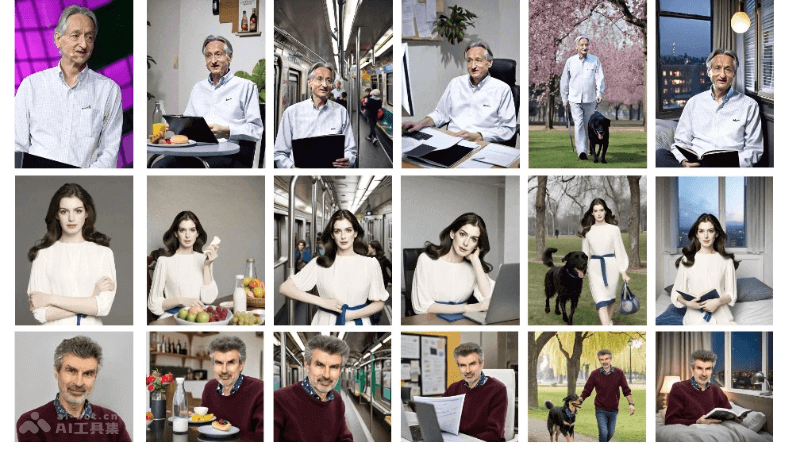
StoryMaker's main features
- Character consistency: It can accurately preserve each character's facial features, clothing, hairstyle, and body characteristics across different images, ensuring the character's visual consistency in continuous scenes.
- Multi-character handling: It supports handling multiple characters in the same scene, keeping each character's features unchanged across different scenes, suitable for creating complex narrative scenes.
- Narrative creation: Through text prompts, StoryMaker can generate continuous images that match the storyline, enhancing visual storytelling capabilities.
- High-fidelity image generation: It integrates the Stable Diffusion XL model and LoRA technology to generate high-quality and detail-rich images.
- Personalized solutions: It provides personalized image generation to meet different creators' unique needs for characters and scenes.
StoryMaker's technical principles
- Text-to-image generation: StoryMaker uses deep learning models, especially large language models based on the Transformer architecture, to understand text descriptions and generate images that match them. The model learns through training to map text features to visual features.
- Stable Diffusion XL model: It is an advanced image generation model that can generate high-quality and high-resolution images. Through the diffusion process, it gradually optimizes the image, starting from noise and progressively introducing structure and details until a clear image is generated.
- LoRA technology (Low-Rank Adaptation): It is a model fine-tuning technique that adjusts model weights by adding low-rank matrices to a pre-trained large model, improving the model's performance on specific tasks without significantly increasing the computational burden. In StoryMaker, LoRA is used to enhance the fidelity and details of generated images.
- Facial feature recognition and preservation: StoryMaker may use facial recognition technology to capture and encode facial features, and then maintain the consistency of these features during image generation. It involves complex image processing and pattern recognition algorithms.
StoryMaker project addresses
- Github repository:https://github.com/RedAIGC/StoryMaker
- HuggingFace model library:https://huggingface.co/RED-AIGC/StoryMaker
- arXiv technical paper:https://arxiv.org/pdf/2409.12576v1
How to use StoryMaker
- Obtain the code and model:Visit StoryMaker's GitHub repository,clone or download the code in the repository to a local environment.
- Install dependencies:According to the
READMEfile or installation guide in the GitHub repository, install the necessary Python libraries and dependencies, such astransformers、torch、diffusers, etc. - Download the pre-trained model:Visit the Huggingface model library,Download the required pretrained models, such as the Stable Diffusion XL model.
- Set up the environment:Ensure that the computing environment (such as CPU or GPU) meets the requirements for running the model.Configure any necessary environment variables or paths to ensure that the code can correctly load the model and resources.
- Text input:Prepare a text description that will guide the model in generating the image. The text should be as detailed as possible to help the model understand the desired image content.
- Generate images:Use the scripts or command-line tools provided by StoryMaker, enter the text description, and start the image generation process.Adjust generation parameters as needed, such as image resolution, style, diversity, and so on.
- Post-processing:The generated images may require some post-processing, such as cropping, adjusting brightness and contrast, or applying filters to achieve the desired visual effect.
Application scenarios of StoryMaker
- Comic and illustration creation: Provides comic artists and illustrators with a method to quickly generate character and scene images, maintaining consistency of characters across a continuous comic or illustration series.
- Game development: Game designers can use StoryMaker to generate concept art for game characters, or create preliminary visual sketches of game environments and backgrounds.
- Film and video production: In the pre-production stage, it can be used to generate storyboards and scene concept art, helping directors and production teams visualize film or video projects.
- Advertising and marketing: Advertising creative teams can use StoryMaker to generate advertising visual sketches, quickly iterate creative concepts, and produce attractive advertising images.
- Virtual fashion and clothing design: Designers can use StoryMaker to show the effect of clothing on different models, or try different clothing designs and combinations.