
What is Hui Shi Launcher
Hui Shi Launcher, formerly known as SD-WebUI Launcher, is a desktop PC version of the Stable Diffusion-WebUI launcher produced and freely released by Bilibili creator @秋葉aaaki, used to simplify theStable Diffusionproject's startup and management. Hui Shi Launcher supports one-click startup, repair, update, model download, model training, and model management functions. It is suitable for use without installation or deployment, ready out of the box, with foolproof operation, and is suitable for beginners with zero foundation who have never used AI painting.
Hui Shi Launcher supports low-spec computers; even if the graphics card performance is relatively low, it can still be used, and it comes with an anti-VRAM-explosion function. It can start, repair, and update with one click, download models, train models, and manage models. Hui Shi Launcher has a troubleshooting system used to diagnose common errors and solve problems users may encounter during use. Hui Shi Launcher supports deploying WebUI interfaces such as SD-WebUI and ComfyUI, and supports users in building a complete environment from scratch.
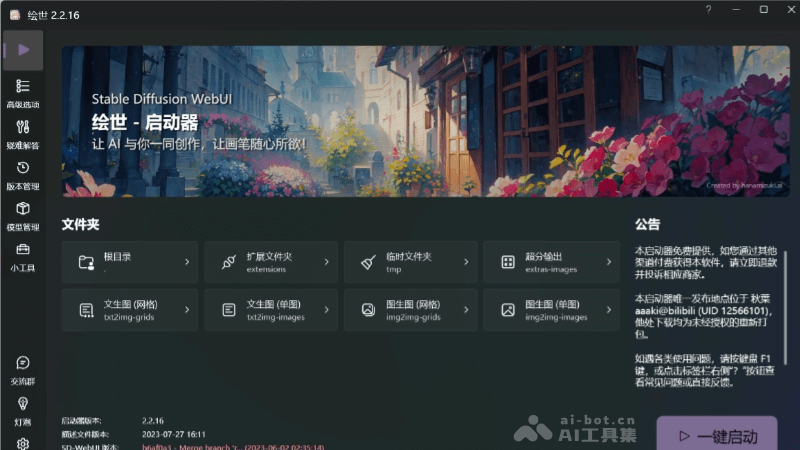
Main Functions of Hui Shi Launcher
- One-click startup: Users can easily start Stable Diffusion-WebUI through Hui Shi Launcher without a complicated configuration process.
- Repair and update: The launcher provides repair and update functions to ensure users are using the latest and most stable version.
- Model download and management: Users can download and manage different Stable Diffusion models through Hui Shi Launcher, making it convenient to switch and use them.
- Troubleshooting system: When users encounter problems, the launcher's built-in troubleshooting system can help diagnose and solve common errors.
- Supports multiple graphics cards: Hui Shi Launcher supports NVIDIA, AMD, and Intel ARC graphics cards, enabling more users to use Stable Diffusion on their own hardware.
- Supports DirectML and oneAPI XPU: Provides additional support for users using DirectML and oneAPI XPU.
Configuration Requirements for Hui Shi Launcher
- Operating system: Requires Windows 10 or a higher version of the system.
- Memory: Requires at least more than 8GB of memory.
- Graphics card: It is recommended to use an NVIDIA discrete graphics card, but the launcher also supports AMD graphics cards and Intel ARC graphics cards.
- .NET 6.0 Desktop Runtime: Hui Shi Launcher requires this runtime environment. If it is not installed in the system or the version is too low, the launcher may prompt to install the required .NET 6 version.
- Disk space: Sufficient disk space is required to store Stable Diffusion models and related files, requiring at least 30-40GB of remaining space.
Download Address for Hui Shi Launcher
- SD-WebUI Launcher address:https://www.bilibili.com/video/BV1ne4y1V7QU/
- Stable Diffusion integration package address:https://www.bilibili.com/video/BV1iM4y1y7oA/
- Cloud drive link:https://pan.quark.cn/s/2c832199b09b Extraction password: bilibili@秋葉aaaki. Be sure to use the official cloud drive client to download, otherwise the compressed package is very likely to be damaged and unable to be extracted. After downloading, be sure to test whether the compressed package is intact before extracting.
How to use Stable Diffusion
There are two ways to use it. Method 1: Use the SD WebUI launcher; Method 2: Use theStable Diffusion integration package。
SD-WebUI Launcheris a simplified startup tool that helps users quickly start and manage Stable Diffusion-WebUI, suitable for users with a certain technical background.
Stable Diffusion整合包is a more comprehensive solution that includes Stable Diffusion WebUI, the necessary runtime environment, pre-installed models, and some commonly used plugins, suitable for beginner users who do not understand programming at all, and can be used immediately after extraction.
Method 1: Using the SD-WebUI launcher
- Download the launcher: First, you need to download the SD-WebUI launcher from Akiha aaaki's video or other provided links.
- Create an installation directory: Create a new folder on your computer, and copy the downloaded launcher into that folder.
- Run the launcher: Double-click the launcher file, and the Akiha launcher will automatically download the required components.
- Configure installation parameters: In the launcher, select the Stable Diffusion project to deploy, such as the AUTOMATIC1111/stable-diffusion-webui mainline, and choose to install PyTorch and its version.
- Install extensions: Install SD-WebUI extensions in the Akiha launcher to enhance its functionality.
- Launch SD-WebUI: Click the "One-click launch" button, and the launcher will start SD-WebUI and may automatically open the browser to enter the SD-WebUI interface.
Method 2: Using the Stable Diffusion整合包
- Download the整合包: Download Akiha aaaki'sStable Diffusion整合包。
- Install the runtime environment: Run "启动器运行依赖-dotnet-6.0.11.exe" in the整合包 to install the .NET runtime.
- Extract the整合包: Extract the downloaded整合包 to the directory of your choice.
- Run the launcher: Find and run "A绘世启动器.exe" in the extracted folder.
- One-click launch: Click the "One-click launch" button in the launcher interface, and wait for the launcher to automatically complete the startup process.
- Use SD-WebUI: After a successful launch, SD-WebUI will automatically open in the browser, and you can start using it.
Application scenarios of the Akiha launcher
- Artistic creation: The Akiha launcher can help artists and designers quickly generate prototypes of artworks, improving creative efficiency and quality.
- Image processing: Users can use the Akiha launcher to beautify photos or perform style transfer, adding personalized elements.
- Education and learning: In the field of education, the Akiha launcher can serve as an auxiliary teaching tool to help students understand the artistic creation process and improve their artistic literacy.
- Design assistance: Designers can use the Akiha launcher for preliminary design and sketch creation, quickly iterating and exploring different design solutions.