
What is Speakr
Speakr is an open-source and free AI meeting assistant that automates meeting audio transcription, content summarization, and intelligent Q&A while ensuring absolute data privacy. Speakr can run without an internet connection, and all data processing is completed locally, completely eliminating the risk of leaking trade secrets or sensitive conversations. Users can easily upload audio files in multiple formats, and transcription and summary generation are automatically performed in the background without interfering with user operations. Speakr provides an interactive chat feature that allows users to interact with the transcribed content through a chat interface, ask questions, or search for relevant information, improving the user experience.
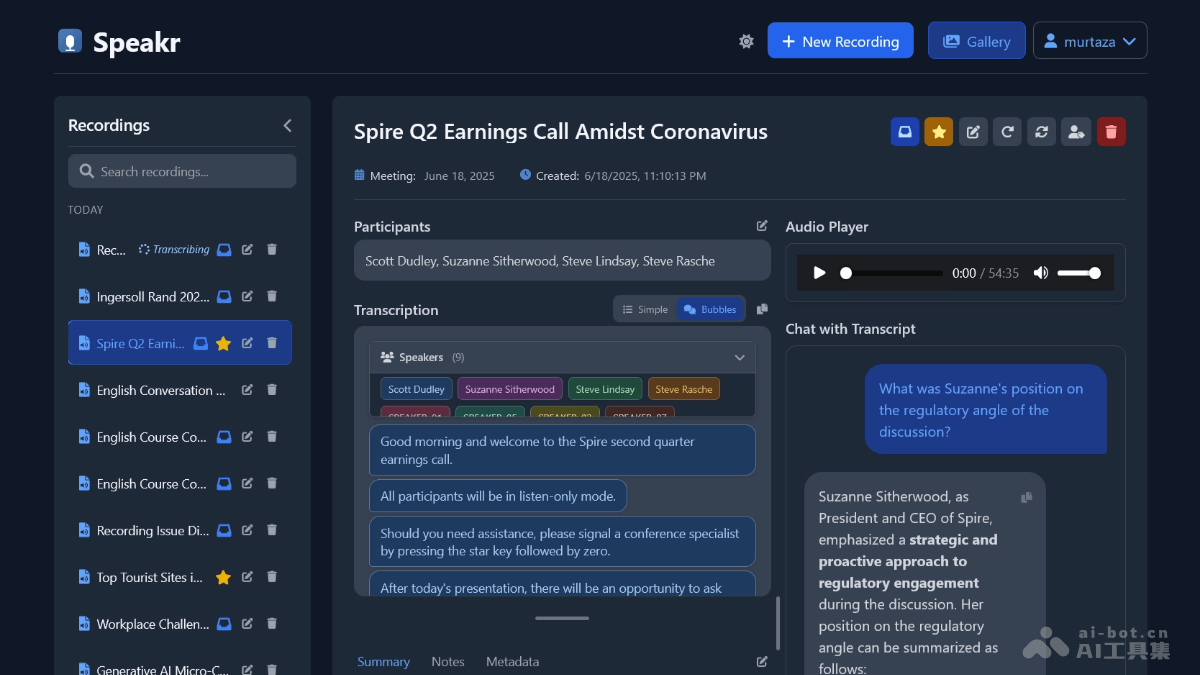
Main Features of Speakr
- Audio Upload and Transcription: Supports multiple audio formats (such as MP3, WAV, M4A, etc.). Users can upload audio by dragging and dropping or selecting files, and the system automatically transcribes in the background without blocking the user interface.
- AI-Powered Summary and Title Generation: Uses AI technology to generate intelligent summaries and titles for meetings, helping users quickly understand the core content of the meeting.
- Interactive Chat: Users can interact with the transcribed content through a chat interface and ask questions or search for relevant information, for example, "List all to-do items" or "the budget discussion section".
- Self-Hosted Security: All data is stored on the user's own server, ensuring data security and privacy and preventing the leakage of sensitive information.
- User Management Features: Supports user registration, login, account management, and recording material management. Administrators can perform user management and system statistics.
- Multilingual Support: Supports user configuration of the language for audio transcription and AI-generated content, meeting the needs of different users.
- Search and Highlight: Supports keyword search and content highlighting, making it convenient for users to quickly locate important information.
- Metadata Editing: Users can edit metadata related to recordings, such as title, participants, meeting date, summary, and notes.
Technical Principles of Speakr
- Speech Recognition Technology: Based on OpenAI-compatible speech-to-text (STT) APIs, such as the Whisper model, it converts audio files into text. Users can configure the use of a self-hosted Whisper model or other compatible APIs.
- Natural Language Processing (NLP): Based on AI-powered text summarization and intelligent Q&A technology, it generates meeting summaries and titles and interacts with users through a chat interface.
- Backend Framework: Builds backend services based on Python and Flask to handle API requests, data storage, and business logic.
- Database: Uses SQLAlchemy ORM and SQLite (default) for data storage, managing user information, recording files, and transcribed content.
- Frontend Technology: Combines technologies such as Jinja2 templates, Tailwind CSS, and Vue.js to build the user interface and provide a smooth user experience.
- Deployment Methods: Supports Docker and local deployment. The application can be deployed quickly through Docker, and local deployment is suitable for development and testing environments.
- Security Mechanisms: Implements user authentication and data protection based on tools such as Flask-Login, Flask-Bcrypt, and Flask-WTF to ensure the security of user data.
Speakr Project Address
- GitHub Repository:https://github.com/murtaza-nasir/speakr
Application Scenarios of Speakr
- Internal Enterprise Meetings: For internal project meetings, team meetings, etc. within an enterprise, quickly generate meeting minutes to ensure sensitive information is not leaked and facilitate subsequent review and task follow-up by team members.
- Education: Teachers upload classroom recordings to generate detailed class notes, making it convenient for students to review.
- Remote Collaboration: Meeting records for remote teams ensure that team members can quickly understand the meeting content, facilitate task assignment and project management, and improve remote collaboration efficiency.
- Personal Learning and Notes: Students or individuals record important meetings and lecture content, generate detailed notes, making it convenient for subsequent review and study, and improving learning efficiency.
- Healthcare Industry: In the healthcare field, it is used for case discussions and training meeting records, protecting patient information and facilitating subsequent review.