
What is Spark Teacher Assistant
Spark Teacher Assistant is an AI lesson preparation tool launched by iFlytek based on the Spark Cognitive Large Model. It can simplify teachers' lesson preparation process, improve teaching efficiency, and provide teachers with personalized teaching resources and design support. Through intelligent analysis and generation, the tool enables teachers to quickly obtain high-quality lesson plans and courseware, saving a great deal of time. Spark Teacher Assistant provides a rich set of interactive tools and resources, enhances classroom participation, and makes teaching more vivid and interesting. Spark Teacher Assistant reduces teachers' burden, inspires teaching innovation, and is an important boost in the digital transformation of education.
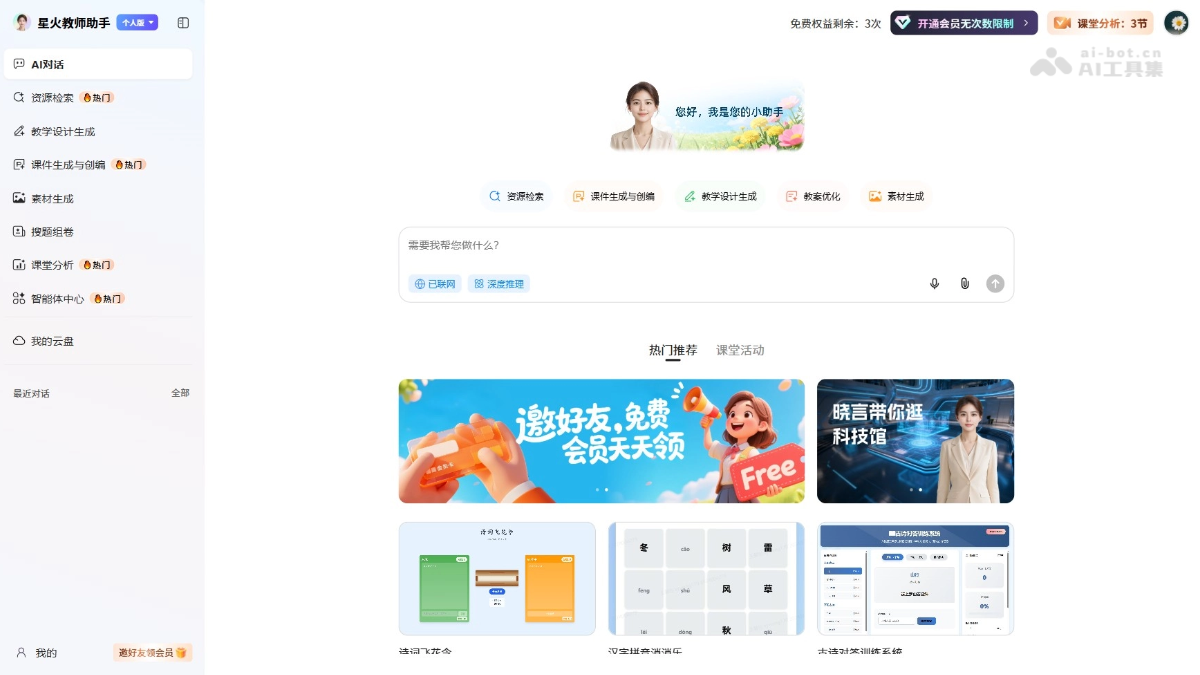
Main features of Spark Teacher Assistant
-
AI dialogue: Provides interaction with AI to help teachers answer questions and obtain teaching suggestions.
-
Resource search: Enables teachers to quickly find the teaching resources they need, including popular resources.
-
Teaching design generation: Supports automatically generating teaching design plans to help teachers prepare lessons efficiently.
-
Courseware generation and editing: Supports creating and editing teaching courseware, providing a variety of templates and materials to choose from.
-
Material generation: Supports helping teachers generate various materials needed for teaching, such as images and tables.
-
Question search and paper assembly: Provides the functions of searching questions and generating test papers, making it convenient for teachers to organize tests and exercises.
-
Classroom analysis: Supports analyzing classroom activities and teaching effectiveness, helping teachers adjust teaching strategies in a timely manner.
-
Agent center: Provides a variety of intelligent tools, such as subject tools and classroom mini-games, to enhance teaching interaction and student participation.
How to use Spark Teacher Assistant
-
Visit the platform: Visit the Spark Teacher Assistant official website https://spark.changyan.com/。
-
Register/Log in: If you are a new user, register an account; if you already have an account, log in directly.
-
Explore the features: On the platform's main interface, users can see multiple functional modules, such as AI dialogue, resource search, teaching design generation, courseware generation and editing, material generation, question search and paper assembly, classroom analysis, and agent center.
-
Choose a feature: According to your needs, click the corresponding functional module. For example, if you need to generate a teaching design, click "Teaching design generation"; if you need to create courseware, click "Courseware generation and editing".
-
Use agents: In the agent center, you can find various preset agents, such as an English conversation classmate and an Australian English tour guide. Choose an agent suitable for teaching needs for interaction.
-
Create an agent: Users can click the "Create Agent" button to customize an agent according to their own teaching needs.
Product pricing of Spark Teacher Assistant
- Free benefits: The free benefits of Spark membership include 5G cloud storage space, a maximum of 1 agent creation, course generation beautification/material generation/resource download 3 times, unlimited general AI dialogue, and unlimited AI resource search.
- Monthly benefits:¥ 69.9yuan. The monthly benefit Spark Membership provides 20G cloud drive space, a maximum number of created agents of 6, unlimited use of massive resources/exam paper topic templates, unlimited general AI conversations, unlimited AI resource searches, unlimited AI instructional design, unlimited AI question search and paper composition, unlimited AI courseware generation and creation, and unlimited AI material generation.
- Annual Benefits:¥ 399yuan. The annual benefit Spark Membership provides 20G cloud drive space, a maximum number of created agents of 100, unlimited use of massive resources/exam paper topic templates, unlimited general AI conversations, unlimited AI resource searches, unlimited AI instructional design, unlimited AI question search and paper composition, unlimited AI courseware generation and creation, and unlimited AI material generation.
Application scenarios of Spark Teacher Assistant
-
Course preparation: Teachers can use Spark Teacher Assistant to prepare course content, including lesson plan writing and courseware creation, improving lesson preparation efficiency.
-
Teaching resource acquisition: Teachers can search for and obtain the teaching resources they need through the platform, including textbooks, exercises, and other supplementary materials.
-
Classroom interaction: In the classroom, teachers can use the tools and activities provided by the assistant to increase student participation and interactivity, making the learning process more lively and interesting.
-
Student assessment: Teachers use Spark Teacher Assistant to design tests and assess student learning outcomes, including generating exam papers and analyzing scores.
-
Teaching reflection and improvement: Through classroom analysis tools, teachers can reflect on teaching practice and make improvements based on feedback, enhancing teaching quality.