
What Is SmartSub
SmartSub (Miaomu) is an open-source all-in-one audio and video subtitle processing desktop tool. The tool integrates the entire workflow into a single application, performing offline speech-to-text based on local models such as Whisper, FunASR, and Qwen3-ASR, and supporting over 20 translation services and multi-role AI dubbing. SmartSub has a built-in online video downloader, is compatible with platforms such as Bilibili and YouTube, supports hardware acceleration such as NVIDIA CUDA and Apple Core ML, and runs locally across Windows, macOS, and Linux
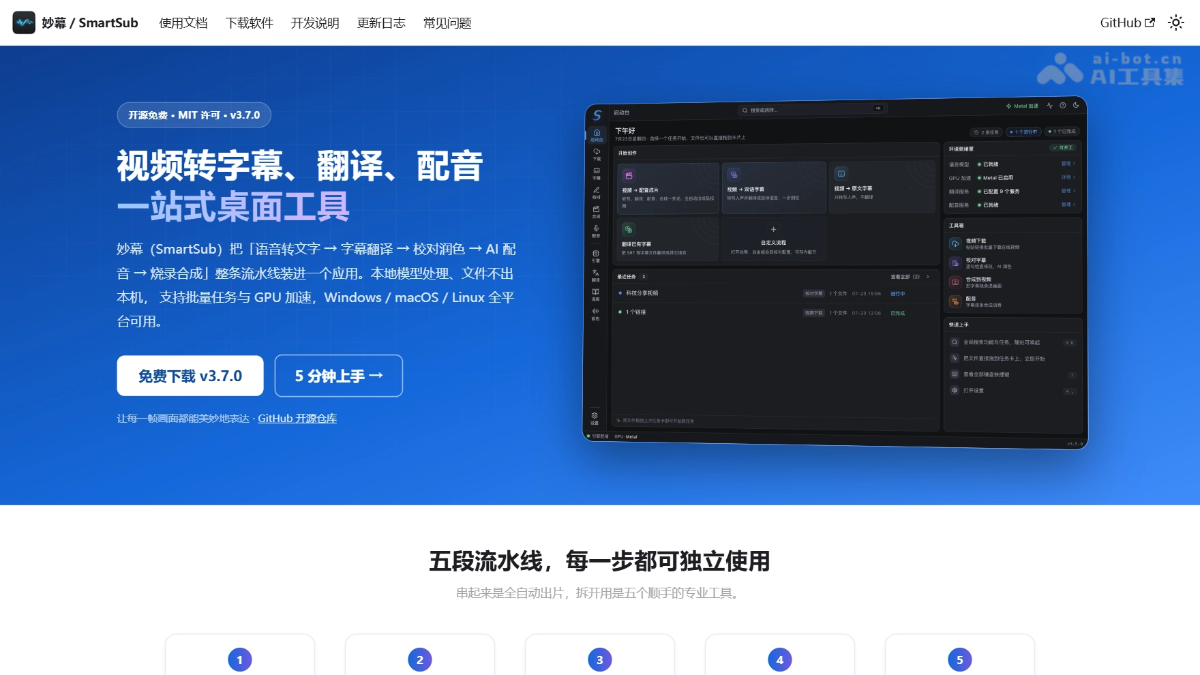
Main Features of SmartSub
- Speech Transcription: Offline recognition based on 6 major local engines such as whisper.cpp, FunASR, and Qwen3-ASR, supporting automatic multilingual detection and batch processing.
- Subtitle Translation: Connects to 20+ translation services (including DeepSeek, Ollama, Tongyi Qianwen, etc.), and outputs either translated-only or original + translated bilingual subtitles.
- AI Proofreading: Built-in visual proofreading panel; subtitles automatically sync and locate during video playback, supporting sentence-by-sentence editing, one-click AI polishing, and alignment with reference transcripts.
- TTS Dubbing: Local Kokoro/VITS offline synthesis, supporting ZipVoice zero-shot voice cloning, multi-role voice assignment, and speaker recognition.
- Subtitle Burning: Hard subtitles are rendered directly into the picture, soft subtitles are losslessly packaged into MKV, and styles such as font, color, and position can be previewed in real time.
- Online Download: Built-in yt-dlp / lux dual engines; paste links from Bilibili, YouTube, and other platforms to batch download videos and official subtitles.
- Custom Workflow: Freely combine steps such as transcription, translation, proofreading, dubbing, and compositing, and save them as recipes for one-click reuse.

Follow WeChat and reply "Open Source" to join theAI Open Source Project Communication Group
How to Use SmartSub
-
Download and Install: Choose the corresponding system version (Windows/macOS/Linux) from GitHub Releases to install; on macOS you can use
brew install --cask smartsub。 -
Download Models: On first launch, go to the "Engines & Models" page to select and download a speech recognition model.
-
Configure Translation: Go to "Settings → Translation Services", select an engine, and enter the API Key.
-
Create a Task: On the launchpad, choose a preset card such as video → dubbed final cut, or customize a workflow to combine your goals.
-
Drag In Files: Drag local video/audio into the task card, or paste a Bilibili/YouTube link to download automatically.
-
Adjust Parameters: Select the transcription engine, target language, whether to use bilingual subtitles, dubbing voice, and subtitle style.
-
Start Processing: Click "Start Task", and the application automatically executes the transcription → translation → proofreading → dubbing → compositing pipeline.
-
Proofread and Export: Check and modify sentence by sentence in the proofreading panel, and after confirmation export the finished video with subtitles or dubbing.
Core Advantages of SmartSub
-
Full Local Closed Loop: Transcription, translation (Ollama), dubbing, and burning can all be completed offline.
-
Free Engine Switching: Supports 6 transcription engines + 20+ translation services + 5 types of dubbing solutions, and can be flexibly combined according to language scenarios and hardware conditions.
-
Full Hardware Acceleration Coverage: NVIDIA CUDA, AMD/Intel Vulkan, and Apple Core ML/Metal are all supported, with one-click installation of acceleration packages within the app.
-
Zero-Cost End-to-End Operation: Local models + built-in free translation + local TTS; the entire pipeline can be used without paid APIs.
-
Multi-Role Voiceover: v3.7.0 supports speaker recognition and batch voice assignment by role, with individual sentences also able to be overridden separately.
SmartSub's project address
- Project website:https://smartsub.linxiaodong.com/
- GitHub repository:https://github.com/buxuku/SmartSub
Comparison of SmartSub with similar competing products
| Dimension | SmartSub (Miaomu) | Whisper Desktop |
|---|---|---|
| Positioning | One-stop platform for subtitle generation + translation + voiceover + burning | Focused on local Whisper speech-to-text |
| Transcription engine | 6 types (Whisper/FunASR/Qwen3-ASR, etc.) | Whisper only |
| Translation capability | 20+ services, supports bilingual subtitles and AI polishing | No built-in translation |
| Voiceover/TTS | Local + cloud multi-engine, supports voice cloning | None |
| Subtitle burning | Hard subtitles/soft subtitles, real-time style preview | None |
| Online download | Built-in yt-dlp/lux, supports Bilibili/YouTube | None |
| Proofreading tools | Visual proofreading panel, one-click AI polishing | Basic text editing |
| Platform | Windows / macOS / Linux | Windows |
SmartSub's application scenarios
-
Foreign-language video localization: Transcribe and translate open courses and documentaries without subtitles into bilingual subtitles, or directly generate Chinese/foreign-language audio tracks for overseas distribution through voiceover.
-
Podcast and meeting organization: Batch transcribe long audio into SRT text for content retrieval, editing materials, or text archiving.
-
Self-media subtitle production: Quickly generate finely proofread subtitles for Bilibili/YouTube videos and burn them in, with multi-platform style presets supported.
-
Online education courseware: Add multilingual voiceover and bilingual subtitles to teaching videos, maintaining the instructor's voice consistency through voice cloning.
-
Film and television secondary creation and dubbing: After downloading online videos, automatically pair official subtitles, and after translation and refinement, publish with hard burning or soft packaging.