
What is Skywork Tags
Skywork Tags is a team-level AI Agent collaboration feature launched in version 3.2 of Kunlun WanweiTianGong, allowing Agents to join work groups on Slack, Feishu, DingTalk, Discord, Telegram, and others as a "shared colleague." Users do not need to migrate context; they can directly @Agent to participate in collaboration. Unlike a personal assistant, Skywork Tags is a transparent node shared by the team, supports asynchronous task handoffs, and makes progress visible to everyone. It can automatically accumulate context in long-term group chats and continuously evolve, becoming stronger the more it is used.
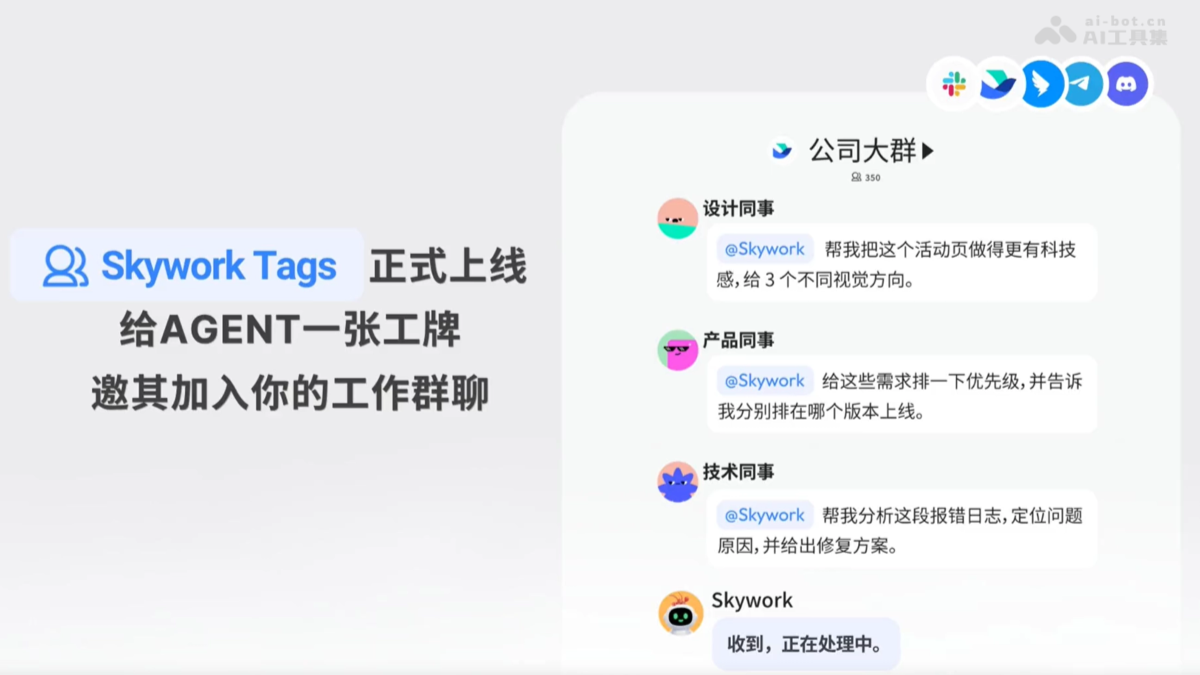
Main features of Skywork Tags
-
Multi-platform group chat integration: Supports mainstream instant messaging tools such as Slack, Feishu/Lark, DingTalk, Discord, Telegram, and others, with Agents directly joining the team's existing work groups.
-
Team-shared Agent: There is only one shared Agent in the same channel, enabling transparent collaboration for all members.
-
Automatic context accumulation: Stays present long-term to follow group chat discussions and automatically accumulates context related to team work, fitting team needs better the more it is used.
-
Asynchronous task handoff: Supports asynchronous task advancement, allowing members to take over Agent tasks initiated by others at any time, with progress visible to everyone.
-
Intelligent work processing: Can perform daily team tasks such as prioritization of requirements, error log analysis, user feedback organization, and visual solution generation.
How to use Skywork Tags
- Visit the official website: Visit the official website ofTianGong AI.
- Get the bot: Find the Skywork Tags feature entry within the platform and obtain a dedicated Skywork bot account.
- Invite to the group: Invite the Skywork bot to join the team's existing work groups, supporting platforms such as Slack, Feishu, DingTalk, Discord, Telegram, and others.
- @Agent to initiate a task: Directly @Skywork in the group and describe the requirement, for example: "Organize these 12 pieces of user feedback and output a table by issue type/priority."
- View asynchronous results: The Agent automatically reads the group chat context and processes the task asynchronously; both the processing progress and final results are publicly visible in the group.
- Handoff and advancement: During task processing, any team member can take over at any time, add requirements, or continue advancing without needing to repeatedly explain the background.
- Continuous accumulation: With long-term use, Skywork automatically accumulates team discussion context, fitting the team's work habits better the more it is used.
Core advantages of Skywork Tags
-
Zero migration cost: No need to export chat records or organize documents; simply pull it into an existing work group to use it.
-
Transparent collaboration: The Agent's processing progress and results are public within the group, eliminating the black-box problem of "key information locked in private chats."
-
Group evolution effect: The more people on the team use it and the longer they use it, the stronger the Agent performs due to context accumulation, growing much faster than a personally tuned version.
-
No change to workflow: Continue using the team's original communication habits and tools; the Agent actively adapts rather than requiring users to move.
Comparison of Skywork Tags with similar competitors
| Comparison dimension | Skywork Tags | Claude Tag (Anthropic) |
|---|---|---|
| Vendor | Kunlun Wanwei | Anthropic |
| Supported platforms | Slack, Feishu, DingTalk, Discord, Telegram | Slack only |
| Agent mode | Team-shared agent, all members share the same instance | Team-shared agent, a permanent channel member |
| Context strategy | Conversations in the group are automatically retained, accumulating and evolving over time | Channel history is automatically read, enabling continuous learning |
| Team sharing | Transparent and visible to all, with public progress | Visible to all, with a transparent process |
| Key differences | Supports multiple platforms (especially covering China's Feishu/DingTalk), targeting global and Chinese teams | Supports Slack only, mainly targeting European and American enterprise markets |
| Product positioning | "Agent comes to you," without changing the team's existing workflow | The third paradigm shift in LLM interaction, with AI becoming a persistently running entity |
Application scenarios of Skywork Tags
- Intelligent organization of user feedback: The operations team drops a batch of user feedback into the work group, and @Skywork automatically categorizes issue types, merges duplicates, marks priorities, and outputs a structured table, saving the time of manually sorting through them one by one.
- Rapid troubleshooting of technical failures: The development team pastes error logs in the group, and @Skywork analyzes and identifies the root cause of the problem, provides a fix plan and code suggestions, shortening the failure response cycle.
- Generation of multiple design options for design requirements: A designer describes the requirements for an event page, and @Skywork provides multiple option directions in different visual styles for the team to discuss and decide on, accelerating creative iteration.
- Asynchronous cross-department task relay: After the product manager initiates a task to prioritize requirements and goes off to do other things, operations colleagues can directly add information and adjust the ranking based on what Skywork has already processed, without needing to repeatedly sync the background.
- Automatic retention of group chat decisions: For long-term project group chats, Skywork automatically extracts key decisions, to-dos, and terminology habits to form a team knowledge base, so new members can quickly understand the project context when they join.