

What is WritingPal
WritingPal Mobao is a high-quality English writing AI assistant designed specifically for international students, incubated by the Harvard Innovation Labs and developed by an experienced Harvard founding team (Zhumn Space). This AI document writing assistant is designed to help the international student community easily handle various English writing challenges, including but not limited to study abroad application essays, job-seeking resumes, job applications, and academic assignments.
Main features of WritingPal
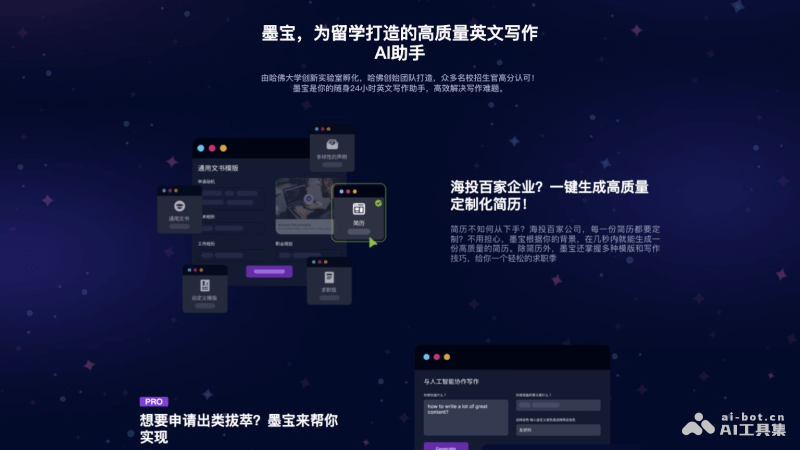
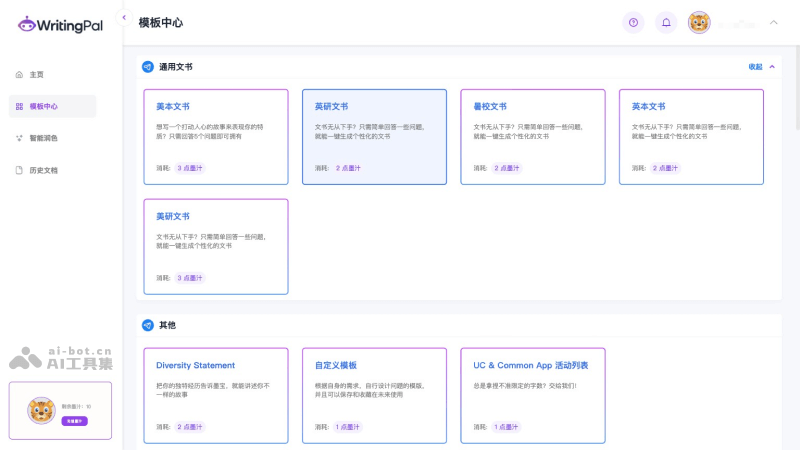
- Out-of-the-box templates: The platform has a rich set of built-in document templates. Enter basic personal background information in Chinese or English, and WritngPal Mobao can help you quickly generate high-quality personalized documents, such as US undergraduate applications, UK graduate applications, summer schools, cover letters, UC applications, etc.
- Customized resume generation: WritingPal can quickly generate a professional resume based on the personal information and career goals provided by the user. Users can use this feature to create customized resumes suitable for applications to different positions, saving time and effort.
- Application essay writing: For students preparing to study abroad, WritingPal provides essay writing services. The AI assistant can create persuasive application essays based on the user's background, experience, and goals, increasing the user's chances of being admitted.
- Text polishing and grammar proofreading: The algorithm built into WritingPal can help users improve grammatical errors and sentence structures in their writing, polishing the text sentence by sentence to achieve English writing quality close to that of a native speaker.
- Chinese and English input support: WritingPal supports Chinese and English input, which means users can directly describe their ideas and experiences in Chinese, and the AI assistant will help transform them into fluent English text.
- Personalized writing suggestions: WritingPal can provide personalized writing suggestions and templates based on the user's writing style and needs, helping users better express their ideas.
How to use WritingPal
- Visit WritingPal's official website (writingpal.ai) and click the login/register button
- After logging in successfully, you will be redirected to the backend interface. Click the Use Now button
- Then select a document template, and then fill in the relevant description and content
- Finally, click the generate button
WritingPal product pricing
- Free version: New users can get 10 credits (i.e., ink) for free after registering, and a single document writing session consumes 1-3 ink
- Paid version: 30 ink for 2099.3 yuan, 90 ink for 6299.3 yuan, 150 ink for 10079.3 yuan


