

What is 图改改
图改改 is an AI-based online image text editing tool. Its English version is PhoText. You can click on text in an image to edit it directly, without professional design skills such as Photoshop. After users upload an image, the system automatically recognizes text areas; clicking allows content replacement, and font, color, size, and position can be adjusted. AI intelligently matches the font style of the original image and seamlessly repairs the background, leaving no ghosting or color patches even with complex textures such as wood grain, fabric, and lighting. It supports conversational AI editing, where a single natural language instruction can complete modifications, and it has capabilities such as text removal and watermark removal, image translation, and high-precision OCR.
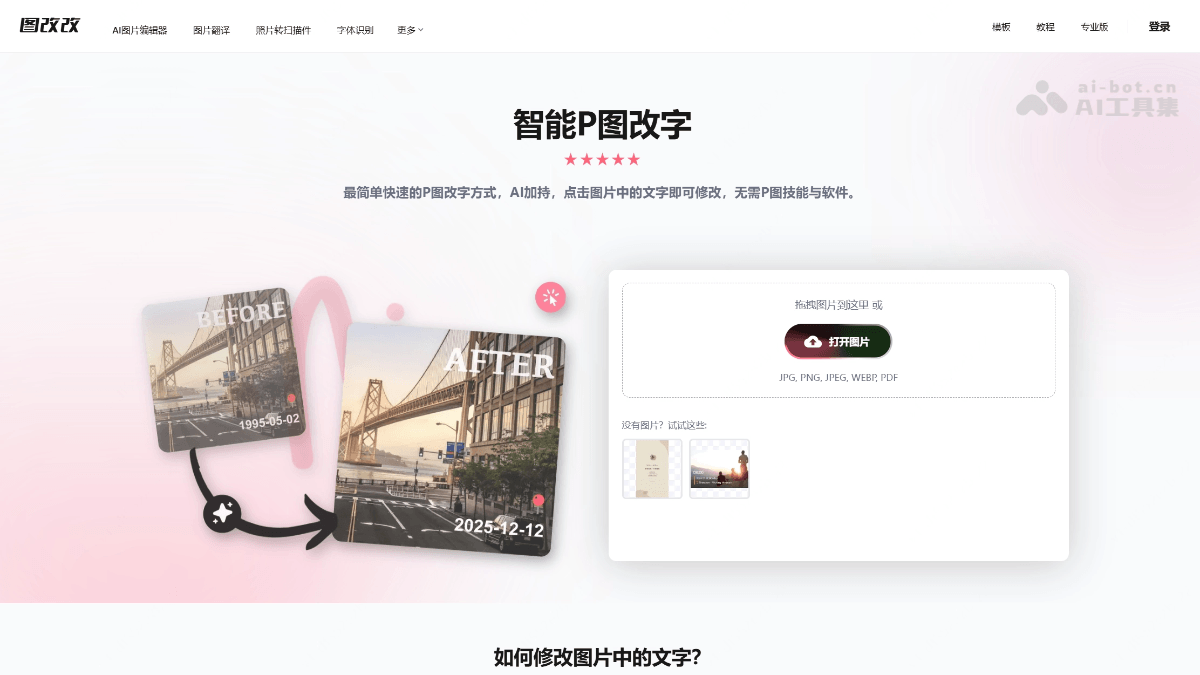
Main Features of 图改改
-
AI Text Editing: After uploading an image, it automatically performs OCR to recognize text areas; click to modify the content, font, color, size, position, and letter spacing.
-
Conversational AI Editing: Through natural language instructions (such as "change 8:00 to 20:30"), it performs "surgical" local modifications, changing only the text area while keeping the remaining pixels unchanged.
-
AI Font Matching: The "Identify Font" feature recognizes fonts in an image and matches similar fonts. It has a built-in massive font library and supports searching and uploading custom fonts.
-
Text Removal and Watermark Removal: AI intelligently reconstructs the background, leaving almost no trace after text removal.
-
Image Text Translation: Recognizes text in an image and translates it into multiple languages while preserving the original layout and design style.
-
High-Precision OCR: Supports recognition in all languages and can handle tilted, curved, small-font, complex-background, and mixed-layout text.
-
Auxiliary Editing Tools: Eraser pen, stamp stickers, filter effects (grayscale, blur, mosaic, etc.), and artistic text.
-
Multi-Format Support: Supports JPG, PNG, JPEG, WEBP, BMP, and PDF formats, and can export high-resolution images.
How to Use 图改改
-
Visit the Official Website: Open the 图改改 official website https://tugaigai.com/ , or the English version:https://photext.ai/,无需下载安装。
-
Upload an Image: Drag and drop or click to upload the image you need to edit. Supports JPG, PNG, JPEG, WEBP, and PDF formats.
-
Edit Text(two methods):
-
Manual mode: Click the text in the image that you want to modify, directly enter the new content, and adjust the font (you can click "Identify Font" for intelligent matching), color, size, and position in the right panel.
-
AI mode: Enter instructions in the PhoText AI dialog box on the left (such as "change '01' to '02'"), and AI automatically completes recognition, erasure, replacement, and style matching.
-
-
Check the Result: Use the Compare feature to compare the effect before and after modification; if there are spots, you can switch background repair schemes.
-
Download and Save: Click the "Download" button at the top to export a high-definition new image, or you can share it.
Core Advantages of 图改改
-
Zero-Threshold Operation: No PS skills required. Complete editing in three steps in the browser, "what you see is what you get," saving the cumbersome process of "smudging → recognition → font selection → alignment."
-
Full AI Automation: Based on an integrated solution of "semantic understanding + intelligent background repair + style transfer," conversational editing requires no manual selection, erasing, or parameter tuning.
-
Seamless repair effect: Automatically restores complex textured backgrounds such as wood grain, fabric, and lighting, with no ghosting, white edges, or color patches.
-
Highly faithful style reproduction: AI matches the font, color, weight, perspective, shadow, and gloss of the original image, making edits "invisible."
-
High cost-effectiveness: Basic features are free, advanced features come with a generous free trial quota, and pricing is transparent with no hidden fees.
-
Privacy and security: Does not collect users' photos, device, or geolocation information; visitor images are automatically deleted after 3 days, and logged-in users' images after 30 days.
Comparison of PhoText with similar competitors
| Comparison dimension | PhoText | ReWords.AI | Fotor |
|---|---|---|---|
| Official website | tugaigai.com / photext.ai | rewords.ai | fotor.com |
| Product positioning | Dedicated AI tool for editing text in images | Dedicated AI tool for replacing text in images | Comprehensive online photo editing and design platform |
| Text editing method | Click text to edit directly + conversational AI instruction-based image editing | Select text area → enter new text → AI pixel-level reconstruction | Mainly overlays text layers; AI Replace can locally replace objects |
| Font matching | AI font recognition + massive font library + font upload support | Automatically detects and matches the original font, weight, color, and shadow | 100+ fonts for manual selection, no automatic recognition of original fonts |
| Background repair | AI seamless restoration, handles complex textures such as wood grain, fabric, and lighting | AI analyzes and reconstructs background noise, making screenshot edits hard to detect | Provides AI erase/replace, specially optimized for non-text-editing scenarios |
| Conversational editing | ✅ Supports full-process automatic image editing via natural language instructions | ❌ Requires manual box selection | Some AI features support text prompts |
| Supported formats | JPG、PNG、JPEG、WEBP、BMP、PDF | JPG, PNG (max 8MB) | Common image formats, broad coverage |
| Multilingual recognition | All-language OCR, supports slanted/curved/small text/mixed layout | Supports 40+ languages, can handle handwritten and curved text | Non-OCR text editing positioning, this capability is not highlighted |
PhoText application scenarios
-
Office document correction: Modify document dates, quotation numbers, and table data errors in screenshots while keeping the original layout unchanged.
-
Certificate and contract editing: Correct names, dates, and titles on certificates while keeping the font size and style completely consistent.
-
Social media content: Modify chat screenshot bubble text, meme text, and poster copy.
-
E-commerce and marketing: Replace product image copy, promotional prices, and event dates to quickly reuse design assets.
-
Content localization: Translate text in images into multiple languages, suitable for cross-border e-commerce and overseas marketing materials.
-
Watermark removal and image cleanup: Remove watermarks, timestamps, and extra text from images to get a clean base image.
Frequently Asked Questions about 图改改
A: After selecting the text, click the "Identify Font" button in the font section of the editing panel, and the AI will automatically identify and match similar fonts; you can also use Find Font to search or upload your own font.
A: The background removal tool offers multiple repair options, and you can switch to other removal results; an easier way is to use AI conversational editing instead, which basically will not produce spots.
A: In manual mode, you can precisely select the target text for editing, or manually erase it and then add new text in the corresponding position; the quickest way is to use AI conversational editing directly.
A: JPG, PNG, JPEG, WEBP, BMP, and PDF formats are supported, with a maximum supported image size of 2560×2560.


