

What is PixPix
PixPix is a full-chain AI image and video creation platform built for cross-border e-commerce sellers and operations teams. Unlike traditional design tools bound to a single self-developed model, PixPix adopts a multi-vendor model aggregation strategy, integrating the world's top AI models such as GPT Image 2, Google Veo, Kuaishou Kling, and ByteDance Seedream into a single platform. Users can freely choose the optimal engine for each scenario, unrestricted by the ceiling of any single model. It currently aggregates 10 image generation models and 11 video generation models, serving nearly a million cross-border e-commerce sellers.
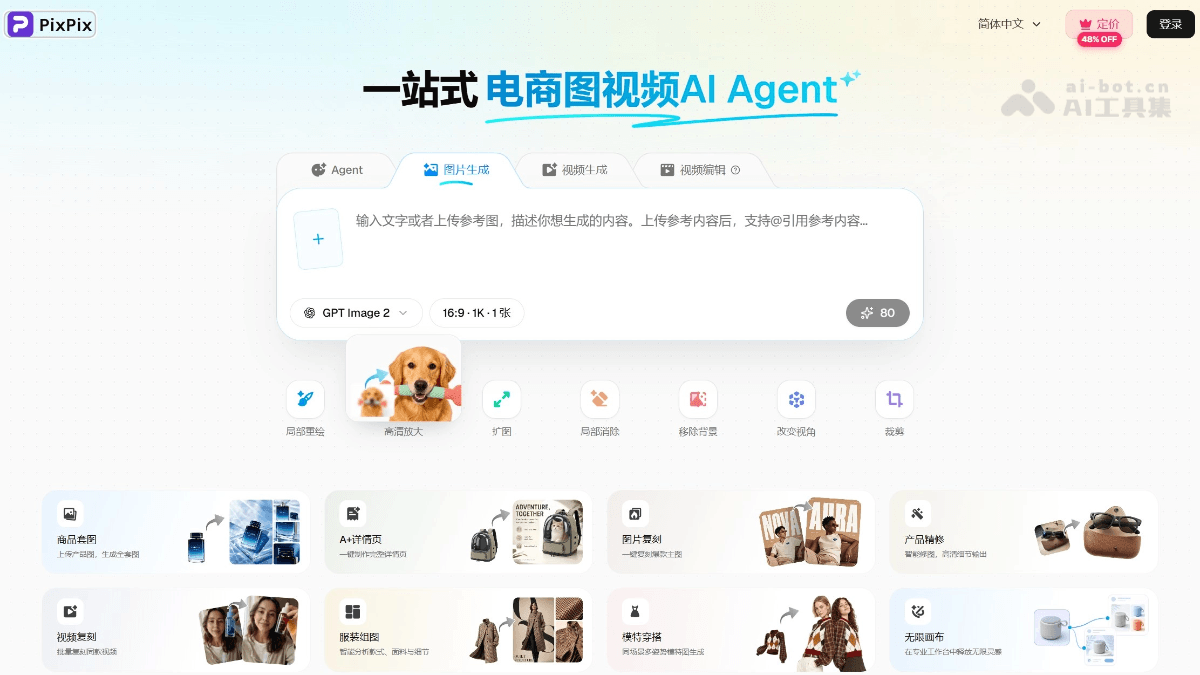
PixPix's Main Features
-
Multi-model AI image generation: Aggregates 10 mainstream image models including GPT Image 2, Google Nano Banana Pro, and ByteDance Seedream 4.5, supporting text-to-image, image-to-image, style transfer, and other image generation methods. The same request can be run concurrently across multiple models for comparison, so you can pick the most satisfactory result.
-
Multi-model AI video generation: Integrates 11 video models including Google Veo 3.1, Kuaishou Kling O1, and Alibaba HappyHorse 1.0, supporting text-to-video, image-to-video, product showcase videos, and talking-head sales videos, quickly producing short video materials suitable for TikTok, Instagram, and Amazon A+.
-
AI Agent conversational creation: Built-in Studio Agent chat panel supports multi-turn conversation iteration. Users can simply describe their needs in Chinese, and the AI understands the context to continuously optimize image results. It has project memory capabilities, remembering style preferences, brand colors, and historical materials, maintaining style consistency across conversations.
-
General image editing tools: No Photoshop needed; complete 8 professional image processing tasks online: local repainting, high-definition upscaling, image expansion, background removal, erasing, cropping and resizing, viewpoint change, and annotation, covering all the basic operations needed in daily e-commerce graphic work.
-
Professional e-commerce tool suite: Provides five scenario-specific tools: product image set generation, A+ detail page layout, clothing group images, product retouching, and hot-selling product replication, deeply adapted to the image specifications of 16 mainstream cross-border platforms including Amazon, AliExpress, Shopify, and TikTok Shop.
-
Dual-view workspace: Provides two views: 'Workbench' (linear process-oriented design, suitable for batch image generation) and 'Infinite Canvas' (free drag-and-drop node-based operation, suitable for multi-image composition and creative exploration). The same project can be switched at any time, with data shared and not lost.
How to Use PixPix
-
Register and log in: Visit the PixPix official website https://www.pixpix.com , register an account and log in.
-
Choose a work view: For batch process-oriented image generation, choose 'Workbench'; for free layout and creative exploration, choose 'Infinite Canvas'.
-
Describe your creation needs: In the Agent dialog box on the right, describe the desired image or video effect in Chinese, and the AI will automatically understand and execute it.
-
Choose models and compare results: The system automatically recommends the most suitable model, and you can also manually switch between different models such as GPT Image, Google, ByteDance, and Kuaishou. After comparing multiple versions, choose the most satisfactory result.
-
Secondary editing and refinement: Use tools such as cutout, image expansion, retouching, and resizing to perform secondary editing on the generated results until you achieve the desired effect.
-
Export and use: Export with one click according to platform specifications and upload directly to the backends of platforms such as Amazon and AliExpress, all without installing any software.
Core Advantages of PixPix
-
Multi-model aggregation for optimal results: Not limited by a single proprietary model, freely switch between 10+ image models and 11+ video models, choose the optimal engine for each scenario, and compare multiple versions concurrently.
-
Natural language-driven, zero design barrier: Simply describe your needs in Chinese, and AI automatically understands and executes, with no need for professional design terminology or software fundamentals.
-
Built-in platform specifications, one-click compliance: Covers image specifications for 16 mainstream cross-border e-commerce platforms, automatically matching dimensions and compliance requirements on export, saving repeated adjustments.
-
Project memory, consistent style: AI has cross-conversation memory capabilities, remembering brand colors, style preferences, and historical assets to maintain visual consistency over the long term.
-
Pure web version, ready to use instantly: No need to download or install any software, open your browser and use it, supporting Windows and macOS.
PixPix Application Scenarios
-
Product main image generation: AI one-click generation of white background images, scene images, and infographics that comply with platform specifications such as Amazon, AliExpress, and Shopify, automatically adapting dimensions and compliance requirements.
-
Detail page and A+ content design: Automatically lays out detail page modules, supports multilingual output, adapts to Amazon A+ graphic and text specifications, and quickly builds high-conversion product display pages.
-
Batch image generation for apparel categories: Batch process clothing on-body effect images, multi-color display images, and model group images, freeing designers from repetitive color and outfit changes and greatly improving image production efficiency.
-
Sales video material production: Generate short sales videos with one click using text descriptions, supporting talking-head videos, product showcase videos, scenario story videos, etc., producing platform-compliant materials without any editing fundamentals.
-
Viral material replication: Reference competitor viral image styles, and AI generates similar but differentiated materials, helping sellers maintain trending styles while avoiding image duplication risks.
PixPix Frequently Asked Questions
Q: Is PixPix free?
A: Currently, a paid subscription model is used. Sellers and teams with continuous high-frequency image generation needs can subscribe to paid plans to unlock more model usage credits and advanced features.
A: Currently, a paid subscription model is used. Sellers and teams with continuous high-frequency image generation needs can subscribe to paid plans to unlock more model usage credits and advanced features.
Q: Can I use it without design knowledge?
A: Absolutely. PixPix supports natural language conversation-driven operation. Just describe the desired effect in Chinese, and AI automatically completes generation and editing, with no design experience or professional software fundamentals required.
A: Absolutely. PixPix supports natural language conversation-driven operation. Just describe the desired effect in Chinese, and AI automatically completes generation and editing, with no design experience or professional software fundamentals required.
Q: What is the difference from Meitu Design Studio and Gaoding Design?
A: The core difference lies in the model strategy. Meitu and Gaoding are both bound to a single proprietary model. PixPix aggregates 10 global image models and 11 video models, selecting the optimal one for each scenario without being limited by a single engine. In addition, the dual-view switching capability between workspace and infinite canvas is unique among major competitors.
A: The core difference lies in the model strategy. Meitu and Gaoding are both bound to a single proprietary model. PixPix aggregates 10 global image models and 11 video models, selecting the optimal one for each scenario without being limited by a single engine. In addition, the dual-view switching capability between workspace and infinite canvas is unique among major competitors.
Q: Which cross-border e-commerce platforms are supported?
A: Built-in image specifications adapted to 16 mainstream cross-border e-commerce platforms, including Amazon, AliExpress, Shopify, TikTok Shop, Etsy, etc., automatically matching platform dimensions and compliance requirements on export.
A: Built-in image specifications adapted to 16 mainstream cross-border e-commerce platforms, including Amazon, AliExpress, Shopify, TikTok Shop, Etsy, etc., automatically matching platform dimensions and compliance requirements on export.
Q: Can the generated images be used commercially?
A: Yes, the copyright of user-generated content belongs to the user, and it can be used for product listings and advertising on e-commerce platforms.
A: Yes, the copyright of user-generated content belongs to the user, and it can be used for product listings and advertising on e-commerce platforms.
Q: Do I need to install software?
A: No, PixPix is a pure web-based tool. You can use it simply by opening a browser, and it supports Windows and macOS.
A: No, PixPix is a pure web-based tool. You can use it simply by opening a browser, and it supports Windows and macOS.


