

What is Tencent Docs Smart Assistant
Tencent Docs Smart Assistant is an AI document generation and assistance tool launched by Tencent. It helps users quickly generate various types of documents and perform Q&A and processing on document content. It covers products such as documents, spreadsheets, slides, collection forms, PDF, mind maps, smart documents, and smart spreadsheets, aiming to provide users with a one-stop intelligent document creation and processing solution.
Tencent Docs Smart Assistant has now fully entered public beta. Users can try it for free through Tencent Docs on the web, PC, and mobile (public beta application address:https://docs.qq.com/form/page/DQnJoYkdBVWRCT0tS#/fill-detail)。
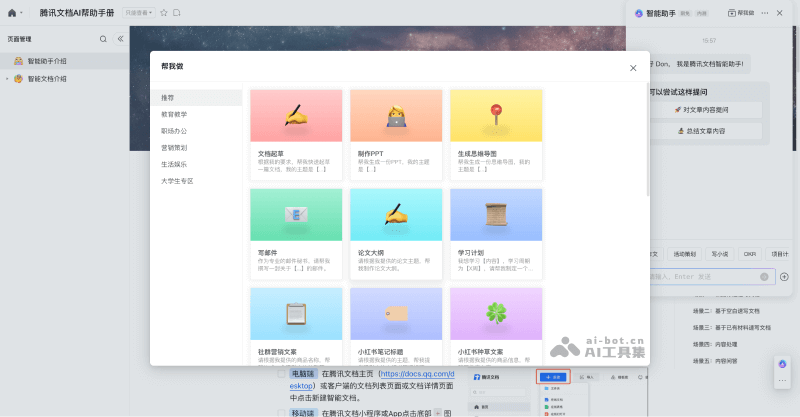
Main features of Tencent Docs Smart Assistant
- Intelligent document content creation: Users only need to briefly describe their needs or provide basic materials, and the smart assistant can quickly build a clearly structured and content-rich document. In addition, it also has advanced features such as content continuation, style polishing, grammar proofreading, and multilingual translation, ensuring the professionalism and internationalization of documents.
- Intelligent spreadsheet data processing: In spreadsheet processing, the Tencent Docs AI Assistant can automatically generate complex formulas to help users quickly complete data analysis. It can also intelligently identify and correct formula errors, automatically generate intuitive charts to make data presentation more vivid, and provide a convenient way to visualize data.
- Intelligent presentation beautification: Whether making a PPT or preparing a speech, the smart assistant can provide powerful support. It can automatically generate presentation content according to user needs, intelligently design speaker notes, and even automatically adjust fonts and color schemes to ensure the professionalism and appeal of the presentation.
- Intelligent PDF file reading: When faced with a large number of PDF documents, the smart assistant can quickly extract key information and provide document summaries to help users quickly grasp the core points. It can also intelligently ask questions about document content and accurately locate the original source, greatly improving the efficiency of reading and learning.
- Intelligent mind map generation: Just enter a topic, and the smart assistant can quickly build the framework of a mind map, helping users organize their thoughts and clearly display the information structure. It is especially suitable for scenarios such as project planning, creative ideation, and knowledge organization.
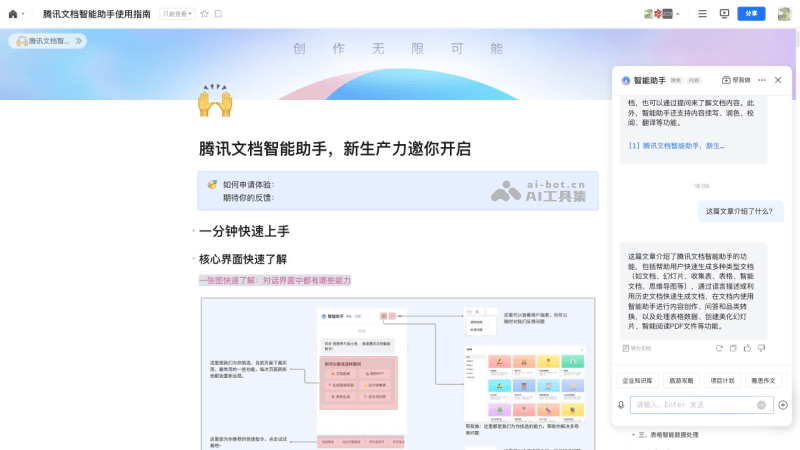
How to use Tencent Docs Smart Assistant
- VisitTencent Docs Smart Assistant public beta application formpage and fill in the information. After a short wait, the application will be automatically approved
- Return to the Tencent Docs interface, click the AI icon in the lower right corner to invoke the smart assistant, or select a document, right-click, and click Smart Assistant to do it for me
- Enter the topic you want to create and wait for the AI to generate the content
Suitable users of Tencent Docs AI Assistant
- Enterprise employees: writing reports, summaries, business plans, etc., can improve writing efficiency and quality
- Students: writing articles, assignments, study reports, etc., helps reduce academic burden
- Teachers: preparing teaching materials, lesson preparation, grading, etc., can improve work efficiency
- Freelancers: writing contracts, proposals, project plans, etc., helps achieve more efficient collaboration
Application scenarios of Tencent Docs Smart Assistant
- Document writing: The smart assistant can help users quickly write documents and provides features such as text generation and material recommendations
- Document editing: When users edit documents, intelligent assistants can provide real-time modification suggestions such as spelling correction, grammar checking, and text replacement
- Information retrieval: When writing documents, intelligent assistants can quickly retrieve relevant materials and provide reliable information sources
- Collaborative office work: Intelligent assistants can help users achieve multi-person online collaborative editing, with real-time synchronization and updates, improving team collaboration efficiency
- Data analysis: Intelligent assistants can extract useful information from large amounts of data, generate visual reports, and help users make decisions

