

What is QuiverAI
QuiverAI is an AI design tool focused on vector graphics generation. It is a "visual code generation" platform built on its self-developed foundation model Arrow, capable of directly outputting editable SVG code rather than traditional pixel images. QuiverAI covers four major scenarios: logos, illustrations, typography, and animation. It provides designers and developers with the ability to generate production-grade vector assets from text or reference images, and supports integration into third-party design tools via API and SDK.
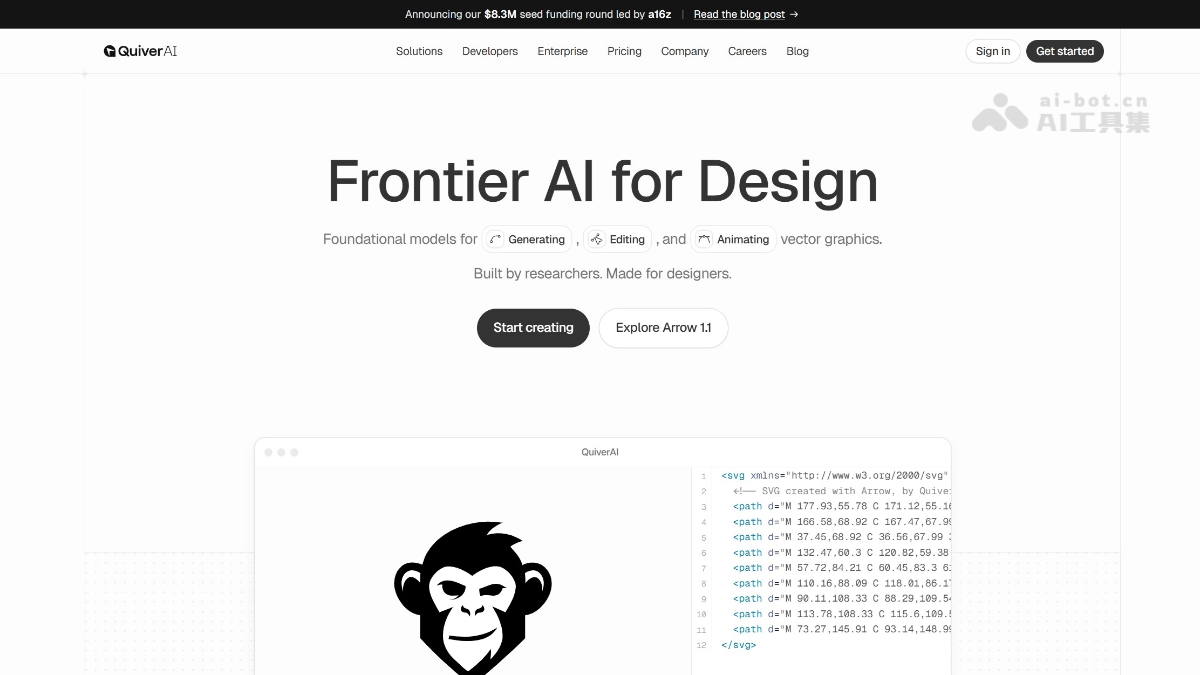
QuiverAI's main features
-
Text-to-SVG: Enter a natural language description to generate vector graphics such as logos, icons, and illustrations, with support for stylistic instructions (such as flat monochrome, rounded corners, and outlined styles).
-
Image-to-SVG / Smart Vectorization (Image-to-SVG): Convert raster images such as PNG, JPEG, and WebP into clean, structured SVG code, with support for automatic subject cropping (
auto_crop)。 -
Real-time streaming rendering: View the reasoning, drafts, and final output during generation in real time via Server-Sent Events.
-
Multi-format export: Supports export in four formats: SVG, PNG, JPEG, and WebP.
-
Natural language iterative editing: After generation, the SVG can be fine-tuned through text instructions without manually adjusting paths.
-
Reference image style constraints: Supports uploading up to 4 reference images to guide the output style and composition.
-
High-fidelity mode (Arrow 1.1 Max): Provides an enhanced model for detail-sensitive scenarios such as complex illustrations and technical drawings.
How to use QuiverAI
-
Register an account: Visit the QuiverAI official website https://quiver.ai/ to complete registration and log in.
-
Choose a generation mode: In the creation interface, choose "Text-to-SVG" (text-to-vector) or "Image-to-SVG" (image-to-vector).
-
Enter a prompt or upload assets:
-
Text-to-vector mode: Enter descriptive prompt words, and optionally add style instructions.
-
Image-to-vector mode: Upload a PNG/JPEG/WebP reference image, and optionally enable
auto_crop。
-
-
Configure parameters: Select the model version (Arrow 1.1 or Arrow 1.1 Max), set the export format, and upload style reference images (up to 4).
-
Generate and preview: Click generate and view the output process in real time through streaming rendering.
-
Iterative optimization: Use natural language instructions to fine-tune colors, shapes, and layout.
-
Export or integrate: Download SVG/PNG files, or connect to your own system via API Key.
Key information and usage requirements for QuiverAI
-
Official website:https://quiver.ai
-
App entry:https://app.quiver.ai/creations
-
Documentation center:https://docs.quiver.ai
-
GitHub:https://github.com/quiverai(提供 Node SDK and OpenAPI specification)
-
API access: The Base URL is
https://api.quiver.ai/v1, and the authentication method isAuthorization: Bearer <API_KEY> -
Core endpoints:
POST /v1/svgs/generations(text-to-image),POST /v1/svgs/vectorizations(image-to-vector) -
Free quota: The Free plan provides 20 SVG generation credits per week
-
Paid plans: Basic ($20/month, 100 images/week), Pro ($40/month, 250 images/week), Enterprise (custom)
-
Usage Requirements: Basic English prompt skills required; API calls require a Node.js or HTTP client environment; for high-fidelity complex graphics, Arrow 1.1 Max is recommended
QuiverAI's Core Advantages
-
Native Vector Output: Generates SVG code directly rather than pixel images, allowing infinite scaling, layer-by-layer editing, and seamless integration into professional workflows such as Figma and Illustrator.
-
Extremely Clean Structure: The generated paths have few control points and a clearly organized hierarchy, remaining editable even when elements overlap, greatly reducing the cost of manual cleanup later.
-
Leading Performance in Professional Domains: The proprietary Arrow model ranks first on the SVG Arena leaderboard with an Elo score of 1583, making it the first design-focused model to surpass 1500 points.
-
Research-Oriented Team Background: The team is composed of researchers in the field of SVG-generating AI and has published cutting-edge papers such as StarVector and RLRF, demonstrating strong technical iteration capability.
-
Developer-Friendly: Provides a REST API and an official Node.js SDK (
@quiverai/sdk), making it easy to integrate into design tools, font editors (such as Runebender), and automated workflows.
Comparison of QuiverAI with Similar Competitors
| Comparison Dimension | QuiverAI | Recraft | Adobe Firefly |
|---|---|---|---|
| Core Output | Native SVG vector code | Supports multiple formats such as SVG, PNG, and PDF | Supports SVG, PNG, PSD, etc., with deep integration into the Adobe ecosystem |
| Generation Method | Text-to-SVG、Image-to-SVG | Text-to-Vector、Image-to-Vector | Text-to-Image, generative fill, vector recoloring |
| Model Positioning | Focuses on a vector foundation model (Arrow) | General-purpose design AI platform | Generative AI integrated into Creative Cloud |
| Editing Capabilities | Natural language iterative SVG editing | Provides canvas editing and style control | Native support for deep editing in Photoshop/Illustrator |
| Developer Interface | REST API + Node.js SDK | Provides API and plugins | Access through Adobe API and plugin ecosystem |
| Pricing Strategy | Free/Basic($20)/Pro($40)/Enterprise | Free quota + paid subscription | Included in Creative Cloud subscription or purchased with credits |
| Differentiated Advantages | Cleanest paths, ranked first on SVG Arena, research-driven | Rich community templates, strong brand kit features | Seamless connection with Adobe workflows, strong enterprise compliance |
QuiverAI's Application Scenarios
-
Brand Identity Systems: Rapid exploration and delivery from concept to production-grade SVG logos.
-
Product Interface Design: Generates icon sets, empty-state illustrations, and marketing materials in a consistent style.
-
Vectorization of Technical Drawings: Intelligent conversion and refinement of architectural floor plans, fashion design sketches, and engineering drawings.
-
Fonts and Experimental Typography: Creates vector letterforms for custom display fonts or functional UI fonts.
-
SVG Animation Production: Directly generates lightweight and controllable vector animations for logos, icons, and illustrations (coming soon).
-
Third-party tool integration: As a cloud-based vectorization engine, embedding into design plugins, font editors, and automated pipelines.


