
What is Yidian PPT
Yidian PPT is designed specifically for professionalsAI intelligent PPT generation tool, focusing on the ultimate efficiency experience of "starting PPT creation in 3 seconds." Users only need to enter a one-sentence topic or upload documents such as Word, PDF, TXT, and Markdown, and AI can automatically generate a logically rigorous outline within 10 seconds, match professional templates, and complete intelligent formatting and color matching, producing a ready-to-use professional-grade presentation in 5 minutes. Yidian PPT supports in-depth online editing, allowing free adjustment of color schemes and fonts, insertion of charts, audio, video, and formula calculations, and provides bilingual Chinese-English generation and translation. It covers a massive template library including business style, technology style, and government style, suitable for many scenarios such as year-end summaries, business plans, product launches, and graduation defenses.
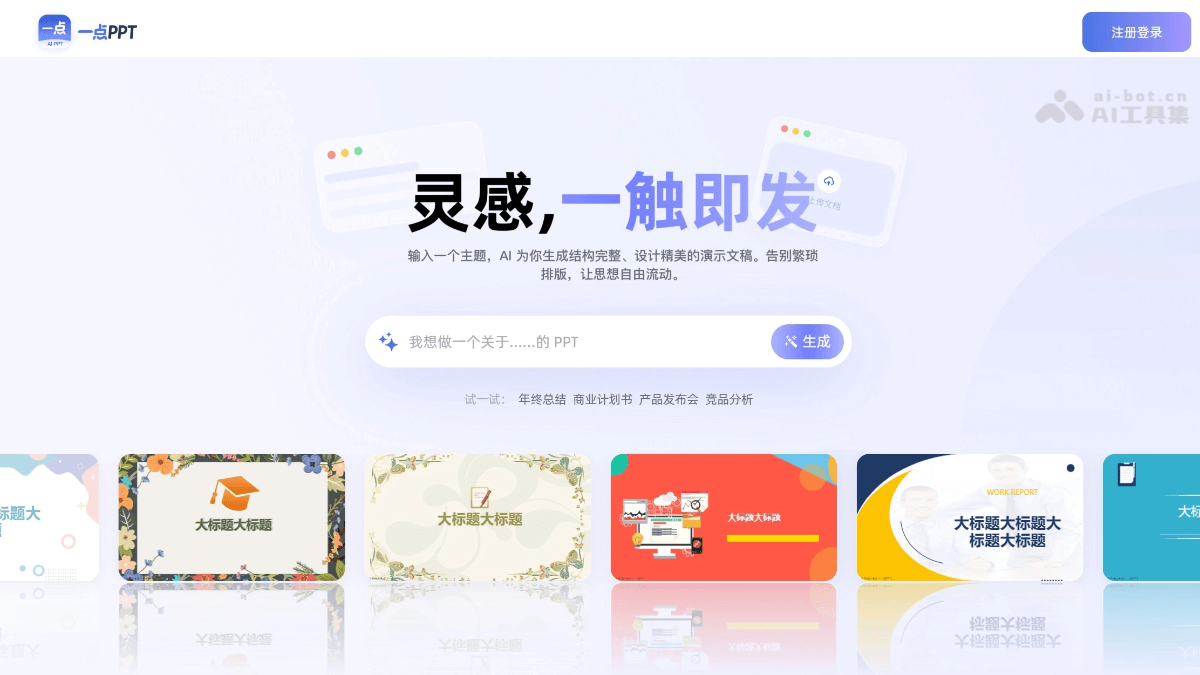
Main features of Yidian PPT
-
One-click AI generation: Enter a topic, and AI generates a complete content structure in 10 seconds, intelligently matching PPT templates, layouts, and color schemes, and supporting in-depth online editing.
-
Multi-format import: Supports one-click import of Word, PDF, TXT, and Markdown, automatically extracts key points from long texts, and AI helps you convert documents to PPT.
-
WYSIWYG editing: AI-assisted formatting and layout optimization, one-click adjustment to highlight key points, and free adjustment of theme colors and font formatting.
-
AI design assistant: Intelligently detects the complexity of chart data, recommends better presentation forms (such as automatically suggesting a donut chart to show proportions), and supports AI rewriting and content optimization.
-
Multi-language switching: Supports bilingual Chinese-English text generation and translation, making cross-border reporting and foreign-related event planning easy to handle.
-
Multimedia support: Supports insertion of charts, audio, video, and formula calculations to meet professional presentation needs.
-
Massive template library: Covers various scenarios such as business style, minimalist style, technology style, and formal style, with hundreds of professional design templates to choose from.
-
Full-platform compatibility: Full-format import and export, multi-device synchronization across computer and mobile phone, and editing and presenting slides anytime, anywhere.
How to use Yidian PPT
- Visit the platform: Visit the Yidian PPT official website https://www.1dppt.com/ , and register and log in to your account.
-
Enter requirements: Describe the presentation topic in the input box on the homepage (such as "year-end summary" or "business plan"), or click to upload documents such as Word, PDF, TXT, and Markdown.
-
AI generates an outline: Wait for AI to automatically parse the content and generate a logically rigorous outline structure and complete PPT framework within 10 seconds.
-
Choose a template: Choose your preferred style from hundreds of professional templates, covering multiple scenarios such as business, education, and technology.
-
Intelligent PPT generation: AI automatically matches layouts and color schemes to generate a beautifully designed complete presentation.
-
Online editing and optimization: Enter the editor to freely adjust text, colors, and font formatting, insert charts, audio, video, and formula calculations, and use the AI assistant to optimize content with one click.
-
Export and use: After editing is complete, export the PPT file, with support for multi-device synchronization across computer and mobile phone, for presentations or further modifications anytime.
Core advantages of Yidian PPT
-
Ultra-fast generation: Produce a first draft in 10 seconds and complete a professional PPT in 5 minutes, saying goodbye to staying up late making slides.
-
All-in-One Input: Supports multiple methods such as topic input and document import, with one-click conversion of Word, PDF, and Markdown to PPT.
-
AI-Powered Smart Design: Automatically organizes logic and optimizes layout and color schemes, delivering results comparable to professional designers.
-
Extremely Simple and Easy to Use: Clean interface with no barriers, no learning curve required, get started in 1 minute.
-
In-Depth Editing: The online editor offers comprehensive features, catering to both beginners who need quick output and experts who require fine-tuning.
-
Full-Platform Compatibility: Supports import and export in all formats, with multi-device synchronization across computers and phones, allowing you to work on presentations anytime, anywhere.
-
Multilingual Support: Bilingual generation and translation between Chinese and English, easily handling cross-border reports and international scenarios.
-
Rich Template Library: Covers multiple scenarios including business, government, education, and technology, with diverse styles to choose from freely.
Who OnePointPPT Is For
-
Workplace Professionals: Quickly complete work summaries and project proposals, with AI organizing logic and professional templates enhancing the quality of your presentations.
-
Business Professionals: Efficiently produce corporate promotion and bid presentation materials, with elegant layouts that showcase brand quality.
-
Educators: Generate courseware and lesson plans with one click, focus on teaching itself, and say goodbye to layout hassles.
-
Party and Government Agencies: Standardized production of Party-building reports and presentation materials, with grand and rigorous templates that elevate presentation standards.
-
Students: Easily complete course assignments, graduation defenses, and job resumes, letting AI help showcase your talents.
-
Entrepreneurs: Quickly create business plans and product launch presentation slides, seizing every pitch opportunity.

