

What is LiblibAI HD Upscaling
LiblibAI HD Upscaling isLiblibAIan AI HD upscaling workflow launched by , based on advanced super-resolution technology, supporting multiple models and capable of significantly improving image clarity and detail. It is mainly used to upscale image resolution, suitable for image output requiring extremely high clarity, such as professional image display or HD wallpapers. It provides users with powerful image HD upscaling capabilities to meet needs in different scenarios.
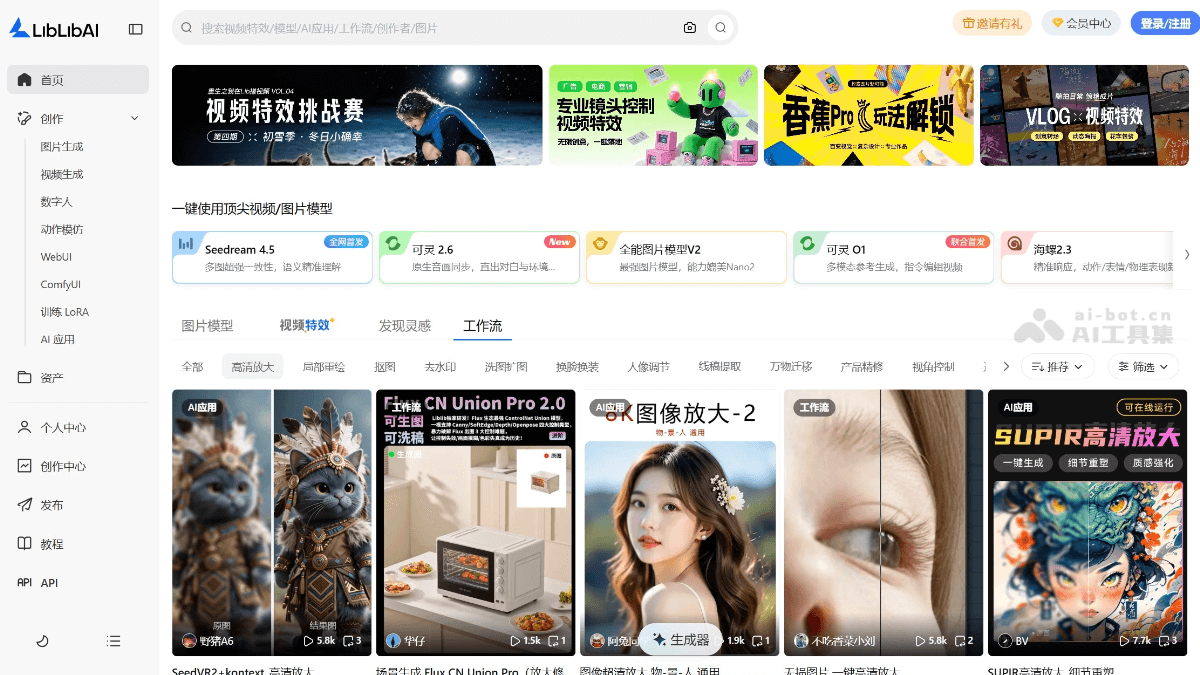
Main Features of LiblibAI HD Upscaling
-
Multiple Model Support: LiblibAI supports multiple super-resolution models, such as R-ESRGAN_4x+Anime6B, SUPIR-v0F, and 4x-UltraSharp. These models are optimized for images of different styles (such as anime, realistic, etc.), and the appropriate model can be selected according to the image type to achieve a more ideal upscaling effect.
-
Low VRAM Operation: Through optimized algorithms, LiblibAI's HD upscaling function can run under relatively low VRAM conditions. For example, when using the InvSR model, only 8G of VRAM is required at minimum to achieve HD upscaling of 4K images.
-
Fast Processing: The HD upscaling function processes quickly, with a single 4K image upscaling taking only about 21 seconds.
-
Integrated into ComfyUI Workflow: LiblibAI's HD upscaling function can be implemented through ComfyUI workflows, and users can conveniently integrate HD upscaling nodes into the workflow.
How to Use LiblibAI HD Upscaling
- Load the HD Upscaling Workflow: Visit the LiblibAI official website www.liblib.art/workflows , find the workflow, select the HD upscaling function, and click "Run in ComfyUI" to jump to the ComfyUI interface.
- Upload an Image: In the ComfyUI interface, find the "Load Image" node, click "choose file to upload", and select the image to be upscaled from your computer.
- Adjust Parameters
-
Adjust the Denoising Strength: Find the "Basic Scheduler" node and adjust the denoising parameter (denoising strength). If the value is too low, the details will not be rich enough; if it is too high, it may deviate from the original image concept. It is recommended to keep it between 0.23 and 0.4.
-
Select a Model (Optional): In the "UNET Loader" node at the upper right of the workflow, you can replace the default model and select a large model matching the image style, but you need to ensure that the base algorithm is the F.1 series.
-
- Run the Workflow: After all parameters are adjusted, click the "Run" button in the upper right corner and wait for the AI to complete processing.
- Save the Result: After processing is complete, find the "Save Image" node in the lower right corner of the interface, right-click the generated image, and select "Save Image".
Application Scenarios of LiblibAI HD Upscaling
-
HD Upscaling of Anime Images: Using the R-ESRGAN_4x+Anime6B model, it is suitable for HD upscaling of anime-style images, can preserve the line and color style unique to anime, enhance image details, and is suitable for making HD anime wallpapers or materials.
-
HD Upscaling of Realistic Images: Through models such as 4x-UltraSharp, it performs HD upscaling on realistic-style images, suitable for realistic images such as landscapes and portraits, can improve image clarity, and is used for high-quality image display or printing.
-
Professional Image Processing: In scenarios requiring high-resolution output, such as advertising design, artistic creation, etc., using the HD upscaling function can upscale low-resolution images to 4K or even higher resolutions, meeting professional needs.
-
Old image restoration: For old or low-quality images, the HD upscaling function can help restore image details, improve clarity, and make them more suitable for modern display or further editing.
-
HD upscaling of video frames: In video production, performing HD upscaling on key frames can improve the overall visual effect of the video, especially in video content that needs to be displayed in high definition, such as documentaries, advertisements, etc.


