

What is LiblibAI Cutout
LiblibAI Cutout isLiblibAIan AI cutout workflow launched by (Libli Libli AI), mainly applied to the "one-click background removal" function in e-commerce workflows. Users only need to upload product images, and LiblibAI Cutout can intelligently identify the product subject and automatically cut it out. Users can choose from multiple background styles provided by the system or upload a custom background to complete background replacement. The feature is simple to operate, suitable for e-commerce beginners and users without a professional design background, and can quickly improve the professionalism and visual effect of product images.
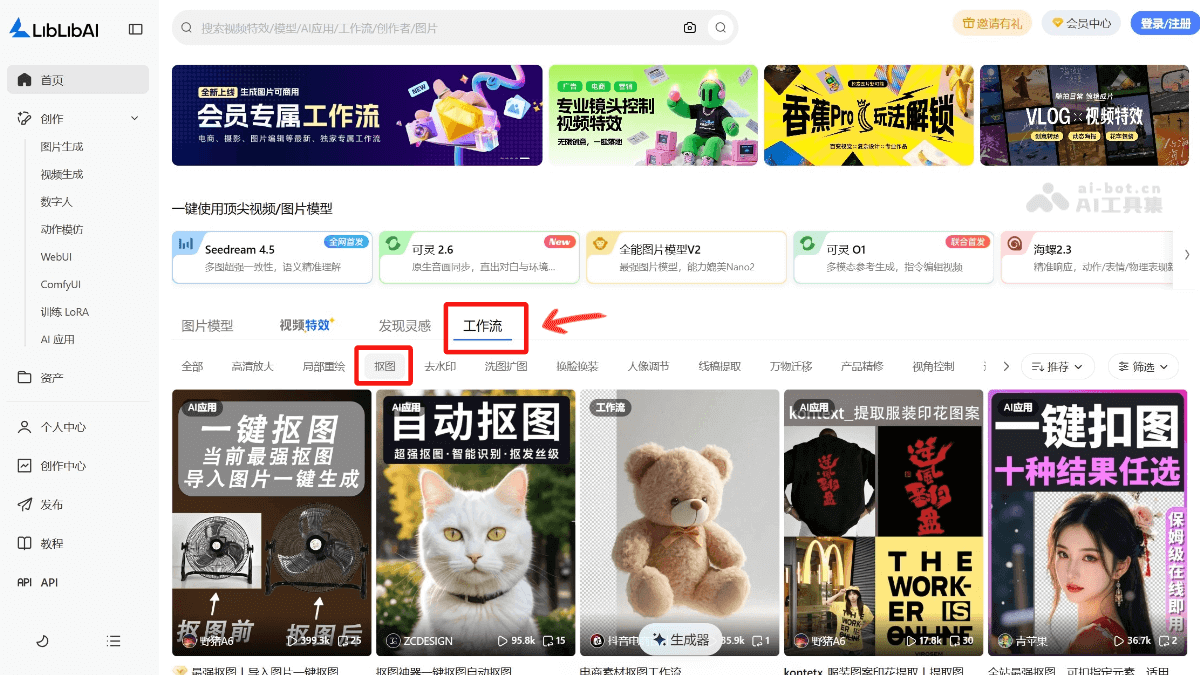
Main features of LiblibAI Cutout
-
Intelligent recognition and cutout: LiblibAI can intelligently identify the subject in a product image and cut it out precisely, providing a foundation for subsequent operations such as background replacement.
-
Background replacement and blending: Users can upload a background reference image with a similar style, and LiblibAI will create a new background based on the reference image's prompt words, intelligently adjusting lighting and color tones so that the product blends naturally with the background.
-
Easy to operate: Whether run online or locally, the operation process is relatively simple. Online running is suitable for beginners; just open the workflow and upload files. Although local running requires some configuration, it can also meet the needs of users with higher hardware performance requirements.
How to use LiblibAI Cutout
-
Download the workflow: Open the LiblibAI Cutout official website www.liblib.art/workflows , enter the workflow selection interface, select the "Cutout" function, and choose to download the selected workflow or application.
-
Choose the running method: You can choose online running or local running. Online running is suitable for beginners; just open the workflow and upload files. Local running requires first installing ComfyUI and the relevant node models, and adjusting parameter configurations.
-
Upload images: Prepare the product image and reference image, and upload them to the workflow. The product image is the product image to be processed, and the reference image is a background image with a similar style.
-
Click generate: After confirming the image upload, click the "Generate" button. The workflow will first cut out the product, then create a background based on the reference image's prompt words, and intelligently adjust lighting and color tones. The whole process takes about 1-3 minutes, depending on image size and hardware performance.
- Notes
-
-
Image quality: The higher the quality of the uploaded product image and reference image, the better the generated effect usually is.
-
Hardware requirements: If you choose local running, you need to ensure that the computer hardware configuration meets the requirements, such as at least 8GB of VRAM.
-
Generation time: Generation time will vary depending on image size and hardware performance, so just wait patiently.
-
Application scenarios of LiblibAI Cutout
- E-commerce product image processing: Quickly and precisely cut products out of their original backgrounds and replace them with more attractive backgrounds, improving product display effects. It is suitable for product detail pages and promotional poster production on e-commerce platforms.
- Social media content creation: Create personalized image content for social media platforms. By cutting out and replacing backgrounds, the image style can better match a specific theme or event, enhancing visual appeal.
- Design and creative work: Designers can use the cutout function to extract different elements from the original image and recompose them into new design scenes, quickly generating creative concept images or testing visual effects.
- Ad and marketing material production: In advertising design, the cutout function can help perfectly blend products or people with the advertising background, creating more persuasive and attractive advertising materials and improving advertising effectiveness.
- Personal photo beautification: Users can cut out personal photos and change the background, for making electronic albums, sharing on social media, or printing photos, etc., making photos more personalized and creative.


