

Xiutu AI is a photography post-processing AI retouching software for photography studios launched by Hainan Xingtu Suyun Technology. With the help of AI facial recognition and advanced image algorithms, it simplifies the cumbersome operations in the retouching process and assists studio photographers in quickly and efficiently performing image processing and batch fine retouching. Users only need to import an image folder to complete functions such as file conversion, skin beautification, and liquify with one click, easily completing the initial retouching of images. Compared with manual retouching, the efficiency is increased by dozens of times, and same-day photo selection can be achieved as quickly as possible.
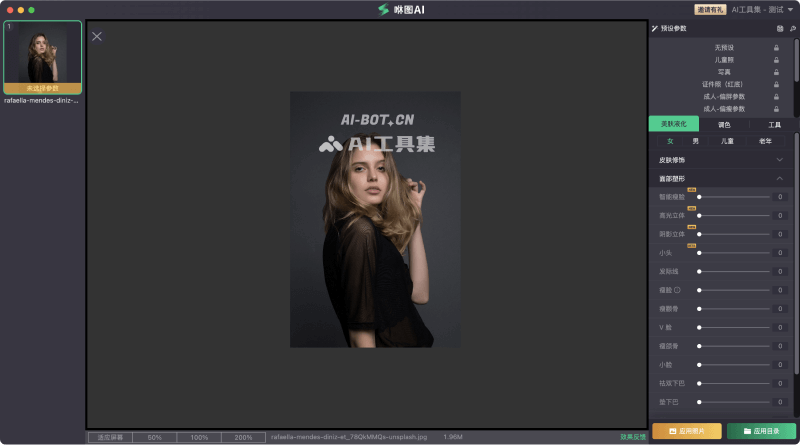
Main features of Xiutu AI
- Fine adjustment and reshaping of facial features: AI simulates the techniques of senior retouchers, performing skin beautification while preserving natural skin texture. It can also make subtle adjustments to the eyes, nose, and other features to make the facial features look more refined and three-dimensional.
- Optimization of face and body proportions: The system intelligently and naturally determines the person's gender and age, and personalizes precise liquify processing for the face and whole body to optimize facial contours and body proportions.
- Multiple built-in popular filters: The software provides a series of popular style filters that cater to current photography trends. It also supports user-defined templates, allowing users to create their own filter effects based on personal preferences and diverse color grading needs.
- One-click intelligent file conversion: Supports importing RAW files and JPG images. No manual operation is required, and file conversion and color grading are completed automatically, making the user's workflow more efficient and convenient.
- Multi-person collaborative shared retouching: Supports package sharing, helping photography studios establish unified retouching standards. In addition, it makes it easy to view members' retouching progress, helping studios carry out digital management and ensuring a coordinated and efficient workflow.
Xiutu AI product pricing
- Xiutu AI provides new users with a free trial quota of 50 photos. Paid versions are billed by the number of retouched photos. The pricing packages are as follows:
- Standard Edition: Cloud retouching 2980 yuan/42000 photos, 8800 yuan/132000 photos, 19800 yuan/420000 photos
- Professional Edition A: Cloud retouching 298 yuan/1500 photos, 9900 yuan/45600 photos, 16800 yuan/112800 photos
- Professional Edition B: Xiutu Manager 9900 yuan/39600 photos, 16800 yuan/117000 photos, 30000 yuan/252000 photos
- Platinum Edition: Xiutu Manager 9900 yuan/27600 photos, 16800 yuan/69600 photos, 30000 yuan/168000 photos
How to use Xiutu AI
- Visit the Xiutu AI official website (www.aixtsy.com), click Free Download, and choose to download the version corresponding to your operating system
- After the download and installation are complete, open the software interface, and drag or click to select the image folder
- Then click the retouching button to select a batch retouching preset. If multiple folders are imported, click the batch retouching button to select a preset
- You can choose to customize adjustment parameters. After setting them, click Start Retouching. When retouching is complete, the finished images will be automatically exported to the original photo folder directory
Frequently Asked Questions
Does Xiutu AI provide free retouching?
Xiutu AI provides new users with a free trial quota of 50 photos.
Which operating systems does Xiutu AI support?
Xiutu AI supports running on both macOS and Windows desktop clients.
Which image formats does Xiutu AI support?
Xiutu AI supports importing multiple image formats, including JPG/JPEG/PNG/CR2/NEF/ARW/CR3/RAF and other formats.


