
What is Job Ark
Job Ark is an AI job-seeking tool with intelligent recognition and automatic resume filling. AI automatically fills resumes, enabling one-click automatic filling of resume forms on corporate recruitment websites, intelligently recognizing form structures and filling in information, greatly saving time; AI job-seeking assistant, enter your job-seeking needs and it helps you find jobs across the web. Position-specific resume enhancement intelligently optimizes your resume based on the target company and position, achieving "one resume per position"; intelligent memory filling means for repeated fields you only need to fill them once, and Job Ark will automatically remember. Users need to download and install the AI automatic resume filling plugin from the official website. After uploading a resume or manually filling in basic information, when submitting a resume on a corporate recruitment website, they can complete the filling with one click through the plugin.
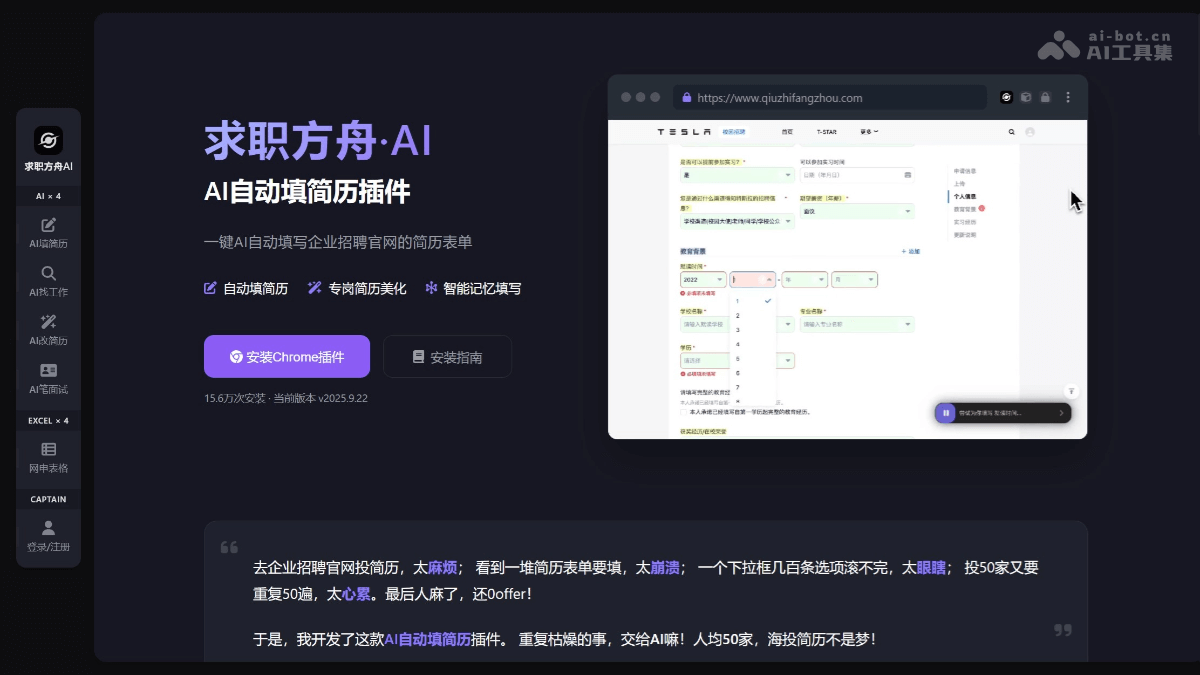
Main features of Job Ark
-
AI automatic resume filling: One-click automatic filling of resume forms on corporate recruitment websites, intelligently recognizing form structures, automatically filling in information, saving time.
- AI job search: A dedicated AI job-seeking assistant. Enter your job-seeking needs and it helps you find jobs and positions across the web.
- AI resume revision: Based on DeepSeek, upload a resume file to intelligently optimize resume content, supporting PDF, Docx, Markdown, TXT and other formats.
- AI written tests and interviews:
- Written test assistance tool: Fully automatic written test mode, with 8 AIs fully automatically helping you analyze. Suitable for all online written tests, various assessments, programming, aptitude tests, figure reasoning, data analysis, etc.
- Interview assistance tool: Original dual-device interconnection. Practice interviews on a computer while a nearby phone generates auxiliary answers in real time. No fear of any screen switching, screen sharing detection.
-
Campus recruitment online application summary table: Real-time updates of campus recruitment, referral and internship position information from 5,000+ companies, displayed by industry and region, ensuring the information source is authentic and reliable.
-
Application progress records: Manage all application records in the form of online Excel, automatically organize historical data and remind you of important time nodes, visually displaying job-seeking progress.
-
Position-specific resume enhancement: Based on the target company and position, intelligently enhance your resume to achieve "one resume per position" and improve the relevance of your resume.
-
Intelligent memory filling: For fields other than the resume, users only need to fill them once, and the system will intelligently learn and remember, avoiding repeated input.
How to use Job Ark
-
Register an account: Visit the Job Ark official website https://www.qiuzhifangzhou.com/ to complete account registration.
-
Install the plugin: Download and install Job Ark AI's automatic resume filling plugin from the browser app store.
-
Upload a resume: Upload your personal resume in the plugin or manually fill in basic information, and Job Ark AI will automatically save this content.
-
Find positions: Use the campus recruitment online application summary table on the official website to find campus recruitment, referral or internship positions at target companies.
-
Submit a resume: Go to the corporate recruitment website, open the plugin, click "Automatic resume filling", and Job Ark AI will automatically recognize and fill in the form.
-
Optimize the resume: Use the position-specific resume enhancement feature to intelligently optimize resume content based on the target position.
-
Record progress: Manage your application history in the application progress records, track your job search progress, and Job Ark AI will automatically remind you of important deadlines.
Job Ark Installation Guide
- Pre-Installation Preparation
-
Browser Requirements: Supports Chrome 88+ or Edge 88+.
-
Network Environment: It is best to be able to access the Chrome Web Store or the Edge Add-ons Store.
-
- Installation Version Description
-
Automatic Installation Version: Reviewed by Google and Microsoft officially, ensuring security; quick deployment with one-click installation; automatic updates for new versions.
-
Manual Installation Version: Manual download and installation, slightly more troublesome to operate; manual updates required; the plugin will be updated frequently to adapt to the latest corporate official websites.
-
- Automatic Installation Version (Recommended)
-
Chrome Browser: Visit the Job Ark official website, click "Install Chrome Plugin", and on the Chrome Web Store page that pops up, click "Add to Chrome" to complete the installation.
-
Edge Browser: Visit the Job Ark official website, click "Install Edge Plugin", and on the Edge Add-ons Store page that pops up, click "Get" to complete the installation.
-
- Manual Installation Version (Chrome Browser)
- Download the plugin compressed package: Visit the Job Ark official website, click "Install Chrome Plugin", and unzip the zip file.
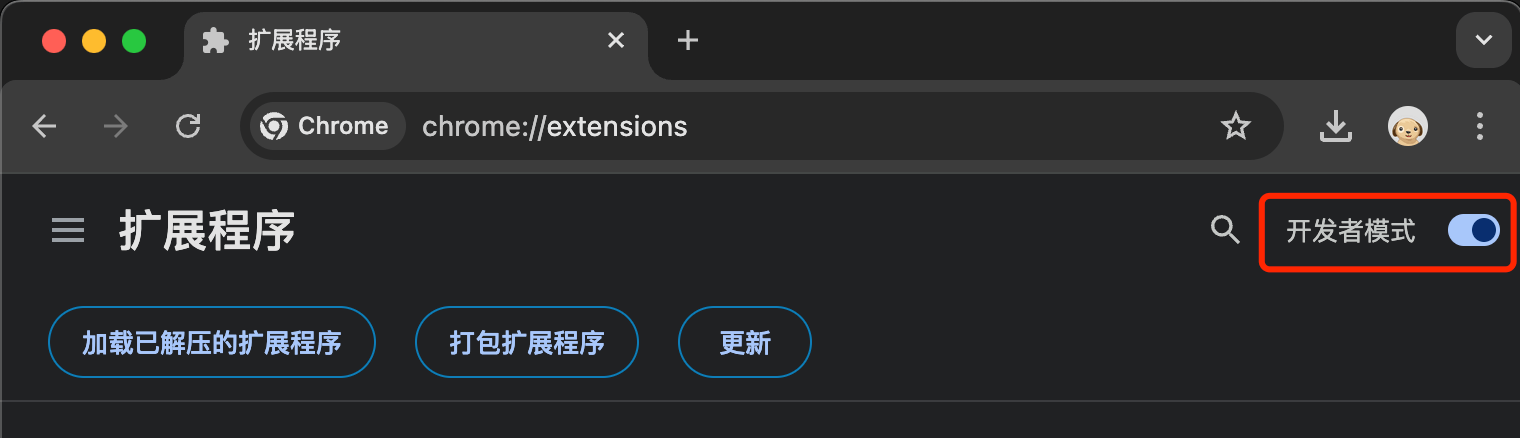
- Go to the Chrome browser's extensions page: Enter in the address bar
chrome://extensionsand press Enter. - Enable "Developer Mode": Click the toggle in the upper right corner of the extensions page.
-
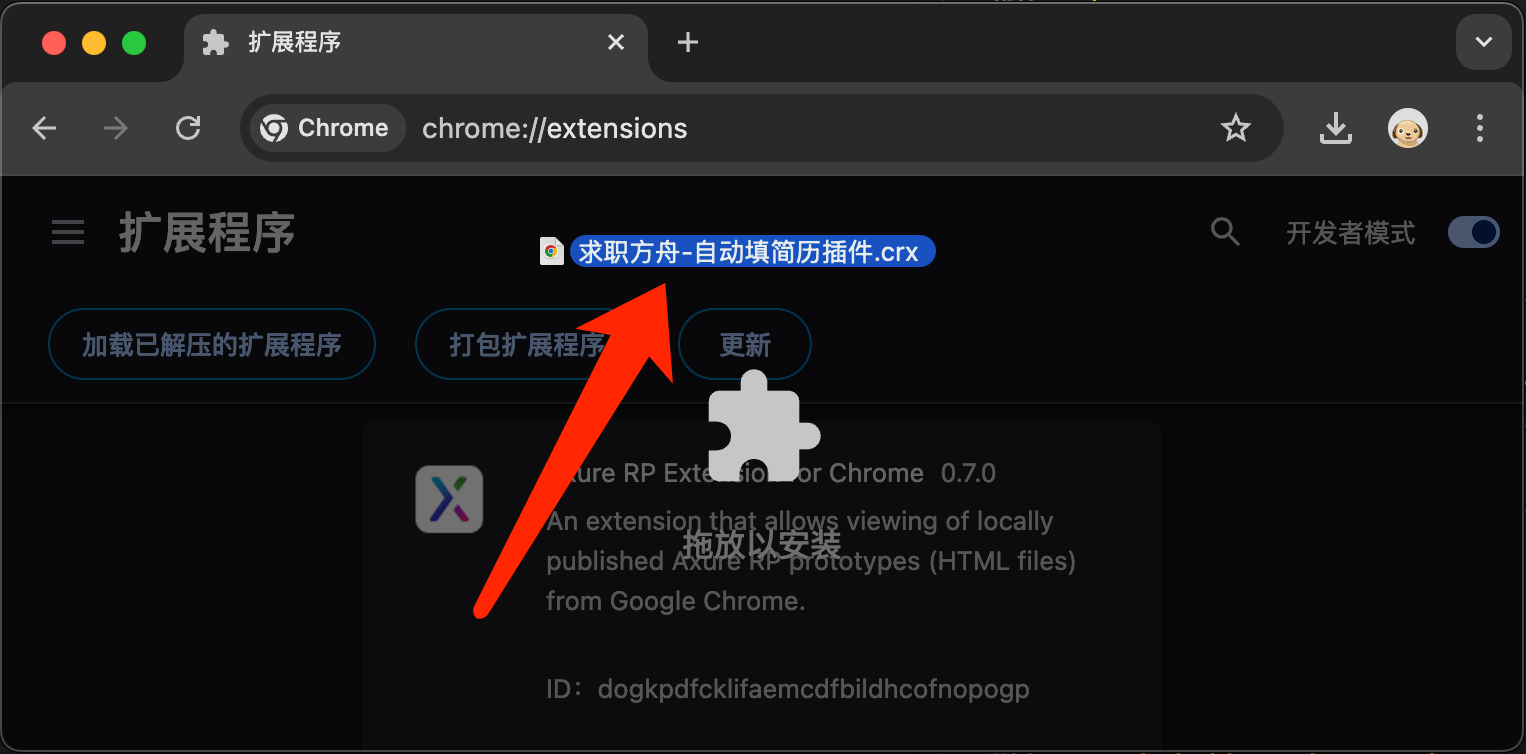
- Install the plugin file: After "unzipping" the downloaded zip file, find the "crx file" inside and drag it into the extensions page.
- First Use
- Visit the Job Ark website: Open the Job Ark official website, go to the "AI Resume Filling" page from the left navigation, and log in to your account.
- Upload Resume: On the AI Resume Filling page, click the "Upload Resume" button, select a resume file (supports PDF, Word, and TXT formats), the system will automatically parse the resume content, check and confirm the parsing results.
- Start Using: Visit any corporate recruitment official website, select a position and click apply, then after logging in, on the resume filling page, a "Job Ark AI" floating button will appear in the lower right corner. Click the button to expand the floating window, click the "Play" button to start filling. After filling is complete, you can adjust and supplement the content and submit the application.
Job Ark Use Cases
-
Job Search for Fresh Graduates: Helps fresh graduates quickly fill out resume forms on a large number of corporate recruitment official websites, optimize resume content to match different positions, and improve job search efficiency.
-
Internship Applications: Provides interns with convenient resume filling and application services, intelligently optimizes resumes to meet internship position requirements, and increases the possibility of obtaining internship opportunities.
-
Mass Job Applications: Supports job seekers in submitting resumes on a large scale, automatically fills repetitive forms, reduces repetitive work, and improves mass application efficiency.
-
Job Search for International Students: Assists international students in adapting to the domestic job search process, intelligently fills out complex forms, and optimizes resumes to meet the recruitment requirements of domestic companies.
-
Daily Job Search: Suitable for anyone with job search needs, looking for full-time or part-time work, enhancing the job search experience through smart form filling and resume optimization features.

