

What is Zhaowoya
Zhaowoya is a local AI knowledge assistant, a file search and intelligent Q&A tool. While ensuring privacy and security, it can bring local files to life and truly turn them into your knowledge. It supports content reading for various types of files such as doc, docx, pptx, pdf, excel, jpg/png images, and more. The built-in file search mode enables searching files using natural language, and the intelligent Q&A mode can perform knowledge Q&A and summarization based on the content of local files. Indexing is processed only locally, and source files are not uploaded to the cloud, ensuring data privacy and security. It supports Windows, macOS, and other systems, automatically monitors file changes and updates the index, and optimizes resource usage without affecting daily work.
Main features of Zhaowoya
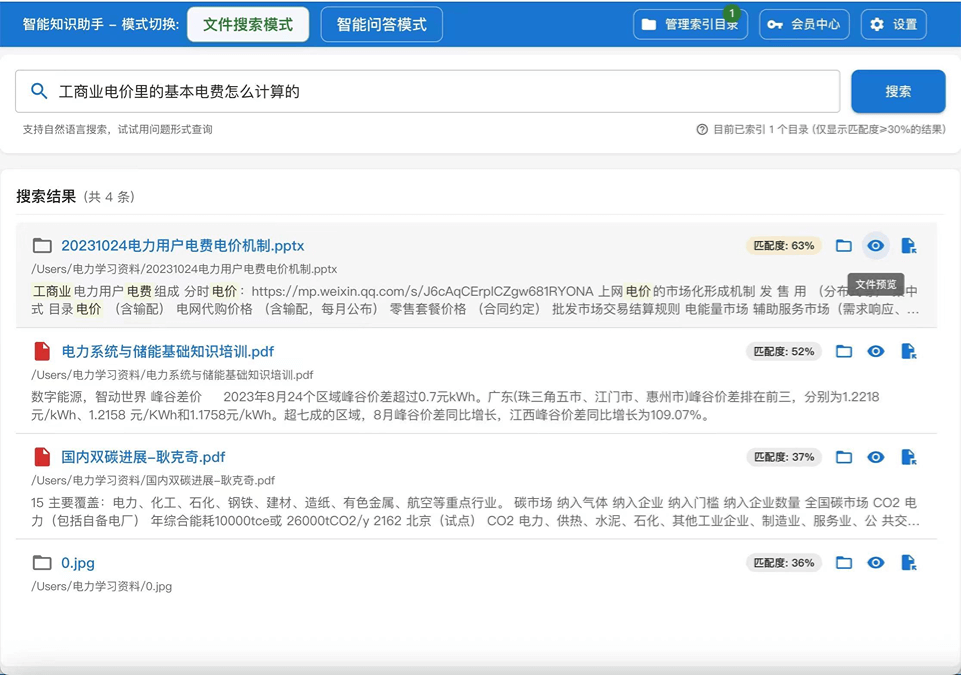
- Intelligent file search: Based on AI semantic understanding, it supports natural language queries and is no longer limited to keyword matching, and also supports preview, open, and locate.
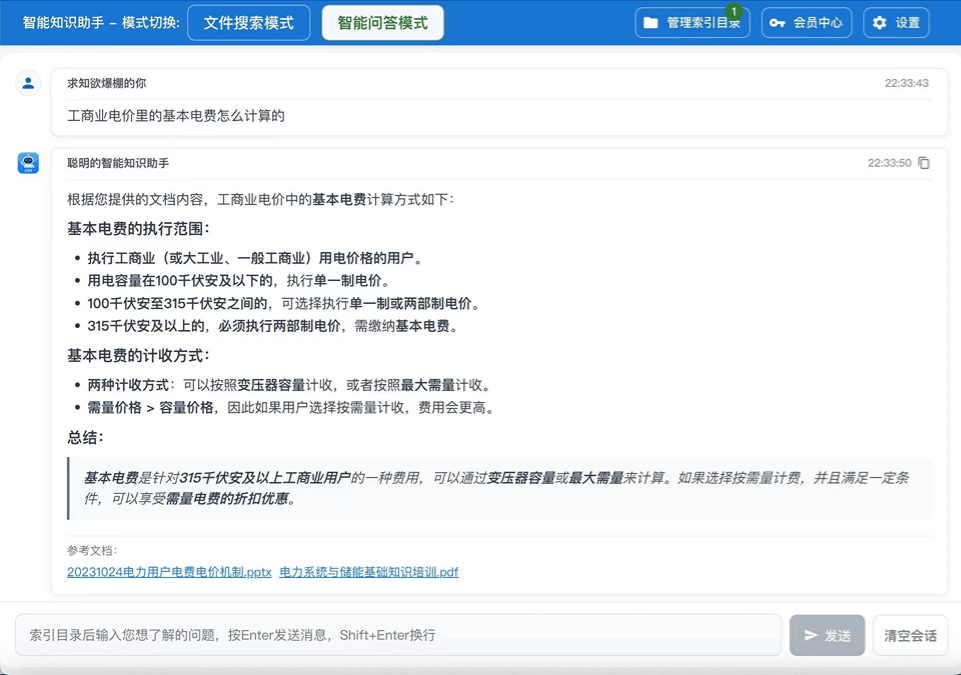
- Intelligent conversational Q&A: Just like chatting with deepseek, it performs intelligent Q&A and content analysis based on local documents.
- Multi-format file support: Supports DOC, DOCX, PDF, TXT, PPTX, XLSX, XLS, CSV, JPG, PNG, and many other formats.
- Intelligent indexing system: Automatically builds semantic indexes for files, monitors file changes in real time, and updates the index.
- Local privacy protection: Files are processed only locally, and source files are never uploaded to the cloud, ensuring data privacy and security.
- Cross-platform compatibility: Perfectly supports Windows, macOS (Intel/M-series chips), with deep optimization for different platforms.
- High-performance search: It responds in seconds even in large file libraries, and optimized resource usage does not affect daily work.
- Custom API configuration: Supports private API configuration for mainstream large models such as OpenAI and Tongyi Qianwen.
- Local data storage: Data such as conversation records is stored only locally, and no data is stored in the cloud.
How to use Zhaowoya
- Download and install: Visit the Zhaowoya official website http://www.findme.net.cn , select the corresponding version, and download and install it.
- Add folders: After starting the software, no login is required. Select the folders to be indexed, and the system will automatically analyze the files in them.
- Wait for indexing: The software automatically builds semantic indexes for files in the background, and the whole process is fast and efficient.
- File search mode: Enter natural language descriptions to find files, and the system displays matching results sorted by relevance.
- Intelligent Q&A mode: Ask questions directly in natural language, and the AI answers based on document content and cites sources.
- View results: Click search results to preview content or directly open the original file, and Q&A results can be traced back to specific document fragments.
- API configuration: Configure a private API key in settings to ensure complete data control and privacy security.
Application scenarios of Zhaowoya
- HR recruitment: Intelligently screen candidates who meet recruitment criteria, summarize and score candidates, and output them in ranked order.
- Knowledge management: Build a personal knowledge base to quickly search and ask questions about historical documents, improving learning and work efficiency.
- Office Collaboration: Quickly find meeting minutes, project documents, contract materials, etc., with support for natural language query descriptions.
- Academic Research: Organize research materials and academic papers, and quickly extract key information and viewpoints through AI Q&A.
- Content Creation: Quickly find relevant content from a large amount of material, with AI-assisted analysis and summarization of key document points.
- Legal Work: Quickly search legal provisions and case documents, with AI Q&A assisting in the understanding and analysis of legal clauses.
- Technical Documentation Management: Manage API documentation and technical specifications, and quickly locate technical details through natural language.
- Enterprise Knowledge Base: Build an internal enterprise knowledge management system so that employees can quickly obtain the information they need through natural language.

