

What is PDF.ai
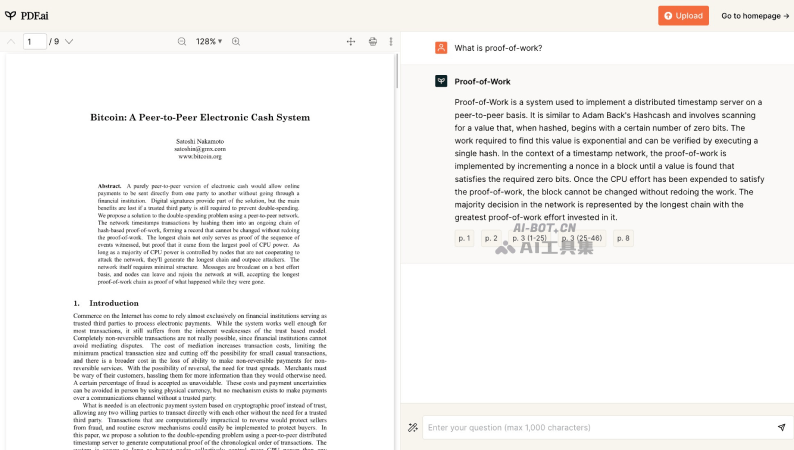
PDF.ai is an AI PDF document reading tool that supports uploading PDF files and chatting with document content. Users can ask questions about PDF files, get summaries, find information, and more. PDF.ai uses GPT technology to extract and interpret data from PDF documents, making it easier and more efficient to handle lengthy document content. Whether it is e-books, research papers, or legal agreements and financial reports, PDF.ai can easily read them intelligently, and will highlight and locate the source of the file passages for its answers to your questions.
Main features of PDF.ai
- PDF file question and summarization: Users can upload PDF files and ask questions about the file content to obtain file information
- AI resume scanning: Get resume overviews and questions to evaluate interview candidates
- AI invoice scanning: Recognize invoice files and data and convert them into JSON format data
- AI quiz generation: Generate teaching quiz questions from uploaded PDF documents
Application scenarios of PDF.ai
- Book reading: Immersive reading experience, chat with your favorite books
- Quick paper reading: Quickly get the key points and main content of research papers
- Financial reports: Quickly understand financial reports and research reports like a professional
- Product manuals: Chat directly with product manuals to resolve usage questions
- Legal documents: Explain headache-inducing legal terminology
- Training documents: Easily handle employee training documents interactively
PDF.ai pricing
- Free version, supports uploading 1 file, 500 questions per month, supports a maximum file size of 10MB per file
- Pro version at $10 per month, supports uploading 100 files, 5,000 questions per month, supports a maximum file size of 50MB per file
- Flagship version at $20 per month, supports uploading unlimited files and unlimited questions, supports a maximum file size of 50MB per file
- Enterprise version at $30 per month, supports uploading unlimited files and unlimited questions, supports a maximum file size of 100MB per file
How to use PDF.ai
- Visit the official PDF.ai website, click Get started for free to log in or sign up, or you can click Try the demo to view sample files
- After logging in, click the Upload button to upload your PDF file (supports importing from URL and OCR)
- After uploading the file, the left side is the document preview area, and on the right side you can ask questions to PDF.ai
- Enter the question you are interested in in the input box. If you do not know what to ask, you can also click some questions that PDF.ai has organized based on the document content
- After PDF.ai answers the question, it will also highlight and locate the source of the passage for its reply on the left side
Frequently asked questions
Is PDF.ai free?
PDF.ai provides a free trial version, and users can upload 1 PDF file for free to ask questions.
What large model is PDF.ai based on?
PDF.ai's intelligent reading capability is based on OpenAI's GPT large model. The free version is based on GPT-3.5, and the paid version supports GPT-4.
What languages does PDF.ai support?
In theory, PDF.ai supports all languages. As long as GPT can recognize it, PDF.ai can read it, and it supports asking questions in one language about files in another language, for example, using Chinese to ask questions about English file content.
What file formats does PDF.ai support?
Currently PDF.ai only supports uploading files in .pdf format, and more file formats will be supported later.

