

What is ProcessOn
ProcessOn is a professional online flowchart and mind map creation tool. In March of this year, ProcessOn partnered with iFLYTEKSpark Large Model, becoming the first platform in China to combine AIGC with flowcharts. By entering a topic, AI can quickly generate flowcharts and mind maps, reducing creation costs, improving quality and efficiency. Whether it is flowchart organization, activity plans, work plans, knowledge summaries, study book lists, reading notes, brainstorming, travel guides, or life tips, ProcessOn's AI creation assistant can handle it all, making the creation of flowcharts and mind maps more convenient.
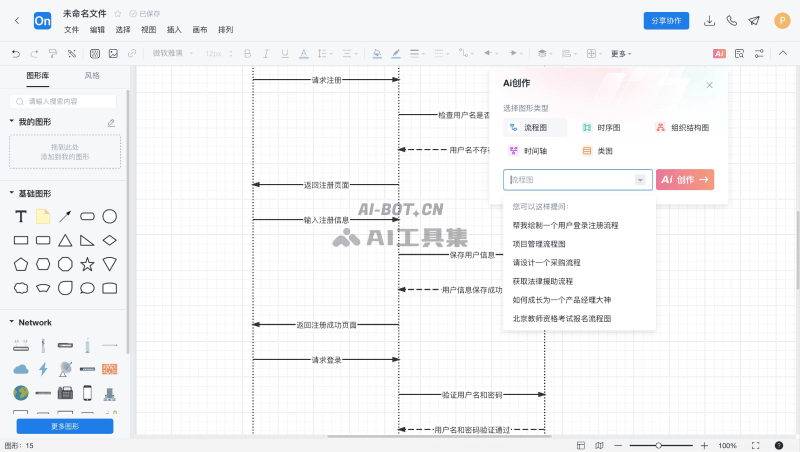
ProcessOn's AI features
- One-click flowchart creation: Enter topic keywords, and with just one click, a flowchart centered around the topic will appear on the page. The content is concise and clear, with intuitive and rigorous logic, simplifying the drawing process, lowering the creation threshold, increasing creation speed, revolutionizing the creation model, and ensuring the objectivity and generality of the content as much as possible.
- One-click mind map creation: Enter topic keywords, and with just one click, a concise mind map outline is completed in 3 seconds, such as brain-computer interaction, breaking through the boundaries of inspiration, achieving high-quality answers, and enjoying an ultimate experience.
- One-click creation of more diagrams: Enter a topic, select the diagram type you want to generate, and sequence diagrams, organizational charts, class diagrams are all within reach. One-click AI draws the diagram content.
- Seamless integration with iFLYTEK Spark: Supports directly calling ProcessOn to draw flowcharts in the chat window of the iFLYTEK Spark Cognitive Large Model, further liberating productivity and unleashing imagination.
How to use ProcessOn's AI features
- Visit ProcessOn's official website (processon.com) and click [Free to Use]
- Log in/register an account. After successful login, you will be automatically redirected to the backend interface. Below, we take AI-generated flowcharts as an example
- Click New, select Flowchart, and then click the [AI] button on the right side of the toolbar
- Select one of the 5 diagram types you want to generate: flowchart, sequence diagram, organizational chart, timeline, or class diagram
- Enter the content you want to draw in the question box, click [AI Create], and wait for the content to be generated
Frequently Asked Questions
Is ProcessOn's AI feature free?
Currently, ProcessOn's AI creation capability is available for free to all users for a limited time.
What large model is ProcessOn's AI feature based on?
ProcessOn's AI generation capability is based on iFLYTEK's "Spark Cognitive Large Model".
Which systems does ProcessOn's AI feature support?
ProcessOn's AI feature supports use on the web and WeChat Mini Program. Mobile app support is coming soon.

